Registrar datos de notificaciones push
Aprende a registrar datos de notificaciones push a través del SDK de Braze.
Registrar datos con la API de Braze (recomendado)
Puedes registrar análisis en tiempo real haciendo llamadas al punto final/users/track . Para registrar los análisis, envía el valor braze_id desde el panel de Braze para identificar qué perfil de usuario hay que actualizar.
Registrar datos manualmente
Dependiendo de los detalles de tu carga útil, puedes registrar los análisis manualmente en tu implementación de FirebaseMessagingService.onMessageReceived o en tu actividad de inicio. Ten en cuenta que tu subclase FirebaseMessagingService debe finalizar la ejecución en un plazo de 9 segundos desde la invocación para evitar ser marcada o terminada por el sistema Android.
Registrar datos con la API de Braze (recomendado)
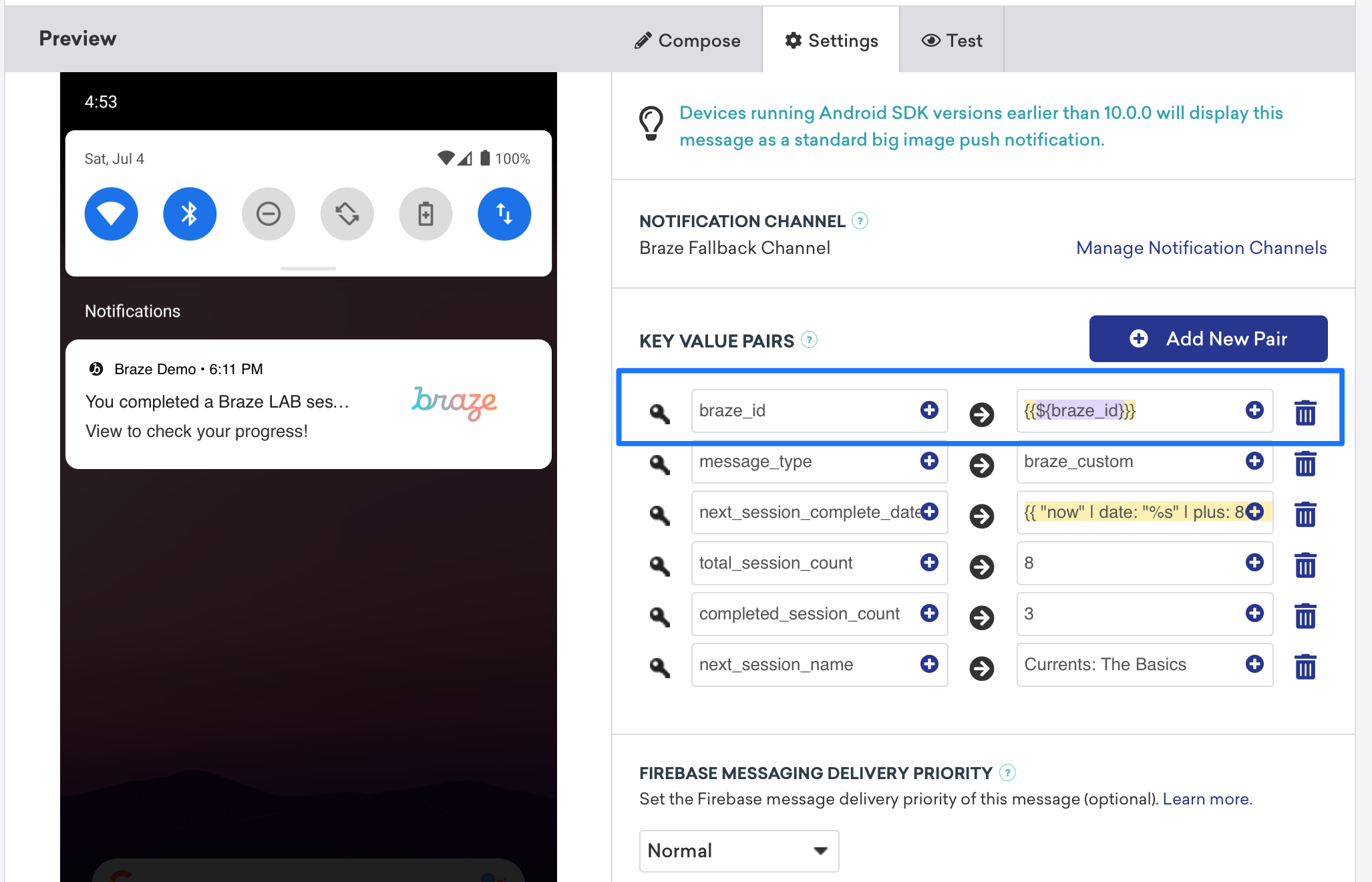
El análisis de los registros puede hacerse en tiempo real con la ayuda del punto final /users/track de la API Braze. Para registrar los análisis, envía el valor braze_id en el campo de los pares clave-valor (como se ve en la siguiente captura de pantalla) para identificar qué perfil de usuario hay que actualizar.

Registrar datos manualmente
El registro manual requerirá que primero configures espacios de trabajo dentro de Xcode, y luego crees, guardes y recuperes análisis. Esto requerirá algún trabajo personalizado de tu desarrollador. Los siguientes fragmentos de código te ayudarán a solucionarlo.
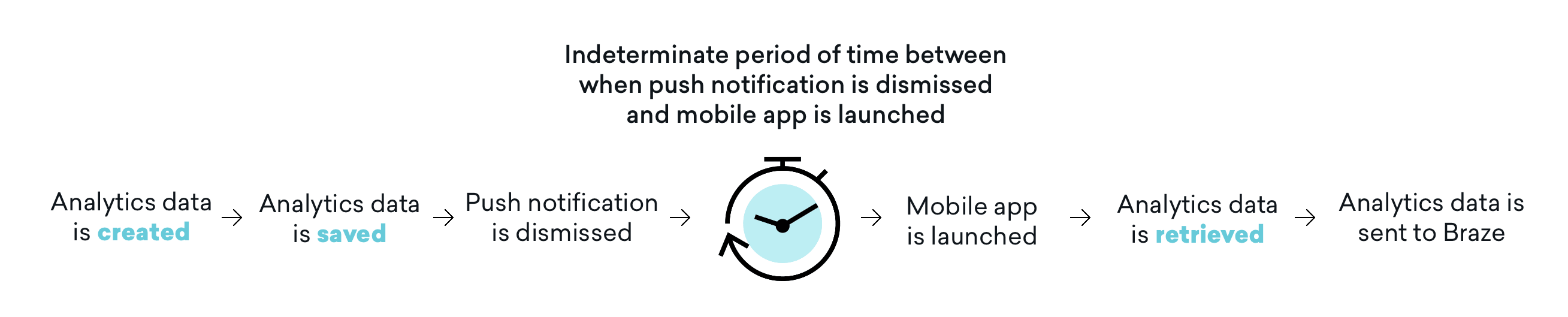
Es importante tener en cuenta que los análisis no se envían a Braze hasta que se lanza posteriormente la aplicación móvil. Esto significa que, dependiendo de tu configuración de rechazo, a menudo existe un periodo de tiempo indeterminado entre que se rechaza una notificación push y se lanza la aplicación móvil y se recuperan los análisis. Aunque es posible que este búfer de tiempo no afecte a todos los casos de uso, debes tener en cuenta este impacto y ajustar tu recorrido de usuario según sea necesario para incluir la apertura de la aplicación con el fin de solucionar este problema.
Paso 1: Configura grupos de aplicaciones en Xcode
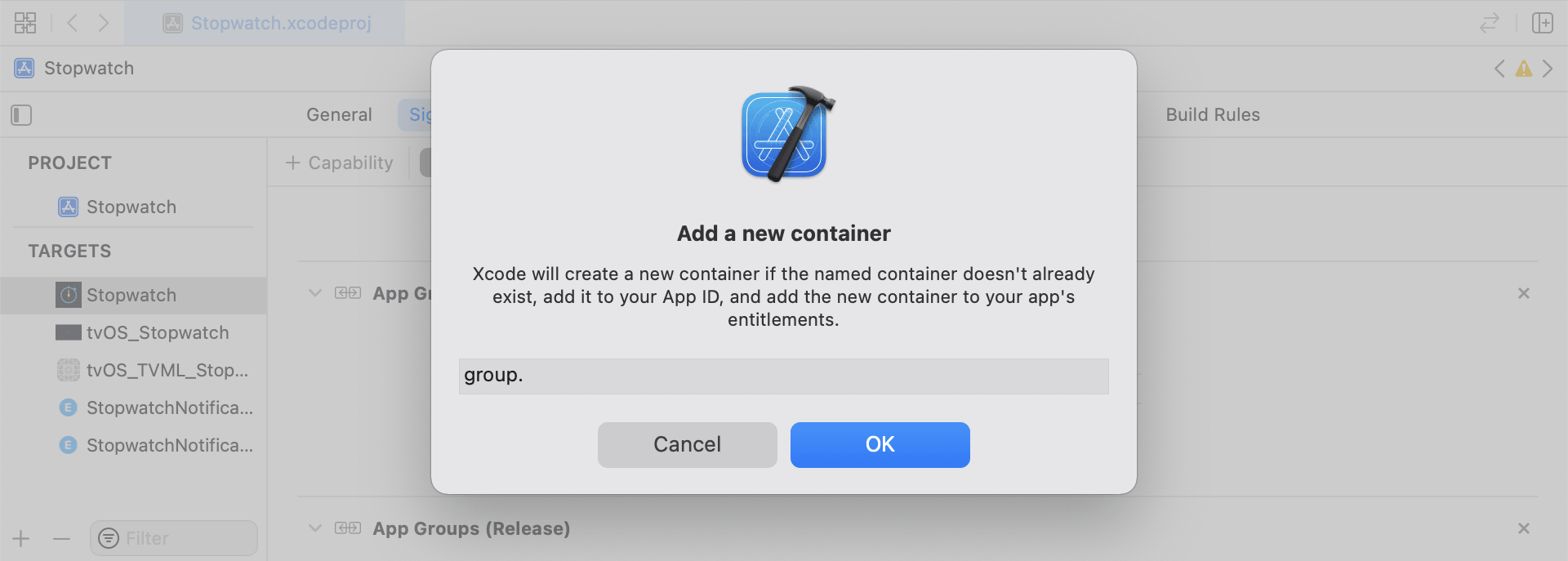
En Xcode, añade la función App Groups. Si no tienes ningún espacio de trabajo en tu aplicación, ve a la capacidad del objetivo principal de la aplicación, activa App Groups, y haz clic en el botón + Añadir. A continuación, utiliza el ID del paquete de tu aplicación para crear el espacio de trabajo. Por ejemplo, si el ID del paquete de tu aplicación es com.company.appname, puedes llamar a tu espacio de trabajo group.com.company.appname.xyz. Asegúrate de que App Groups está activado tanto para el destino principal de tu aplicación como para el destino de la extensión de contenido.
Paso 2: Integrar fragmentos de código
Los siguientes fragmentos de código son una referencia útil sobre cómo guardar y enviar eventos personalizados, atributos personalizados y atributos de usuario. En esta guía se hablará en términos de UserDefaults, pero la representación del código se hará en forma del archivo de ayuda RemoteStorage. Hay archivos de ayuda adicionales, UserAttributes y EventName Dictionary, que se utilizan al enviar y guardar atributos de usuario.
Guardar eventos personalizados
Para guardar eventos personalizados, debes crear el análisis desde cero. Esto se hace creando un diccionario, rellenándolo con metadatos y guardando los datos mediante el uso de un archivo de ayuda.
- Inicializar un diccionario con metadatos de eventos
- Inicializa
userDefaultspara recuperar y almacenar los datos del evento - Si hay una matriz existente, añade los nuevos datos a la matriz existente y guarda
- Si no existe una matriz, guarda la nueva matriz en
userDefaults
1
2
3
4
5
6
7
8
9
10
11
12
13
14
15
16
func saveCustomEvent(with properties: [String: Any]? = nil) {
  // 1
  let customEventDictionary = Dictionary(eventName: "YOUR-EVENT-NAME", properties: properties)

  // 2
  let remoteStorage = RemoteStorage(storageType: .suite)

  // 3
  if var pendingEvents = remoteStorage.retrieve(forKey: .pendingCustomEvents) as? [[String: Any]] {
    pendingEvents.append(contentsOf: [customEventDictionary])
    remoteStorage.store(pendingEvents, forKey: .pendingCustomEvents)
  } else {
  // 4
    remoteStorage.store([customEventDictionary], forKey: .pendingCustomEvents)
  }
}
1
2
3
4
5
6
7
8
9
10
11
12
13
14
15
16
17
- (void)saveCustomEvent:(NSDictionary<NSString *, id> *)properties {
  // 1
  NSDictionary<NSString *, id> *customEventDictionary = [[NSDictionary alloc] initWithEventName:@"YOUR-EVENT-NAME" properties:properties];

  // 2
  RemoteStorage *remoteStorage = [[RemoteStorage alloc] initWithStorageType:StorageTypeSuite];
  NSMutableArray *pendingEvents = [[remoteStorage retrieveForKey:RemoteStorageKeyPendingCustomEvents] mutableCopy];

  // 3
  if (pendingEvents) {
    [pendingEvents addObject:customEventDictionary];
    [remoteStorage store:pendingEvents forKey:RemoteStorageKeyPendingCustomAttributes];
  } else {
  // 4
    [remoteStorage store:@[ customEventDictionary ] forKey:RemoteStorageKeyPendingCustomAttributes];
  }
}
Envío de eventos personalizados a Braze
El mejor momento para registrar cualquier análisis guardado de una extensión de aplicación de contenido de notificaciones es justo después de inicializar el SDK. Esto se puede hacer recorriendo en bucle los eventos pendientes, buscando la clave “Nombre del evento”, configurando los valores adecuados en Braze y, a continuación, borrando el almacenamiento para la próxima vez que se necesite esta función.
- Recorre la matriz de eventos pendientes
- Recorre cada par clave-valor del diccionario
pendingEvents - Comprueba explícitamente la clave de “Nombre del evento” para establecer el valor correspondiente
- Cualquier otra clave-valor se añadirá al diccionario
properties - Registrar evento personalizado individual
- Eliminar todos los eventos pendientes del almacén
1
2
3
4
5
6
7
8
9
10
11
12
13
14
15
16
17
18
19
20
21
22
23
24
25
26
27
28
29
30
31
32
func logPendingCustomEventsIfNecessary() {
  let remoteStorage = RemoteStorage(storageType: .suite)
  guard let pendingEvents = remoteStorage.retrieve(forKey: .pendingCustomEvents) as? [[String: Any]] else { return }

  // 1
  for event in pendingEvents {
    var eventName: String?
    var properties: [AnyHashable: Any] = [:]

  // 2
    for (key, value) in event {
      if key == PushNotificationKey.eventName.rawValue {
  // 3
        if let eventNameValue = value as? String {
          eventName = eventNameValue
        } else {
          print("Invalid type for event_name key")
        }
      } else {
  // 4
        properties[key] = value
      }
    }
  // 5
    if let eventName = eventName {
      AppDelegate.braze?.logCustomEvent(eventName, properties: properties)
    }
  }

  // 6
  remoteStorage.removeObject(forKey: .pendingCustomEvents)
}
1
2
3
4
5
6
7
8
9
10
11
12
13
14
15
16
17
18
19
20
21
22
23
24
25
26
27
28
29
30
31
32
- (void)logPendingEventsIfNecessary {
  RemoteStorage *remoteStorage = [[RemoteStorage alloc] initWithStorageType:StorageTypeSuite];
  NSArray *pendingEvents = [remoteStorage retrieveForKey:RemoteStorageKeyPendingCustomEvents];

  // 1
  for (NSDictionary<NSString *, id> *event in pendingEvents) {
    NSString *eventName = nil;
    NSMutableDictionary *properties = [NSMutableDictionary dictionary];

  // 2
    for (NSString* key in event) {
      if ([key isEqualToString:@"event_name"]) {
  // 3
        if ([[event objectForKey:key] isKindOfClass:[NSString class]]) {
          eventName = [event objectForKey:key];
        } else {
          NSLog(@"Invalid type for event_name key");
        }
      } else {
  // 4
        properties[key] = event[key];
      }
    }
  // 5
    if (eventName != nil) {
      [AppDelegate.braze logCustomEvent:eventName properties:properties];
    }
  }

  // 6
  [remoteStorage removeObjectForKey:RemoteStorageKeyPendingCustomEvents];
}
Guardar atributos personalizados
Para guardar atributos personalizados, debes crear el análisis desde cero. Esto se hace creando un diccionario, rellenándolo con metadatos y guardando los datos mediante el uso de un archivo de ayuda.
- Inicializar un diccionario con metadatos de atributos
- Inicializa
userDefaultspara recuperar y almacenar los datos del atributo - Si hay una matriz existente, añade los nuevos datos a la matriz existente y guarda
- Si no existe una matriz, guarda la nueva matriz en
userDefaults
1
2
3
4
5
6
7
8
9
10
11
12
13
14
15
16
func saveCustomAttribute() {
  // 1
  let customAttributeDictionary: [String: Any] = ["YOUR-CUSTOM-ATTRIBUTE-KEY": "YOUR-CUSTOM-ATTRIBUTE-VALUE"]

  // 2
  let remoteStorage = RemoteStorage(storageType: .suite)

  // 3
  if var pendingAttributes = remoteStorage.retrieve(forKey: .pendingCustomAttributes) as? [[String: Any]] {
    pendingAttributes.append(contentsOf: [customAttributeDictionary])
    remoteStorage.store(pendingAttributes, forKey: .pendingCustomAttributes)
  } else {
  // 4
    remoteStorage.store([customAttributeDictionary], forKey: .pendingCustomAttributes)
  }
}
1
2
3
4
5
6
7
8
9
10
11
12
13
14
15
16
17
- (void)saveCustomAttribute {
  // 1
  NSDictionary<NSString *, id> *customAttributeDictionary = @{ @"YOUR-CUSTOM-ATTRIBUTE-KEY": @"YOUR-CUSTOM-ATTRIBUTE-VALUE" };

  // 2
  RemoteStorage *remoteStorage = [[RemoteStorage alloc] initWithStorageType:StorageTypeSuite];
  NSMutableArray *pendingAttributes = [[remoteStorage retrieveForKey:RemoteStorageKeyPendingCustomAttributes] mutableCopy];

  // 3
  if (pendingAttributes) {
    [pendingAttributes addObject:customAttributeDictionary];
    [remoteStorage store:pendingAttributes forKey:RemoteStorageKeyPendingCustomAttributes];
  } else {
  // 4
    [remoteStorage store:@[ customAttributeDictionary ] forKey:RemoteStorageKeyPendingCustomAttributes];
  }
}
Envío de atributos personalizados a Braze
El mejor momento para registrar cualquier análisis guardado de una extensión de aplicación de contenido de notificaciones es justo después de inicializar el SDK. Esto puede hacerse recorriendo en bucle los atributos pendientes, configurando el atributo personalizado apropiado en Braze y, a continuación, borrando el almacenamiento para la próxima vez que se necesite esta función.
- Recorre la matriz de atributos pendientes
- Recorre cada par clave-valor del diccionario
pendingAttributes - Registra atributos personalizados individuales con la clave y el valor correspondientes
- Eliminar todos los atributos pendientes del almacén
1
2
3
4
5
6
7
8
9
10
11
12
13
14
15
16
17
18
19
20
21
22
func logPendingCustomAttributesIfNecessary() {
  let remoteStorage = RemoteStorage(storageType: .suite)
  guard let pendingAttributes = remoteStorage.retrieve(forKey: .pendingCustomAttributes) as? [[String: Any]] else { return }

  // 1
  pendingAttributes.forEach { setCustomAttributesWith(keysAndValues: $0) }

  // 4
  remoteStorage.removeObject(forKey: .pendingCustomAttributes)
}

func setCustomAttributesWith(keysAndValues: [String: Any]) {
  // 2
  for (key, value) in keysAndValues {
  // 3
    if let value = value as? [String] {
      setCustomAttributeArrayWithKey(key, andValue: value)
    } else {
      setCustomAttributeWithKey(key, andValue: value)
    }
  }
}
1
2
3
4
5
6
7
8
9
10
11
12
13
14
15
16
17
18
19
20
- (void)logPendingCustomAttributesIfNecessary {
  RemoteStorage *remoteStorage = [[RemoteStorage alloc] initWithStorageType:StorageTypeSuite];
  NSArray *pendingAttributes = [remoteStorage retrieveForKey:RemoteStorageKeyPendingCustomAttributes];

  // 1
  for (NSDictionary<NSString*, id> *attribute in pendingAttributes) {
    [self setCustomAttributeWith:attribute];
  }

  // 4
  [remoteStorage removeObjectForKey:RemoteStorageKeyPendingCustomAttributes];
}

- (void)setCustomAttributeWith:(NSDictionary<NSString *, id> *)keysAndValues {
  // 2
  for (NSString *key in keysAndValues) {
  // 3
    [self setCustomAttributeWith:key andValue:[keysAndValues objectForKey:key]];
  }
}
Guardar atributos de usuario
Al guardar atributos de usuario, recomendamos crear un objeto personalizado para descifrar qué tipo de atributo se está actualizando (email, first_name, phone_number, etc.). El objeto debe ser compatible con ser almacenado/recuperado desde UserDefaults. Consulta el archivo de ayuda UserAttribute para ver un ejemplo de cómo conseguirlo.
- Inicializa un objeto
UserAttributecodificado con el tipo correspondiente - Inicializa
userDefaultspara recuperar y almacenar los datos del evento - Si hay una matriz existente, añade los nuevos datos a la matriz existente y guarda
- Si no existe una matriz, guarda la nueva matriz en
userDefaults
1
2
3
4
5
6
7
8
9
10
11
12
13
14
15
16
func saveUserAttribute() {
  // 1
  guard let data = try? PropertyListEncoder().encode(UserAttribute.userAttributeType("USER-ATTRIBUTE-VALUE")) else { return }

  // 2
  let remoteStorage = RemoteStorage(storageType: .suite)

  // 3
  if var pendingAttributes = remoteStorage.retrieve(forKey: .pendingUserAttributes) as? [Data] {
    pendingAttributes.append(contentsOf: [data])
    remoteStorage.store(pendingAttributes, forKey: .pendingUserAttributes)
  } else {
  // 4
    remoteStorage.store([data], forKey: .pendingUserAttributes)
  }
}
1
2
3
4
5
6
7
8
9
10
11
12
13
14
15
16
17
18
19
20
21
22
23
- (void)saveUserAttribute {
  // 1
  UserAttribute *userAttribute = [[UserAttribute alloc] initWithUserField:@"USER-ATTRIBUTE-VALUE" attributeType:UserAttributeTypeEmail];

  NSError *error;
  NSData *data = [NSKeyedArchiver archivedDataWithRootObject:userAttribute requiringSecureCoding:YES error:&error];

  if (error != nil) {
    // log error
  }
  // 2
  RemoteStorage *remoteStorage = [[RemoteStorage alloc] initWithStorageType:StorageTypeSuite];
  NSMutableArray *pendingAttributes = [[remoteStorage retrieveForKey:RemoteStorageKeyPendingUserAttributes] mutableCopy];

  // 3
  if (pendingAttributes) {
    [pendingAttributes addObject:data];
    [remoteStorage store:pendingAttributes forKey:RemoteStorageKeyPendingUserAttributes];
  } else {
  // 4
    [remoteStorage store:@[data] forKey:RemoteStorageKeyPendingUserAttributes];
  }
}
Envío de atributos de usuario a Braze
El mejor momento para registrar cualquier análisis guardado de una extensión de aplicación de contenido de notificaciones es justo después de inicializar el SDK. Esto puede hacerse recorriendo en bucle los atributos pendientes, configurando el atributo personalizado apropiado en Braze y, a continuación, borrando el almacenamiento para la próxima vez que se necesite esta función.
- Recorre la matriz de datos
pendingAttributes - Inicializar un objeto
UserAttributecodificado a partir de datos de atributos - Establecer un campo de usuario específico basado en el tipo de atributo de usuario (correo electrónico)
- Eliminar todos los atributos de usuario pendientes del almacén
1
2
3
4
5
6
7
8
9
10
11
12
13
14
15
16
17
18
func logPendingUserAttributesIfNecessary() {
  let remoteStorage = RemoteStorage(storageType: .suite)
  guard let pendingAttributes = remoteStorage.retrieve(forKey: .pendingUserAttributes) as? [Data] else { return }

  // 1
  for attributeData in pendingAttributes {
  // 2
    guard let userAttribute = try? PropertyListDecoder().decode(UserAttribute.self, from: attributeData) else { continue }

  // 3
    switch userAttribute {
    case .email(let email):
      user?.email = email
    }
  }
  // 4
  remoteStorage.removeObject(forKey: .pendingUserAttributes)
}
1
2
3
4
5
6
7
8
9
10
11
12
13
14
15
16
17
18
19
20
21
22
23
24
25
26
27
- (void)logPendingUserAttributesIfNecessary {
  RemoteStorage *remoteStorage = [[RemoteStorage alloc] initWithStorageType:StorageTypeSuite];
  NSArray *pendingAttributes = [remoteStorage retrieveForKey:RemoteStorageKeyPendingUserAttributes];

  // 1
  for (NSData *attributeData in pendingAttributes) {
    NSError *error;

  // 2
    UserAttribute *userAttribute = [NSKeyedUnarchiver unarchivedObjectOfClass:[UserAttribute class] fromData:attributeData error:&error];

    if (error != nil) {
      // log error
    }

  // 3
    if (userAttribute) {
      switch (userAttribute.attributeType) {
        case UserAttributeTypeEmail:
          [self user].email = userAttribute.userField;
          break;
      }
    }
  }
  // 4
  [remoteStorage removeObjectForKey:RemoteStorageKeyPendingUserAttributes];
}
Archivos de ayuda
RemoteStorage Helper File
1
2
3
4
5
6
7
8
9
10
11
12
13
14
15
16
17
18
19
20
21
22
23
24
25
26
27
28
29
30
31
32
33
34
35
36
37
38
39
40
41
42
43
44
45
46
enum RemoteStorageKey: String, CaseIterable {

  // MARK: - Notification Content Extension Analytics
  case pendingCustomEvents = "pending_custom_events"
  case pendingCustomAttributes = "pending_custom_attributes"
  case pendingUserAttributes = "pending_user_attributes"
}

enum RemoteStorageType {
  case standard
  case suite
}

class RemoteStorage: NSObject {
  private var storageType: RemoteStorageType = .standard
  private lazy var defaults: UserDefaults = {
    switch storageType {
    case .standard:
      return .standard
    case .suite:
      return UserDefaults(suiteName: "YOUR-DOMAIN-IDENTIFIER")!
    }
  }()

  init(storageType: RemoteStorageType = .standard) {
    self.storageType = storageType
  }

  func store(_ value: Any, forKey key: RemoteStorageKey) {
    defaults.set(value, forKey: key.rawValue)
  }

  func retrieve(forKey key: RemoteStorageKey) -> Any? {
    return defaults.object(forKey: key.rawValue)
  }

  func removeObject(forKey key: RemoteStorageKey) {
    defaults.removeObject(forKey: key.rawValue)
  }

  func resetStorageKeys() {
    for key in RemoteStorageKey.allCases {
      defaults.removeObject(forKey: key.rawValue)
    }
  }
}
1
2
3
4
5
6
7
8
9
10
11
12
13
14
15
16
17
18
19
20
21
22
23
24
25
26
27
28
29
30
31
32
33
34
35
36
37
38
39
40
41
42
43
44
45
46
47
48
49
50
51
52
53
54
55
56
57
58
59
60
@interface RemoteStorage ()

@property (nonatomic) StorageType storageType;
@property (nonatomic, strong) NSUserDefaults *defaults;

@end

@implementation RemoteStorage

- (id)initWithStorageType:(StorageType)storageType {
  if (self = [super init]) {
    self.storageType = storageType;
  }
  return self;
}

- (void)store:(id)value forKey:(RemoteStorageKey)key {
  [[self defaults] setValue:value forKey:[self rawValueForKey:key]];
}

- (id)retrieveForKey:(RemoteStorageKey)key {
  return [[self defaults] objectForKey:[self rawValueForKey:key]];
}

- (void)removeObjectForKey:(RemoteStorageKey)key {
  [[self defaults] removeObjectForKey:[self rawValueForKey:key]];
}

- (void)resetStorageKeys {
  [[self defaults] removeObjectForKey:[self rawValueForKey:RemoteStorageKeyPendingCustomEvents]];
  [[self defaults] removeObjectForKey:[self rawValueForKey:RemoteStorageKeyPendingCustomAttributes]];
  [[self defaults] removeObjectForKey:[self rawValueForKey:RemoteStorageKeyPendingUserAttributes]];
}

- (NSUserDefaults *)defaults {
  if (!self.defaults) {
    switch (self.storageType) {
      case StorageTypeStandard:
        return [NSUserDefaults standardUserDefaults];
        break;
      case StorageTypeSuite:
        return [[NSUserDefaults alloc] initWithSuiteName:@"YOUR-DOMAIN-IDENTIFIER"];
    }
  } else {
    return self.defaults;
  }
}

- (NSString*)rawValueForKey:(RemoteStorageKey)remoteStorageKey {
    switch(remoteStorageKey) {
    case RemoteStorageKeyPendingCustomEvents:
      return @"pending_custom_events";
    case RemoteStorageKeyPendingCustomAttributes:
      return @"pending_custom_attributes";
    case RemoteStorageKeyPendingUserAttributes:
      return @"pending_user_attributes";
    default:
      [NSException raise:NSGenericException format:@"Unexpected FormatType."];
  }
}
UserAttribute Helper File
1
2
3
4
5
6
7
8
9
10
11
12
13
14
15
16
17
18
19
20
21
22
23
24
25
26
enum UserAttribute: Hashable {
  case email(String?)
}

// MARK: - Codable
extension UserAttribute: Codable {
  private enum CodingKeys: String, CodingKey {
    case email
  }

  func encode(to encoder: Encoder) throws {
    var values = encoder.container(keyedBy: CodingKeys.self)

    switch self {
    case .email(let email):
      try values.encode(email, forKey: .email)
    }
  }

  init(from decoder: Decoder) throws {
    let values = try decoder.container(keyedBy: CodingKeys.self)

    let email = try values.decode(String.self, forKey: .email)
    self = .email(email)
  }
}
1
2
3
4
5
6
7
8
9
10
11
12
13
14
15
16
17
18
19
20
21
22
23
24
25
26
@implementation UserAttribute

- (id)initWithUserField:(NSString *)userField attributeType:(UserAttributeType)attributeType {
  if (self = [super init]) {
    self.userField = userField;
    self.attributeType = attributeType;
  }
  return self;
}

- (void)encodeWithCoder:(NSCoder *)encoder {
  [encoder encodeObject:self.userField forKey:@"userField"];
  [encoder encodeInteger:self.attributeType forKey:@"attributeType"];
}

- (id)initWithCoder:(NSCoder *)decoder {
  if (self = [super init]) {
    self.userField = [decoder decodeObjectForKey:@"userField"];

    NSInteger attributeRawValue = [decoder decodeIntegerForKey:@"attributeType"];
    self.attributeType = (UserAttributeType) attributeRawValue;
  }
  return self;
}

@end
EventName Dictionary Helper File
1
2
3
4
5
6
7
8
9
10
11
12
extension Dictionary where Key == String, Value == Any {
  init(eventName: String, properties: [String: Any]? = nil) {
    self.init()
    self[PushNotificationKey.eventName.rawValue] = eventName

    if let properties = properties {
      for (key, value) in properties {
        self[key] = value
      }
    }
  }
}
1
2
3
4
5
6
7
8
9
10
11
12
13
14
15
@implementation NSDictionary (Helper)

- (id)initWithEventName:(NSString *)eventName properties:(NSDictionary *)properties {
  self = [self init];
  if (self) {
    dict[@"event_name"] = eventName;

    for(id key in properties) {
      dict[key] = properties[key];
    }
  }
  return self;
}

@end
 Editar esta página en GitHub