푸시 알림 데이터를 기록하십시오
Braze SDK를 통해 푸시 알림 데이터를 기록하는 방법을 알아보세요.
Braze API로 데이터 로깅(권장)
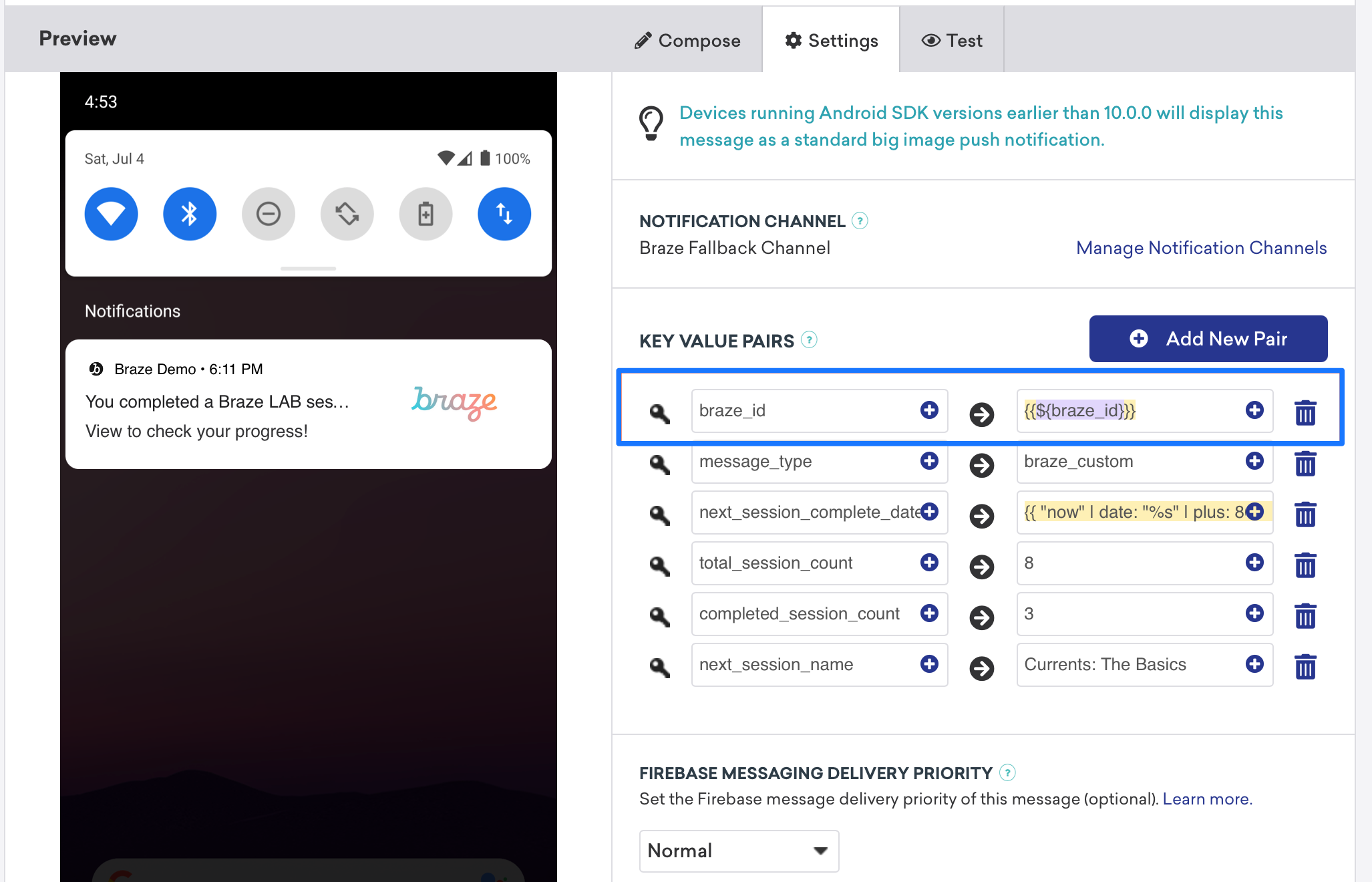
/users/track 엔드포인트를 호출하여 실시간으로 분석을 기록할 수 있습니다. 분석을 기록하려면 Braze 대시보드에서 braze_id 값을 전송하여 업데이트할 고객 프로필을 식별합니다.
수동으로 데이터 로깅하기
페이로드의 세부 사항에 따라 FirebaseMessagingService.onMessageReceived 구현 또는 스타트업 활동 내에서 수동으로 분석을 기록할 수 있습니다. FirebaseMessagingService 서브클래스는 호출 후 9초 이내에 실행을 완료해야 Android 시스템에 의해 플래그가 지정되거나 종료되지 않는다는 점을 명심하세요.
Braze API로 데이터 로깅(권장)
Braze API /users/track 엔드포인트를 통해 실시간으로 분석 로깅을 수행할 수 있습니다. 분석을 기록하려면 다음 스크린샷과 같이 키-값 페어 필드에 braze_id 값을 보내 업데이트할 고객 프로필을 식별합니다.

수동으로 데이터 로깅하기
수동으로 로깅하려면 먼저 Xcode 내에서 워크스페이스를 구성한 다음, 분석을 생성, 저장 및 검색해야 합니다. 이를 위해서는 사용자 측에서 커스텀 개발자의 작업이 필요합니다. 표시된 다음 코드 스니펫은 이 문제를 해결하는 데 도움이 됩니다.
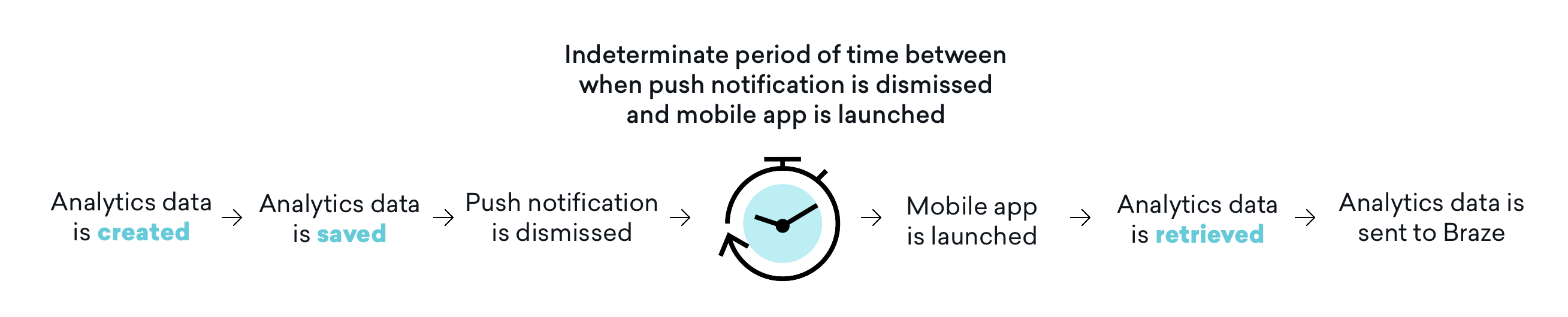
모바일 애플리케이션이 후속으로 실행될 때까지 분석 데이터를 Braze로 전송하지 않는다는 점이 중요합니다. 즉, 해제 설정에 따라 푸시 알림 해제, 모바일 앱 실행 및 분석 검색 사이에 확정되지 않은 시간이 존재하기도 합니다. 이 시간 버퍼가 모든 사용 사례에 영향을 미치는 것은 아니지만, 사용자는 이 영향을 고려해야 하며, 필요한 경우 이 문제를 해결하기 위해 애플리케이션을 여는 것을 포함하여 사용자 여정을 조정해야 합니다.
1단계: Xcode 내에서 앱 그룹 구성
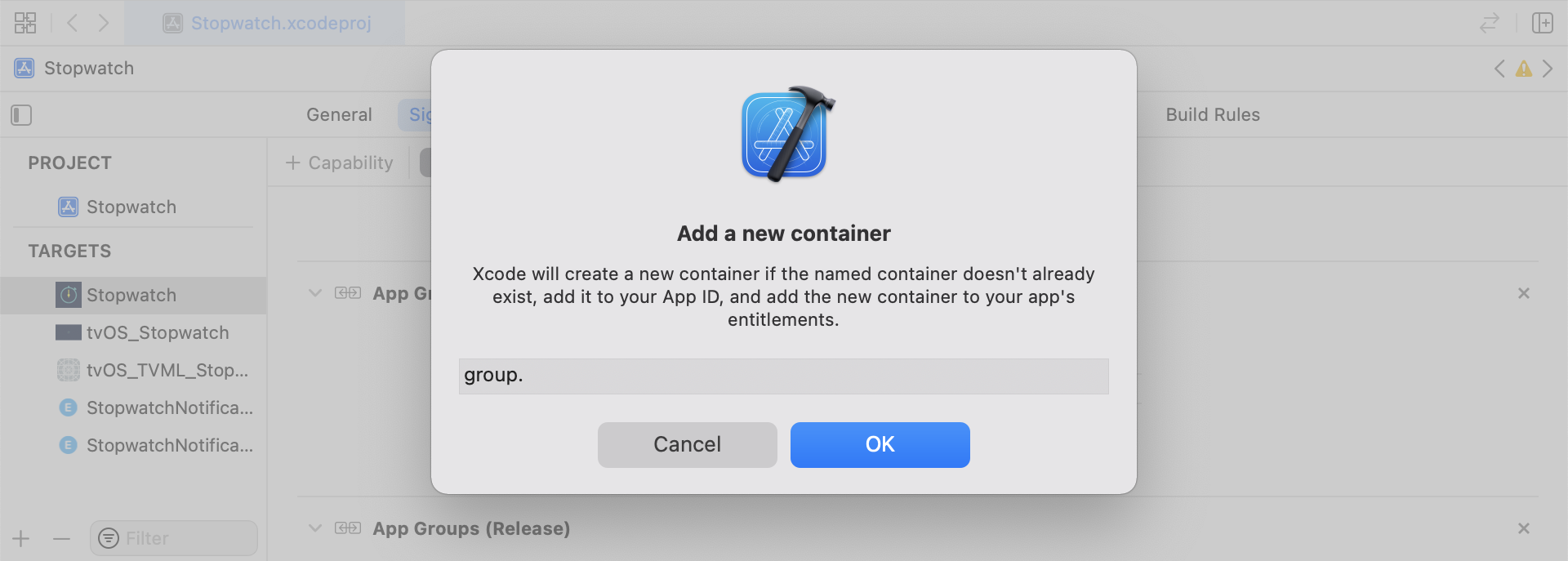
Xcode에서 App Groups 기능을 추가합니다. 앱에 워크스페이스가 없는 경우 기본 앱 대상의 기능으로 이동하여 App Groups 을 켜고 + 추가 버튼을 클릭합니다. 그런 다음 앱의 번들 ID를 사용하여 워크스페이스를 만듭니다. 예를 들어 앱의 번들 ID가 com.company.appname인 경우 워크스페이스 이름을 group.com.company.appname.xyz로 지정할 수 있습니다. 기본 앱 대상과 콘텐츠 확장 대상 모두에 대해 App Groups가 켜져 있는지 확인합니다.
2단계: 코드 스니펫 통합
다음 코드 스니펫은 커스텀 이벤트, 커스텀 속성 및 사용자 속성을 저장하고 전송하는 방법에 대한 유용한 참고 자료입니다. 이 가이드에서는 UserDefaults의 관점에서 설명하지만 코드는 헬퍼 파일 RemoteStorage의 형태로 표현됩니다. 사용자 속성을 전송하고 저장할 때 사용되는 추가 헬퍼 파일 UserAttributes 및 EventName Dictionary가 있습니다.
사용자 지정 이벤트 저장
사용자 지정 이벤트를 저장하려면 애널리틱스를 처음부터 새로 만들어야 합니다. 이는 사전을 만들고 메타데이터로 채운 다음 도우미 파일을 사용하여 데이터를 저장하는 방식으로 이루어집니다.
- 이벤트 메타데이터로 사전 초기화
userDefaults를 초기화하여 이벤트 데이터 검색 및 저장- 기존 배열이 있는 경우 기존 배열에 새 데이터를 추가하고 저장합니다.
- 기존 배열이 없는 경우
userDefaults에 새 배열 저장
1
2
3
4
5
6
7
8
9
10
11
12
13
14
15
16
func saveCustomEvent(with properties: [String: Any]? = nil) {
  // 1
  let customEventDictionary = Dictionary(eventName: "YOUR-EVENT-NAME", properties: properties)

  // 2
  let remoteStorage = RemoteStorage(storageType: .suite)

  // 3
  if var pendingEvents = remoteStorage.retrieve(forKey: .pendingCustomEvents) as? [[String: Any]] {
    pendingEvents.append(contentsOf: [customEventDictionary])
    remoteStorage.store(pendingEvents, forKey: .pendingCustomEvents)
  } else {
  // 4
    remoteStorage.store([customEventDictionary], forKey: .pendingCustomEvents)
  }
}
1
2
3
4
5
6
7
8
9
10
11
12
13
14
15
16
17
- (void)saveCustomEvent:(NSDictionary<NSString *, id> *)properties {
  // 1
  NSDictionary<NSString *, id> *customEventDictionary = [[NSDictionary alloc] initWithEventName:@"YOUR-EVENT-NAME" properties:properties];

  // 2
  RemoteStorage *remoteStorage = [[RemoteStorage alloc] initWithStorageType:StorageTypeSuite];
  NSMutableArray *pendingEvents = [[remoteStorage retrieveForKey:RemoteStorageKeyPendingCustomEvents] mutableCopy];

  // 3
  if (pendingEvents) {
    [pendingEvents addObject:customEventDictionary];
    [remoteStorage store:pendingEvents forKey:RemoteStorageKeyPendingCustomAttributes];
  } else {
  // 4
    [remoteStorage store:@[ customEventDictionary ] forKey:RemoteStorageKeyPendingCustomAttributes];
  }
}
Braze에 사용자 지정 이벤트 보내기
SDK가 초기화된 직후가 알림 콘텐츠 앱 확장에 저장된 모든 분석을 기록하기에 가장 좋은 시기입니다. 보류 중인 이벤트를 반복하고 ‘이벤트 이름’ 키를 확인하며 Braze에서 적절한 값을 설정하고 다음에 이 기능이 필요할 때를 대비해 스토리지를 지워 이 작업을 수행할 수 있습니다.
- 보류 중인 이벤트 배열 반복
pendingEvents사전의 각 키-값 쌍을 반복합니다.- ‘이벤트 이름’에 대한 키를 명시적으로 확인하여 적절히 값 설정
- 다른 모든 키 값은
properties사전에 추가됩니다. - 개별 사용자 지정 이벤트 기록
- 스토리지에서 보류 중인 모든 이벤트 제거
1
2
3
4
5
6
7
8
9
10
11
12
13
14
15
16
17
18
19
20
21
22
23
24
25
26
27
28
29
30
31
32
func logPendingCustomEventsIfNecessary() {
  let remoteStorage = RemoteStorage(storageType: .suite)
  guard let pendingEvents = remoteStorage.retrieve(forKey: .pendingCustomEvents) as? [[String: Any]] else { return }

  // 1
  for event in pendingEvents {
    var eventName: String?
    var properties: [AnyHashable: Any] = [:]

  // 2
    for (key, value) in event {
      if key == PushNotificationKey.eventName.rawValue {
  // 3
        if let eventNameValue = value as? String {
          eventName = eventNameValue
        } else {
          print("Invalid type for event_name key")
        }
      } else {
  // 4
        properties[key] = value
      }
    }
  // 5
    if let eventName = eventName {
      AppDelegate.braze?.logCustomEvent(eventName, properties: properties)
    }
  }

  // 6
  remoteStorage.removeObject(forKey: .pendingCustomEvents)
}
1
2
3
4
5
6
7
8
9
10
11
12
13
14
15
16
17
18
19
20
21
22
23
24
25
26
27
28
29
30
31
32
- (void)logPendingEventsIfNecessary {
  RemoteStorage *remoteStorage = [[RemoteStorage alloc] initWithStorageType:StorageTypeSuite];
  NSArray *pendingEvents = [remoteStorage retrieveForKey:RemoteStorageKeyPendingCustomEvents];

  // 1
  for (NSDictionary<NSString *, id> *event in pendingEvents) {
    NSString *eventName = nil;
    NSMutableDictionary *properties = [NSMutableDictionary dictionary];

  // 2
    for (NSString* key in event) {
      if ([key isEqualToString:@"event_name"]) {
  // 3
        if ([[event objectForKey:key] isKindOfClass:[NSString class]]) {
          eventName = [event objectForKey:key];
        } else {
          NSLog(@"Invalid type for event_name key");
        }
      } else {
  // 4
        properties[key] = event[key];
      }
    }
  // 5
    if (eventName != nil) {
      [AppDelegate.braze logCustomEvent:eventName properties:properties];
    }
  }

  // 6
  [remoteStorage removeObjectForKey:RemoteStorageKeyPendingCustomEvents];
}
사용자 지정 속성 저장
사용자 지정 속성을 저장하려면 분석을 처음부터 새로 만들어야 합니다. 이는 사전을 만들고 메타데이터로 채운 다음 도우미 파일을 사용하여 데이터를 저장하는 방식으로 이루어집니다.
- 속성 메타데이터로 사전 초기화
userDefaults를 초기화하여 속성 데이터 검색 및 저장- 기존 배열이 있는 경우 기존 배열에 새 데이터를 추가하고 저장합니다.
- 기존 배열이 없는 경우
userDefaults에 새 배열 저장
1
2
3
4
5
6
7
8
9
10
11
12
13
14
15
16
func saveCustomAttribute() {
  // 1
  let customAttributeDictionary: [String: Any] = ["YOUR-CUSTOM-ATTRIBUTE-KEY": "YOUR-CUSTOM-ATTRIBUTE-VALUE"]

  // 2
  let remoteStorage = RemoteStorage(storageType: .suite)

  // 3
  if var pendingAttributes = remoteStorage.retrieve(forKey: .pendingCustomAttributes) as? [[String: Any]] {
    pendingAttributes.append(contentsOf: [customAttributeDictionary])
    remoteStorage.store(pendingAttributes, forKey: .pendingCustomAttributes)
  } else {
  // 4
    remoteStorage.store([customAttributeDictionary], forKey: .pendingCustomAttributes)
  }
}
1
2
3
4
5
6
7
8
9
10
11
12
13
14
15
16
17
- (void)saveCustomAttribute {
  // 1
  NSDictionary<NSString *, id> *customAttributeDictionary = @{ @"YOUR-CUSTOM-ATTRIBUTE-KEY": @"YOUR-CUSTOM-ATTRIBUTE-VALUE" };

  // 2
  RemoteStorage *remoteStorage = [[RemoteStorage alloc] initWithStorageType:StorageTypeSuite];
  NSMutableArray *pendingAttributes = [[remoteStorage retrieveForKey:RemoteStorageKeyPendingCustomAttributes] mutableCopy];

  // 3
  if (pendingAttributes) {
    [pendingAttributes addObject:customAttributeDictionary];
    [remoteStorage store:pendingAttributes forKey:RemoteStorageKeyPendingCustomAttributes];
  } else {
  // 4
    [remoteStorage store:@[ customAttributeDictionary ] forKey:RemoteStorageKeyPendingCustomAttributes];
  }
}
Braze에 사용자 지정 속성 보내기
SDK가 초기화된 직후가 알림 콘텐츠 앱 확장에 저장된 모든 분석을 기록하기에 가장 좋은 시기입니다. 보류 중인 속성을 반복하고 Braze에서 적절한 값을 설정하며 다음에 이 기능이 필요할 때를 대비해 스토리지를 지워 이 작업을 수행할 수 있습니다.
- 보류 중인 속성 배열 반복
pendingAttributes사전의 각 키-값 쌍을 반복합니다.- 해당 키와 값으로 개별 사용자 지정 속성을 기록합니다.
- 스토리지에서 보류 중인 모든 속성 제거
1
2
3
4
5
6
7
8
9
10
11
12
13
14
15
16
17
18
19
20
21
22
func logPendingCustomAttributesIfNecessary() {
  let remoteStorage = RemoteStorage(storageType: .suite)
  guard let pendingAttributes = remoteStorage.retrieve(forKey: .pendingCustomAttributes) as? [[String: Any]] else { return }

  // 1
  pendingAttributes.forEach { setCustomAttributesWith(keysAndValues: $0) }

  // 4
  remoteStorage.removeObject(forKey: .pendingCustomAttributes)
}

func setCustomAttributesWith(keysAndValues: [String: Any]) {
  // 2
  for (key, value) in keysAndValues {
  // 3
    if let value = value as? [String] {
      setCustomAttributeArrayWithKey(key, andValue: value)
    } else {
      setCustomAttributeWithKey(key, andValue: value)
    }
  }
}
1
2
3
4
5
6
7
8
9
10
11
12
13
14
15
16
17
18
19
20
- (void)logPendingCustomAttributesIfNecessary {
  RemoteStorage *remoteStorage = [[RemoteStorage alloc] initWithStorageType:StorageTypeSuite];
  NSArray *pendingAttributes = [remoteStorage retrieveForKey:RemoteStorageKeyPendingCustomAttributes];

  // 1
  for (NSDictionary<NSString*, id> *attribute in pendingAttributes) {
    [self setCustomAttributeWith:attribute];
  }

  // 4
  [remoteStorage removeObjectForKey:RemoteStorageKeyPendingCustomAttributes];
}

- (void)setCustomAttributeWith:(NSDictionary<NSString *, id> *)keysAndValues {
  // 2
  for (NSString *key in keysAndValues) {
  // 3
    [self setCustomAttributeWith:key andValue:[keysAndValues objectForKey:key]];
  }
}
사용자 속성 저장
사용자 속성을 저장할 때는 사용자 정의 객체를 만들어 업데이트되는 속성 유형을 해독하는 것이 좋습니다(email, first_name, phone_number, 등). 개체는 UserDefaults 에서 저장/검색하는 것과 호환되어야 합니다. 이를 수행하는 방법에 대한 한 가지 예제는 UserAttribute 헬퍼 파일을 참조하세요.
- 인코딩된
UserAttribute객체를 해당 유형으로 초기화합니다. userDefaults를 초기화하여 이벤트 데이터 검색 및 저장- 기존 배열이 있는 경우 기존 배열에 새 데이터를 추가하고 저장합니다.
- 기존 배열이 없는 경우
userDefaults에 새 배열 저장
1
2
3
4
5
6
7
8
9
10
11
12
13
14
15
16
func saveUserAttribute() {
  // 1
  guard let data = try? PropertyListEncoder().encode(UserAttribute.userAttributeType("USER-ATTRIBUTE-VALUE")) else { return }

  // 2
  let remoteStorage = RemoteStorage(storageType: .suite)

  // 3
  if var pendingAttributes = remoteStorage.retrieve(forKey: .pendingUserAttributes) as? [Data] {
    pendingAttributes.append(contentsOf: [data])
    remoteStorage.store(pendingAttributes, forKey: .pendingUserAttributes)
  } else {
  // 4
    remoteStorage.store([data], forKey: .pendingUserAttributes)
  }
}
1
2
3
4
5
6
7
8
9
10
11
12
13
14
15
16
17
18
19
20
21
22
23
- (void)saveUserAttribute {
  // 1
  UserAttribute *userAttribute = [[UserAttribute alloc] initWithUserField:@"USER-ATTRIBUTE-VALUE" attributeType:UserAttributeTypeEmail];

  NSError *error;
  NSData *data = [NSKeyedArchiver archivedDataWithRootObject:userAttribute requiringSecureCoding:YES error:&error];

  if (error != nil) {
    // log error
  }
  // 2
  RemoteStorage *remoteStorage = [[RemoteStorage alloc] initWithStorageType:StorageTypeSuite];
  NSMutableArray *pendingAttributes = [[remoteStorage retrieveForKey:RemoteStorageKeyPendingUserAttributes] mutableCopy];

  // 3
  if (pendingAttributes) {
    [pendingAttributes addObject:data];
    [remoteStorage store:pendingAttributes forKey:RemoteStorageKeyPendingUserAttributes];
  } else {
  // 4
    [remoteStorage store:@[data] forKey:RemoteStorageKeyPendingUserAttributes];
  }
}
Braze에 사용자 속성 보내기
SDK가 초기화된 직후가 알림 콘텐츠 앱 확장에 저장된 모든 분석을 기록하기에 가장 좋은 시기입니다. 보류 중인 속성을 반복하고 Braze에서 적절한 값을 설정하며 다음에 이 기능이 필요할 때를 대비해 스토리지를 지워 이 작업을 수행할 수 있습니다.
pendingAttributes데이터 배열 반복- 속성 데이터에서 인코딩된
UserAttribute객체를 초기화합니다. - 사용자 속성 유형(이메일)에 따라 특정 사용자 필드를 설정합니다.
- 스토리지에서 보류 중인 모든 사용자 속성 제거
1
2
3
4
5
6
7
8
9
10
11
12
13
14
15
16
17
18
func logPendingUserAttributesIfNecessary() {
  let remoteStorage = RemoteStorage(storageType: .suite)
  guard let pendingAttributes = remoteStorage.retrieve(forKey: .pendingUserAttributes) as? [Data] else { return }

  // 1
  for attributeData in pendingAttributes {
  // 2
    guard let userAttribute = try? PropertyListDecoder().decode(UserAttribute.self, from: attributeData) else { continue }

  // 3
    switch userAttribute {
    case .email(let email):
      user?.email = email
    }
  }
  // 4
  remoteStorage.removeObject(forKey: .pendingUserAttributes)
}
1
2
3
4
5
6
7
8
9
10
11
12
13
14
15
16
17
18
19
20
21
22
23
24
25
26
27
- (void)logPendingUserAttributesIfNecessary {
  RemoteStorage *remoteStorage = [[RemoteStorage alloc] initWithStorageType:StorageTypeSuite];
  NSArray *pendingAttributes = [remoteStorage retrieveForKey:RemoteStorageKeyPendingUserAttributes];

  // 1
  for (NSData *attributeData in pendingAttributes) {
    NSError *error;

  // 2
    UserAttribute *userAttribute = [NSKeyedUnarchiver unarchivedObjectOfClass:[UserAttribute class] fromData:attributeData error:&error];

    if (error != nil) {
      // log error
    }

  // 3
    if (userAttribute) {
      switch (userAttribute.attributeType) {
        case UserAttributeTypeEmail:
          [self user].email = userAttribute.userField;
          break;
      }
    }
  }
  // 4
  [remoteStorage removeObjectForKey:RemoteStorageKeyPendingUserAttributes];
}
도우미 파일
RemoteStorage Helper File
1
2
3
4
5
6
7
8
9
10
11
12
13
14
15
16
17
18
19
20
21
22
23
24
25
26
27
28
29
30
31
32
33
34
35
36
37
38
39
40
41
42
43
44
45
46
enum RemoteStorageKey: String, CaseIterable {

  // MARK: - Notification Content Extension Analytics
  case pendingCustomEvents = "pending_custom_events"
  case pendingCustomAttributes = "pending_custom_attributes"
  case pendingUserAttributes = "pending_user_attributes"
}

enum RemoteStorageType {
  case standard
  case suite
}

class RemoteStorage: NSObject {
  private var storageType: RemoteStorageType = .standard
  private lazy var defaults: UserDefaults = {
    switch storageType {
    case .standard:
      return .standard
    case .suite:
      return UserDefaults(suiteName: "YOUR-DOMAIN-IDENTIFIER")!
    }
  }()

  init(storageType: RemoteStorageType = .standard) {
    self.storageType = storageType
  }

  func store(_ value: Any, forKey key: RemoteStorageKey) {
    defaults.set(value, forKey: key.rawValue)
  }

  func retrieve(forKey key: RemoteStorageKey) -> Any? {
    return defaults.object(forKey: key.rawValue)
  }

  func removeObject(forKey key: RemoteStorageKey) {
    defaults.removeObject(forKey: key.rawValue)
  }

  func resetStorageKeys() {
    for key in RemoteStorageKey.allCases {
      defaults.removeObject(forKey: key.rawValue)
    }
  }
}
1
2
3
4
5
6
7
8
9
10
11
12
13
14
15
16
17
18
19
20
21
22
23
24
25
26
27
28
29
30
31
32
33
34
35
36
37
38
39
40
41
42
43
44
45
46
47
48
49
50
51
52
53
54
55
56
57
58
59
60
@interface RemoteStorage ()

@property (nonatomic) StorageType storageType;
@property (nonatomic, strong) NSUserDefaults *defaults;

@end

@implementation RemoteStorage

- (id)initWithStorageType:(StorageType)storageType {
  if (self = [super init]) {
    self.storageType = storageType;
  }
  return self;
}

- (void)store:(id)value forKey:(RemoteStorageKey)key {
  [[self defaults] setValue:value forKey:[self rawValueForKey:key]];
}

- (id)retrieveForKey:(RemoteStorageKey)key {
  return [[self defaults] objectForKey:[self rawValueForKey:key]];
}

- (void)removeObjectForKey:(RemoteStorageKey)key {
  [[self defaults] removeObjectForKey:[self rawValueForKey:key]];
}

- (void)resetStorageKeys {
  [[self defaults] removeObjectForKey:[self rawValueForKey:RemoteStorageKeyPendingCustomEvents]];
  [[self defaults] removeObjectForKey:[self rawValueForKey:RemoteStorageKeyPendingCustomAttributes]];
  [[self defaults] removeObjectForKey:[self rawValueForKey:RemoteStorageKeyPendingUserAttributes]];
}

- (NSUserDefaults *)defaults {
  if (!self.defaults) {
    switch (self.storageType) {
      case StorageTypeStandard:
        return [NSUserDefaults standardUserDefaults];
        break;
      case StorageTypeSuite:
        return [[NSUserDefaults alloc] initWithSuiteName:@"YOUR-DOMAIN-IDENTIFIER"];
    }
  } else {
    return self.defaults;
  }
}

- (NSString*)rawValueForKey:(RemoteStorageKey)remoteStorageKey {
    switch(remoteStorageKey) {
    case RemoteStorageKeyPendingCustomEvents:
      return @"pending_custom_events";
    case RemoteStorageKeyPendingCustomAttributes:
      return @"pending_custom_attributes";
    case RemoteStorageKeyPendingUserAttributes:
      return @"pending_user_attributes";
    default:
      [NSException raise:NSGenericException format:@"Unexpected FormatType."];
  }
}
UserAttribute Helper File
1
2
3
4
5
6
7
8
9
10
11
12
13
14
15
16
17
18
19
20
21
22
23
24
25
26
enum UserAttribute: Hashable {
  case email(String?)
}

// MARK: - Codable
extension UserAttribute: Codable {
  private enum CodingKeys: String, CodingKey {
    case email
  }

  func encode(to encoder: Encoder) throws {
    var values = encoder.container(keyedBy: CodingKeys.self)

    switch self {
    case .email(let email):
      try values.encode(email, forKey: .email)
    }
  }

  init(from decoder: Decoder) throws {
    let values = try decoder.container(keyedBy: CodingKeys.self)

    let email = try values.decode(String.self, forKey: .email)
    self = .email(email)
  }
}
1
2
3
4
5
6
7
8
9
10
11
12
13
14
15
16
17
18
19
20
21
22
23
24
25
26
@implementation UserAttribute

- (id)initWithUserField:(NSString *)userField attributeType:(UserAttributeType)attributeType {
  if (self = [super init]) {
    self.userField = userField;
    self.attributeType = attributeType;
  }
  return self;
}

- (void)encodeWithCoder:(NSCoder *)encoder {
  [encoder encodeObject:self.userField forKey:@"userField"];
  [encoder encodeInteger:self.attributeType forKey:@"attributeType"];
}

- (id)initWithCoder:(NSCoder *)decoder {
  if (self = [super init]) {
    self.userField = [decoder decodeObjectForKey:@"userField"];

    NSInteger attributeRawValue = [decoder decodeIntegerForKey:@"attributeType"];
    self.attributeType = (UserAttributeType) attributeRawValue;
  }
  return self;
}

@end
EventName Dictionary Helper File
1
2
3
4
5
6
7
8
9
10
11
12
extension Dictionary where Key == String, Value == Any {
  init(eventName: String, properties: [String: Any]? = nil) {
    self.init()
    self[PushNotificationKey.eventName.rawValue] = eventName

    if let properties = properties {
      for (key, value) in properties {
        self[key] = value
      }
    }
  }
}
1
2
3
4
5
6
7
8
9
10
11
12
13
14
15
@implementation NSDictionary (Helper)

- (id)initWithEventName:(NSString *)eventName properties:(NSDictionary *)properties {
  self = [self init];
  if (self) {
    dict[@"event_name"] = eventName;

    for(id key in properties) {
      dict[key] = properties[key];
    }
  }
  return self;
}

@end
 GitHub 에서 이 페이지를 편집합니다.