앱보이키트 (Objective-C 소프트웨어 개발 키트라고도 함)는 더 이상 지원되지 않으며 Swift SDK. 새로운 기능, 버그 수정, 보안 업데이트 또는 기술 지원은 더 이상 제공되지 않지만 메시징 및 분석은 정상적으로 계속 작동합니다. 자세한 내용은 새로운 Braze Swift 소프트웨어 개발 키트 소개 를 참조하세요.
기본 콘텐츠 카드 개발자 통합 가이드를 찾고 계신가요? 찾기 here.
콘텐츠 카드 구현 가이드
이 고급 구현 가이드(선택 사항)에서는 콘텐츠 카드 코드 고려사항, 저희 팀이 구축한 세 가지 커스텀 사용 사례, 함께 제공되는 코드 스니펫, 노출 횟수, 클릭 및 해제 로깅에 대한 지침을 다룹니다. 여기에서 Braze 데모 리포지토리를 방문하세요! 이 구현 가이드는 Swift 구현을 중심으로 하지만 관심 있는 사람을 위해 Objective-C 스니펫도 제공됩니다.
코드 고려 사항
사용자 지정 객체로서의 콘텐츠 카드
로켓 우주선에 부스터를 추가하는 것처럼, 커스텀 오브젝트는 콘텐츠 카드로 작동하도록 확장될 수 있습니다. 이와 같은 제한된 API 표면은 서로 다른 데이터 백엔드를 상호 호환적으로 함께 사용할 수 있는 유연성을 제공합니다. 다음 코드 스니펫에서 볼 수 있듯이 ContentCardable 프로토콜을 준수하고 초기화 기능을 구현함으로써 이를 수행할 수 있으며, ContentCardData 구조를 사용하여 ABKContentCard 데이터를 액세스할 수 있습니다. ABKContentCard 페이로드는 ContentCardData 구조와 커스텀 오브젝트 자체를 초기화하는 데 사용되며, 모두 프로토콜과 함께 제공되는 초기화 기능을 통해 Dictionary 유형에서 가져옵니다.
초기화 기능에는 ContentCardClassType 열거형도 포함됩니다. 이 열거형은 초기화할 객체를 결정하는 데 사용됩니다. Braze 대시보드 내에서 키-값 페어를 사용하여 초기화할 오브젝트를 결정하는 데 사용할 명시적 class_type 키를 설정할 수 있습니다. 콘텐츠 카드의 이러한 키-값 페어는 ABKContentCard에서 extras 변수로 전달됩니다. 초기화 기능의 또 다른 핵심 구성요소는 metaData 사전 매개변수입니다. metaData에는 ABKContentCard에서 구문 분석된 모든 내용이 일련의 키와 값으로 포함됩니다. 관련 카드를 구문 분석하고 커스텀 오브젝트로 변환한 후, 앱은 JSON 또는 다른 소스에서 인스턴스화된 것처럼 해당 요소와 함께 작업을 시작할 준비를 마칩니다.
이러한 코드 고려사항을 확실히 이해했다면 사용 사례를 참조하여 자체 커스텀 오브젝트 구현을 시작합니다.
ContentCardable 프로토콜
ContentCardData 오브젝트는 ContentCardClassType 열거형으로 ABKContentCard 데이터를 표시합니다. ABKContentCard 메타데이터로 커스텀 객체를 인스턴스화하는 데 사용되는 초기화 프로그램.
1
2
3
4
5
6
7
8
9
10
11
12
13
14
15
16
17
18
19
20
21
22
protocol ContentCardable {
  var contentCardData: ContentCardData? { get }
  init?(metaData: [ContentCardKey: Any], classType contentCardClassType: ContentCardClassType)
}

extension ContentCardable {
  var isContentCard: Bool {
    return contentCardData != nil
  }

  func logContentCardClicked() {
    BrazeManager.shared.logContentCardClicked(idString: contentCardData?.contentCardId)
  }

  func logContentCardDismissed() {
    BrazeManager.shared.logContentCardDismissed(idString: contentCardData?.contentCardId)
  }

  func logContentCardImpression() {
    BrazeManager.shared.logContentCardImpression(idString: contentCardData?.contentCardId)
  }
}
콘텐츠 카드 데이터 구조
ContentCardData는 ABKContentCard의 구문 분석된 값을 나타냅니다.
1
2
3
4
5
6
7
8
9
10
11
12
13
14
struct ContentCardData: Hashable {
  let contentCardId: String
  let contentCardClassType: ContentCardClassType
  let createdAt: Double
  let isDismissable: Bool
  ...
  // other Content Card properties such as expiresAt, pinned, etc.
}

extension ContentCardData: Equatable {
  static func ==(lhs: ContentCardData, rhs: ContentCardData) -> Bool {
    return lhs.contentCardId == rhs.contentCardId
  }
}
ContentCardable 프로토콜
ContentCardData 오브젝트는 ContentCardClassType 열거형으로 ABKContentCard 데이터를 표시하며, ABKContentCard 메타데이터로 커스텀 오브젝트를 인스턴스화하는 데 사용되는 초기화 기능입니다.
1
2
3
4
5
6
7
8
9
10
11
12
@protocol ContentCardable <NSObject>

@property (nonatomic, strong) ContentCardData *contentCardData;
- (instancetype __nullable)initWithMetaData:(NSDictionary *)metaData
                                  classType:(enum ContentCardClassType)classType;

- (BOOL)isContentCard;
- (void)logContentCardImpression;
- (void)logContentCardClicked;
- (void)logContentCardDismissed;

@end
콘텐츠 카드 데이터 구조
ContentCardData는 ABKContentCard의 구문 분석된 값을 나타냅니다.
1
2
3
4
5
6
7
8
9
10
11
12
13
14
15
16
@interface ContentCardData : NSObject

+ (ContentCardClassType)contentCardClassTypeForString:(NSString *)rawValue;

- (instancetype)initWithIdString:(NSString *)idString
                       classType:(ContentCardClassType)classType
                       createdAt:(double)createdAt isDismissible:(BOOL)isDismissible;

@property (nonatomic, readonly) NSString *contentCardId;
@property (nonatomic) ContentCardClassType classType;
@property (nonatomic, readonly) double *createdAt;
@property (nonatomic, readonly) BOOL isDismissible;
...
// other Content Card properties such as expiresAt, pinned, etc.

@end
사용자 지정 객체 초기화 프로그램
ABKContentCard의 메타데이터는 오브젝트의 변수를 채우는 데 사용됩니다. Braze 대시보드에 설정된 키-값 쌍은 “extras” 사전에 표시됩니다.
1
2
3
4
5
6
7
8
9
10
11
12
13
14
extension CustomObject: ContentCardable {
  init?(metaData: [ContentCardKey: Any], classType contentCardClassType: ContentCardClassType) {
    guard let idString = metaData[.idString] as? String,
      let createdAt = metaData[.created] as? Double,
      let isDismissable = metaData[.dismissable] as? Bool,
      let extras = metaData[.extras] as? [AnyHashable: Any],
      else { return nil }

    let contentCardData = ContentCardData(contentCardId: idString, contentCardClassType: contentCardClassType, createdAt: createdAt, isDismissable: isDismissable)
    let customObjectProperty = extras["YOUR-CUSTOM-OBJECT-PROPERTY"] as? String

    self.init(contentCardData: contentCardData, property: customObjectProperty)
  }
}
유형 식별
ContentCardClassType 열거형은 Braze 대시보드에서 class_type 값을 표시합니다. 이 값은 필터 식별자로도 사용되어 다양한 위치에서 콘텐츠 카드를 표시합니다.
1
2
3
4
5
6
7
8
9
10
11
12
13
14
15
16
17
18
enum ContentCardClassType: Hashable {
  case yourValue
  case yourOtherValue
  ...
  case none

  init(rawType: String?) {
    switch rawType?.lowercased() {
    case "your_value": // these values much match the value set in the Braze dashboard
      self = .yourValue
    case "your_other_value": // these values much match the value set in the Braze dashboard
      self = .yourOtherValue
    ...
    default:
      self = .none
    }
  }
}
사용자 지정 객체 초기화 프로그램
ABKContentCard의 메타데이터는 오브젝트의 변수를 채우는 데 사용됩니다. Braze 대시보드에 설정된 키-값 쌍은 “extras” 사전에 표시됩니다.
1
2
3
4
5
6
7
8
9
10
11
12
13
14
15
16
17
18
19
- (id _Nullable)initWithMetaData:(nonnull NSDictionary *)metaData classType:(enum ContentCardClassType)classType {
  self = [super init];
  if (self) {
    if ([metaData objectForKey:ContentCardKeyIdString] && [metaData objectForKey:ContentCardKeyCreated] && [metaData objectForKey:ContentCardKeyDismissible] && [metaData objectForKey:ContentCardKeyExtras]) {
      NSDictionary  *extras = metaData[ContentCardKeyExtras];
      NSString *idString = metaData[ContentCardKeyIdString];
      double createdAt = [metaData[ContentCardKeyCreated] doubleValue];
      BOOL isDismissible = metaData[ContentCardKeyDismissible];

      if ([extras objectForKey: @"YOUR-CUSTOM-PROPERTY")
        _customObjectProperty = extras[@"YOUR-CUSTOM-OBJECT-PROPERTY"];

      self.contentCardData = [[ContentCardData alloc] initWithIdString:idString classType:classType createdAt:createdAt isDismissible:isDismissible];

      return self;
    }
  }
  return nil;
}
유형 식별
ContentCardClassType 열거형은 Braze 대시보드에서 class_type 값을 표시합니다. 이 값은 필터 식별자로도 사용되어 다양한 위치에서 콘텐츠 카드를 표시합니다.
1
2
3
4
5
6
7
8
9
10
11
12
13
14
15
16
17
18
19
typedef NS_ENUM(NSInteger, ContentCardClassType) {
  ContentCardClassTypeNone = 0,
  ContentCardClassTypeYourValue,
  ContentCardClassTypeYourOtherValue,
  ...
};

+ (NSArray *)contentCardClassTypeArray {
  return @[ @"", @"your_value", @"your_other_value" ];
}

+ (ContentCardClassType)contentCardClassTypeForString:(NSString*)rawValue {
  if ([[self contentCardClassTypeArray] indexOfObject:rawValue] == NSNotFound) {
    return ContentCardClassTypeNone;
  } else {
    NSInteger value = [[self contentCardClassTypeArray] indexOfObject:rawValue];
    return (ContentCardClassType) value;
  }
}
콘텐츠 카드 요청
관찰자가 여전히 메모리에 유지되는 한, Braze SDK의 알림 콜백이 예상될 수 있습니다.
1
2
3
4
func loadContentCards() {
  BrazeManager.shared.addObserverForContentCards(observer: self, selector: #selector(contentCardsUpdated))
  BrazeManager.shared.requestContentCardsRefresh()
}
콘텐츠 카드 SDK 콜백 처리
알림 콜백을 헬퍼 파일로 전달하여 커스텀 오브젝트에 대해 페이로드 데이터를 구문 분석합니다.
1
2
3
4
5
@objc func contentCardsUpdated(_ notification: Notification) {
  guard let contentCards = BrazeManager.shared.handleContentCardsUpdated(notification, for: [.yourValue]) as? [CustomObject],!contentCards.isEmpty else { return }

 // do something with your array of custom objects
}
콘텐츠 카드 작업
class_type은 필터로 전달되어 class_type이 일치하는 콘텐츠 카드만 반환합니다.
1
2
3
4
5
func handleContentCardsUpdated(_ notification: Notification, for classTypes: [ContentCardClassType]) -> [ContentCardable] {
  guard let updateIsSuccessful = notification.userInfo?[ABKContentCardsProcessedIsSuccessfulKey] as? Bool, updateIsSuccessful, let cards = contentCards else { return [] }

  return convertContentCards(cards, for: classTypes)
}
콘텐츠 카드 요청
관찰자가 여전히 메모리에 유지되는 한, Braze SDK의 알림 콜백이 예상될 수 있습니다.
1
2
3
4
- (void)loadContentCards {
  [[BrazeManager shared] addObserverForContentCards:self selector:@selector(contentCardsUpdated:)];
  [[BrazeManager shared] requestContentCardsRefresh];
}
콘텐츠 카드 SDK 콜백 처리
알림 콜백을 헬퍼 파일로 전달하여 커스텀 오브젝트에 대해 페이로드 데이터를 구문 분석합니다.
1
2
3
4
5
6
- (void)contentCardsUpdated:(NSNotification *)notification {
  NSArray *classTypes = @[@(ContentCardClassTypeYourValue)];
  NSArray *contentCards = [[BrazeManager shared] handleContentCardsUpdated:notification forClassTypes:classTypes];

  // do something with your array of custom objects
}
콘텐츠 카드 작업
class_type은 필터로 전달되어 class_type이 일치하는 콘텐츠 카드만 반환합니다.
1
2
3
4
5
6
7
8
- (NSArray *)handleContentCardsUpdated:(NSNotification *)notification forClassType:(ContentCardClassType)classType {
  BOOL updateIsSuccessful = [notification.userInfo[ABKContentCardsProcessedIsSuccessfulKey] boolValue];
  if (updateIsSuccessful) {
    return [self convertContentCards:self.contentCards forClassType:classType];
  } else {
    return @[];
  }
}
페이로드 데이터 작업
콘텐츠 카드 배열을 반복하고 class_type이 일치하는 카드만 구문 분석합니다. ABKContentCard의 페이로드는 Dictionary로 구문 분석됩니다.
1
2
3
4
5
6
7
8
9
10
11
12
13
14
15
16
17
18
19
20
21
22
23
24
25
26
27
28
29
30
31
32
33
34
35
36
37
func convertContentCards(_ cards: [ABKContentCard], for classTypes: [ContentCardClassType]) -> [ContentCardable] {
  var contentCardables: [ContentCardable] = []

  for card in cards {
    let classTypeString = card.extras?[ContentCardKey.classType.rawValue] as? String
    let classType = ContentCardClassType(rawType: classTypeString)
    guard classTypes.contains(classType) else { continue }

    var metaData: [ContentCardKey: Any] = [:]
    switch card {
    case let banner as ABKBannerContentCard:
      metaData[.image] = banner.image
    case let captioned as ABKCaptionedImageContentCard:
      metaData[.title] = captioned.title
      metaData[.cardDescription] = captioned.cardDescription
      metaData[.image] = captioned.image
    case let classic as ABKClassicContentCard:
      metaData[.title] = classic.title
      metaData[.cardDescription] = classic.cardDescription
    default:
      break
    }

    metaData[.idString] = card.idString
    metaData[.created] = card.created
    metaData[.dismissible] = card.dismissible
    metaData[.urlString] = card.urlString
    metaData[.extras] = card.extras
    ...
    // other Content Card properties such as expiresAt, pinned, etc.

    if let contentCardable = contentCardable(with: metaData, for: classType) {
      contentCardables.append(contentCardable)
    }
  }
  return contentCardables
}
커스텀 객체를 콘텐츠 카드 페이로드 데이터에서 초기화하는 중
class_type은(는) 페이로드 데이터에서 초기화될 커스텀 객체를 결정하는 데 사용됩니다.
1
2
3
4
5
6
7
8
9
10
11
func contentCardable(with metaData: [ContentCardKey: Any], for classType: ContentCardClassType) -> ContentCardable? {
  switch classType {
  case .yourValue:
    return CustomObject(metaData: metaData, classType: classType)
  case .yourOtherValue:
    return OtherCustomObject(metaData: metaData, classType: classType)
  ...
  default:
    return nil
  }
}
페이로드 데이터 작업
콘텐츠 카드 배열을 반복하고 class_type이 일치하는 카드만 구문 분석합니다. ABKContentCard의 페이로드는 Dictionary로 구문 분석됩니다.
1
2
3
4
5
6
7
8
9
10
11
12
13
14
15
16
17
18
19
20
21
22
23
24
25
26
27
28
29
30
31
32
33
34
35
36
37
- (NSArray *)convertContentCards:(NSArray<ABKContentCard*> *)cards forClassType:(ContentCardClassType)classType {
  NSMutableArray *contentCardables = [[NSMutableArray alloc] init];      for (ABKContentCard *card in cards) {
    NSString *classTypeString = [card.extras objectForKey:ContentCardKeyClassType];
    ContentCardClassType cardClassType = [ContentCardData contentCardClassTypeForString: classTypeString];
    if (cardClassType != classType) { continue; }

    NSMutableDictionary *metaData = [[NSMutableDictionary alloc] init];
    if ([card isKindOfClass:[ABKBannerContentCard class]]) {
      ABKBannerContentCard *banner = (ABKBannerContentCard *)card;
      metaData[ContentCardKeyImage] = banner.image;
    } else if ([card isKindOfClass:[ABKCaptionedImageContentCard class]]) {
      ABKCaptionedImageContentCard *captioned = (ABKCaptionedImageContentCard *)card;
      metaData[ContentCardKeyTitle] = captioned.title;
      metaData[ContentCardKeyCardDescription] = captioned.cardDescription;
      metaData[ContentCardKeyImage] = captioned.image;
    } else if ([card isKindOfClass:[ABKClassicContentCard class]]) {
      ABKClassicContentCard *classic = (ABKClassicContentCard *)card;
      metaData[ContentCardKeyCardDescription] = classic.title;
      metaData[ContentCardKeyImage] = classic.image;
    }

    metaData[ContentCardKeyIdString] = card.idString;
    metaData[ContentCardKeyCreated] = [NSNumber numberWithDouble:card.created];
    metaData[ContentCardKeyDismissible] = [NSNumber numberWithBool:card.dismissible];
    metaData[ContentCardKeyUrlString] = card.urlString;
    metaData[ContentCardKeyExtras] = card.extras;
    ...
    // other Content Card properties such as expiresAt, pinned, etc.

    id<ContentCardable> contentCardable = [self contentCardableWithMetaData:metaData forClassType:classType];
    if (contentCardable) {
      [contentCardables addObject:contentCardable];
    }
  }

  return contentCardables;
}
커스텀 객체를 콘텐츠 카드 페이로드 데이터에서 초기화하는 중
class_type은(는) 페이로드 데이터에서 초기화될 커스텀 객체를 결정하는 데 사용됩니다.
1
2
3
4
5
6
7
8
9
10
11
- (id<ContentCardable>)contentCardableWithMetaData:(NSDictionary *)metaData forClassType:(ContentCardClassType)classType {
  switch (classType) {
    case ContentCardClassTypeYourValue:
      return [[CustomObject alloc] initWithMetaData:metaData classType:classType];
    case ContentCardClassTypeYourOtherValue:
      return nil;
    ...
    default:
      return nil;
  }
}
사용 사례
우리는 아래에 세 가지 사용 사례를 제공했습니다. 각 사용 사례는 자세한 설명, 관련 코드 스니펫 및 Braze 대시보드에서 콘텐츠 카드 변수의 모양과 느낌에 대한 인상을 제공합니다.
보조 콘텐츠로서의 콘텐츠 카드
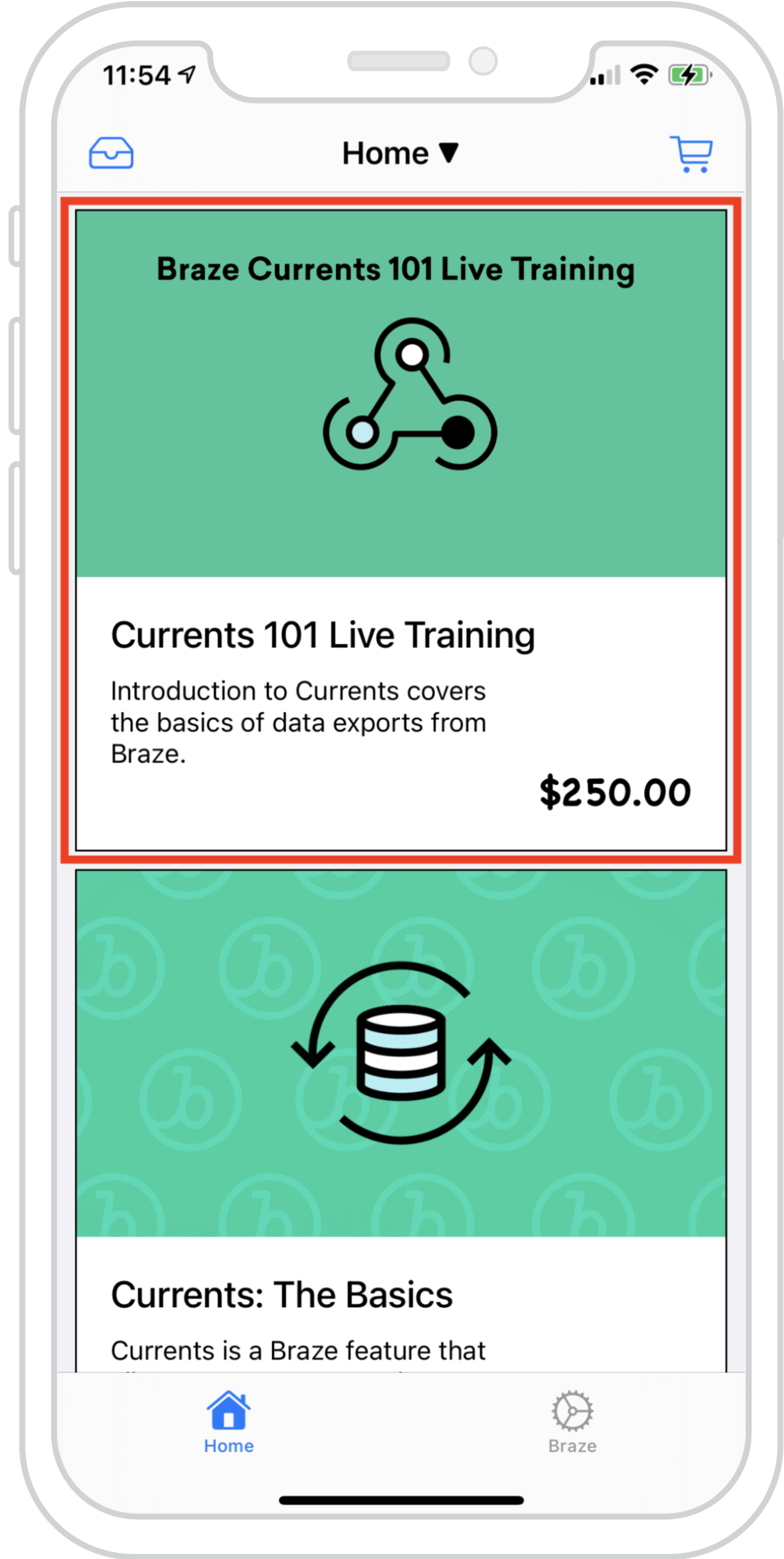
콘텐츠 카드를 기존 피드에 원활하게 혼합하여 여러 피드의 데이터를 동시에 로드할 수 있습니다. 이렇게 하면 Braze 콘텐츠 카드와 기존 피드 콘텐츠가 일관된 조화로운 환경을 만들 수 있습니다.
오른쪽 예제는 로컬 데이터와 Braze에서 제공하는 콘텐츠 카드를 통해 채워지는 하이브리드 항목 목록이 포함된 UICollectionView를 보여줍니다. 이를 통해 콘텐츠 카드를 기존 콘텐츠와 구분할 수 있습니다.
대시보드 구성
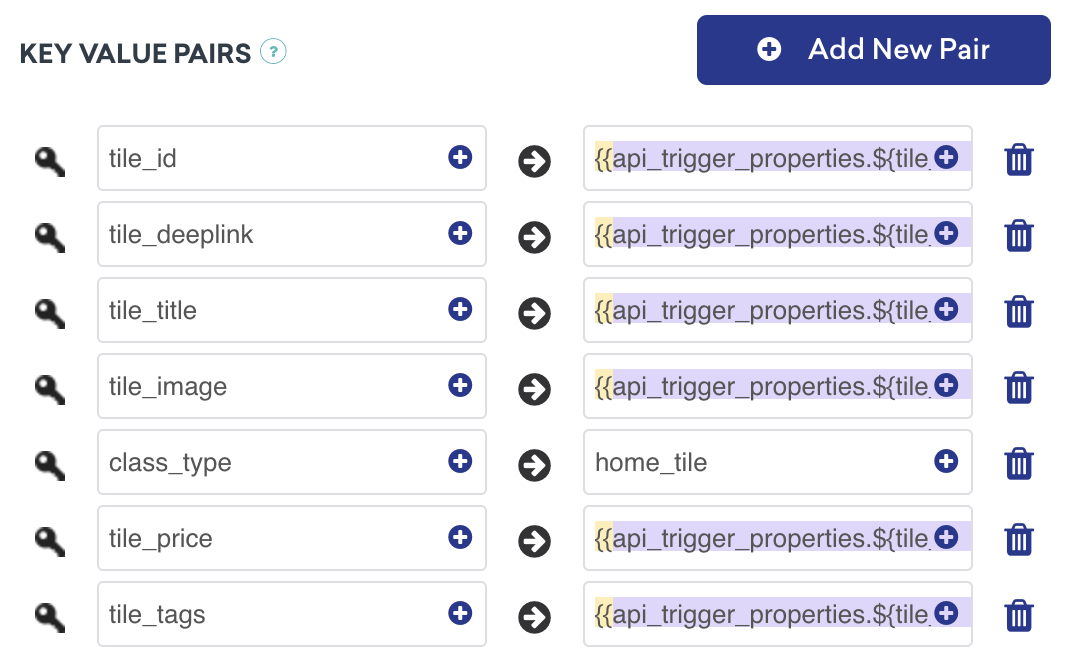
이 콘텐츠 카드는 API 트리거 키-값 페어를 사용하여 API 트리거 캠페인에 의해 전달됩니다. 이것은 카드의 값이 사용자에게 표시할 콘텐츠를 결정하기 위해 외부 요인에 따라 달라지는 캠페인에 이상적입니다. 설정 시 class_type을 알아야 합니다.
분석을 기록할 준비가 되셨습니까?
데이터 흐름의 진행 방식을 더 잘 이해하려면 다음 섹션을 참조하세요.
메시지 센터의 콘텐츠 카드
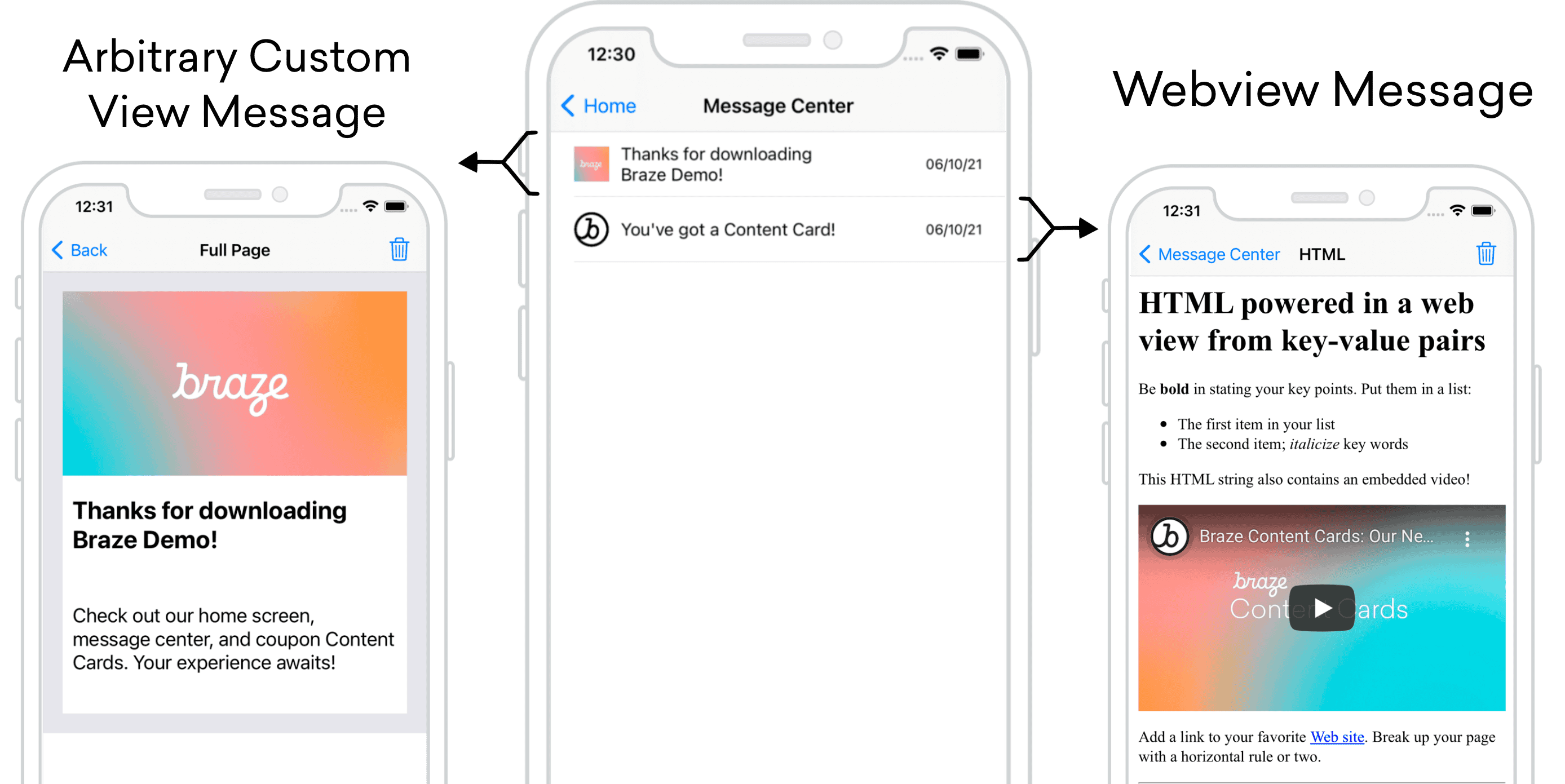
콘텐츠 카드는 각 메시지가 카드 자체인 메시지 센터 형식으로 사용할 수 있습니다. 메시지 센터의 각 메시지는 콘텐츠 카드 페이로드를 통해 채워지며, 각 카드는 클릭 시 UI/UX를 활성화하는 추가 키-값 페어를 포함합니다. 다음 예제에서 하나의 메시지는 임의의 커스텀 보기를 안내하고, 다른 하나는 커스텀 HTML을 표시하는 웹 보기로 열립니다.
대시보드 구성
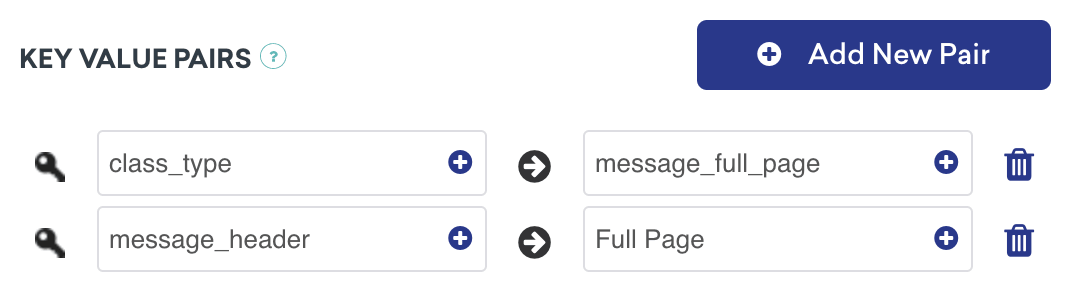
다음 메시지 유형의 경우 키-값 페어 class_type을 대시보드 구성에 추가해야 합니다. 여기에 할당된 값은 임의적이지만 클래스 유형 간에 구별할 수 있어야 합니다. 이러한 키-값 페어는 사용자가 요약된 받은편지함 메시지를 클릭할 때 이동 위치를 결정하는 경우 애플리케이션이 확인하는 키 식별자입니다.
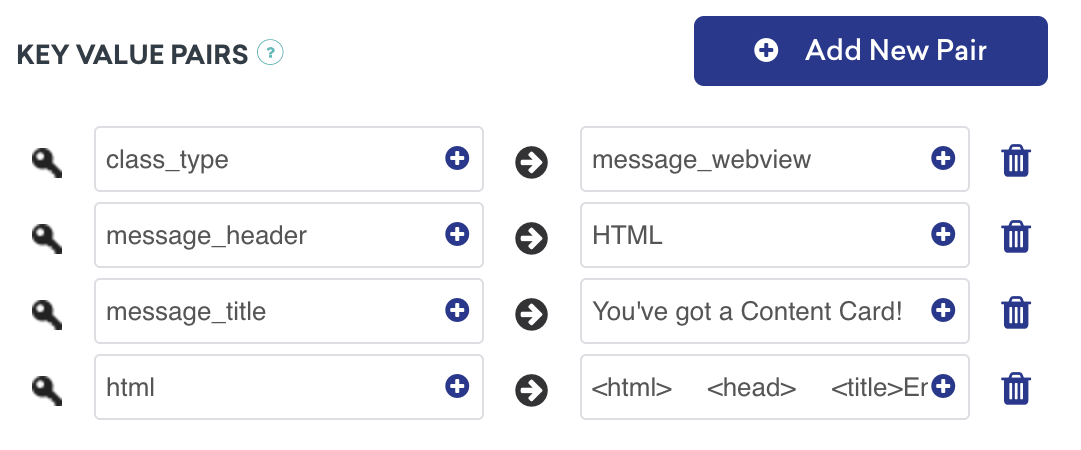
추가 설명
메시지 센터 로직은 Braze의 키-값 페어에서 제공하는 contentCardClassType에 의해 구동됩니다. addContentCardToView 메서드를 사용하면 이러한 클래스 유형을 필터링하고 식별할 수 있습니다.
클릭 시 동작에 class_type 사용
메시지가 클릭되면 ContentCardClassType에서 다음 화면을 채우는 방법을 처리합니다.
1
2
3
4
5
6
7
8
9
10
func addContentCardToView(with message: Message) {
    switch message.contentCardData?.contentCardClassType {
      case .message(.fullPage):
        loadContentCardFullPageView(with: message as! FullPageMessage)
      case .message(.webView):
        loadContentCardWebView(with: message as! WebViewMessage)
      default:
        break
    }
}
클릭 시 동작에 class_type 사용
메시지가 클릭되면 ContentCardClassType에서 다음 화면을 채우는 방법을 처리합니다.
1
2
3
4
5
6
7
8
9
10
11
12
- (void)addContentCardToView:(Message *)message {
  switch (message.contentCardData.classType) {
    case ContentCardClassTypeMessageFullPage:
      [self loadContentCardFullPageView:(FullPageMessage *)message];
      break;
    case ContentCardClassTypeMessageWebview:
      [self loadContentCardWebView:(WebViewMessage *)message];
      break;
    default:
      break;
  }
}
분석을 기록할 준비가 되셨습니까?
데이터 흐름의 진행 방식을 더 잘 이해하려면 다음 섹션을 참조하세요.
인터랙티브 콘텐츠 카드
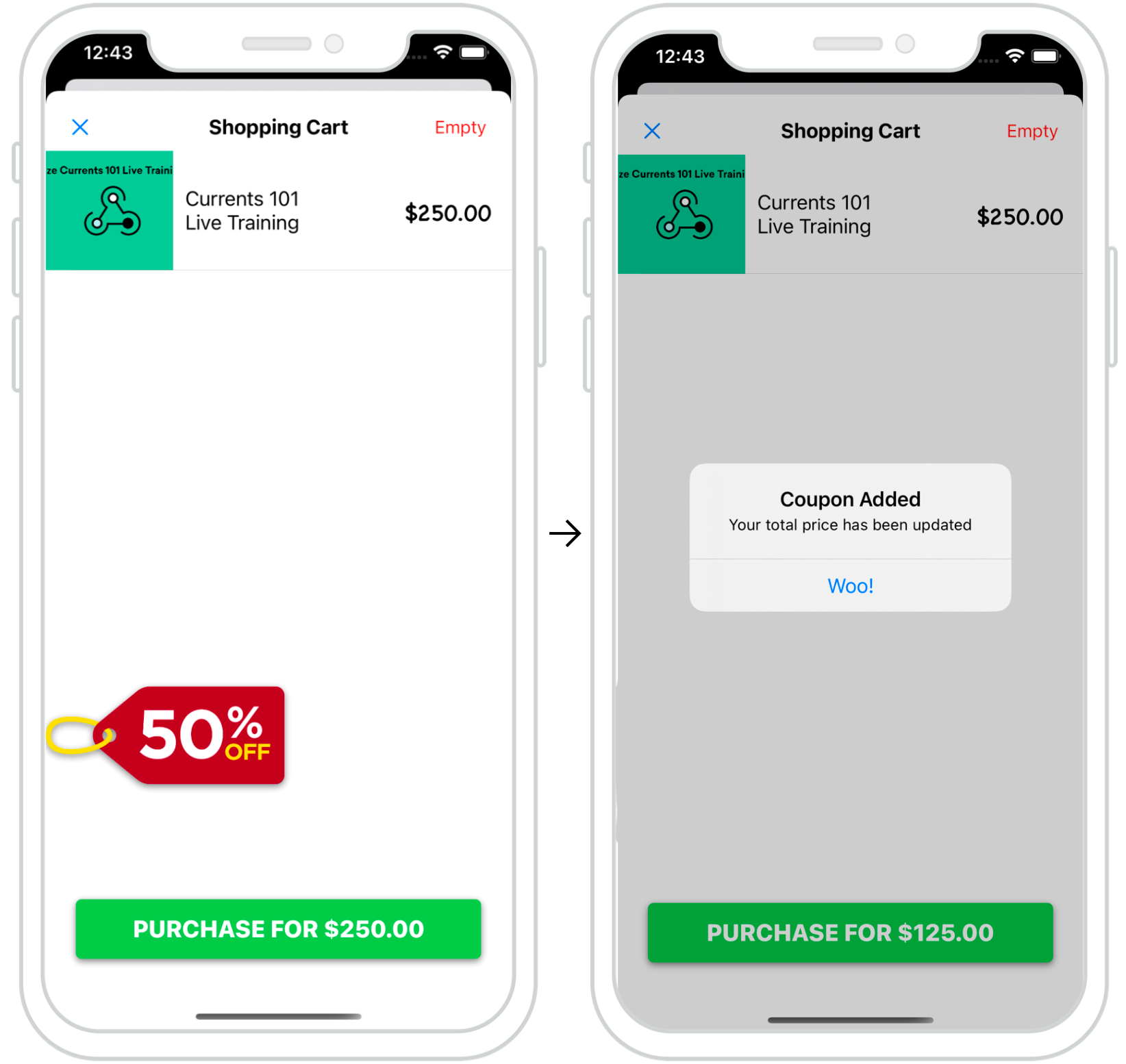
콘텐츠 카드를 활용하여 사용자를 위한 역동적이고 인터랙티브한 경험을 만들 수 있습니다. 오른쪽 예제에서는 결제 시 콘텐츠 카드 팝업이 표시되어 사용자에게 막바지 프로모션을 제공합니다.
이와 같은 카드를 잘 배치하면 특정 사용자 작업을 ‘유도’할 수 있습니다.
대시보드 구성
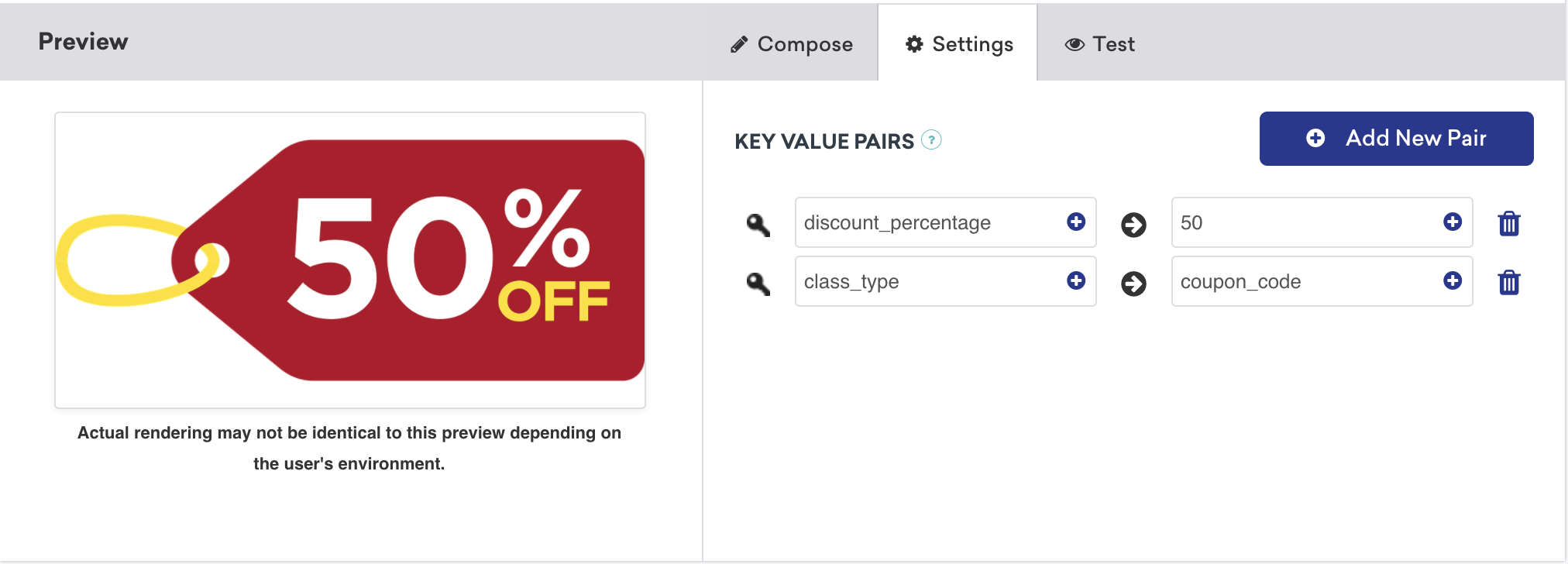
대화형 콘텐츠 카드의 대시보드 구성은 간단합니다. 이 사용 사례의 키-값 쌍에는 원하는 할인 금액으로 설정된 discount_percentage 과 coupon_code 로 설정된 class_type 이 포함됩니다. 이러한 키-값 페어에 따라 유형별 콘텐츠 카드가 필터링되고 결제 화면에 표시되는 방식이 결정됩니다.
분석을 기록할 준비가 되셨습니까?
데이터 흐름의 진행 방식을 더 잘 이해하려면 다음 섹션을 참조하세요.
다크 모드 커스터마이징
기본적으로 콘텐츠 카드 보기는 테마 색상 집합을 통해 기기의 다크 모드 변경에 자동으로 대응합니다.
이 동작은 당사의 커스텀 스타일 가이드에 자세히 설명된 대로 재정의할 수 있습니다.
노출 횟수, 클릭, 해제 기록
커스텀 오브젝트를 콘텐츠 카드로 작동하도록 확장한 후에는 노출 횟수, 클릭, 해제와 같은 중요한 측정기준을 빠르게 기록할 수 있습니다. Braze SDK에 의해 기록할 헬퍼 파일에 데이터를 참조 및 제공하는 ContentCardable 프로토콜을 사용하여 수행할 수 있습니다.
구현 구성 요소
로그 분석
로깅 메서드는 ContentCardable 프로토콜을 준수하는 객체에서 직접 호출할 수 있습니다.
1
2
3
customObject.logContentCardImpression()
customObject.logContentCardClicked()
customObject.logContentCardDismissed()
ABKContentCard 검색
커스텀 오브젝트에서 전달된 idString은 분석을 기록하기 위해 관련된 콘텐츠 카드를 식별하는 데 사용됩니다.
1
2
3
4
5
6
7
8
9
10
11
extension BrazeManager {
  func logContentCardImpression(idString: String?) {
    guard let contentCard = getContentCard(forString: idString) else { return }

    contentCard.logContentCardImpression()
  }

  private func getContentCard(forString idString: String?) -> ABKContentCard? {
    return contentCards?.first(where: { $0.idString == idString })
  }
}
로그 분석
로깅 메서드는 ContentCardable 프로토콜을 준수하는 객체에서 직접 호출할 수 있습니다.
1
2
3
[customObject logContentCardImpression];
[customObject logContentCardClicked];
[customObject logContentCardDismissed];
ABKContentCard 검색
커스텀 오브젝트에서 전달된 idString은 분석을 기록하기 위해 관련된 콘텐츠 카드를 식별하는 데 사용됩니다.
1
2
3
4
5
6
7
8
9
10
11
- (void)logContentCardImpression:(NSString *)idString {
  ABKContentCard *contentCard = [self getContentCard:idString];
  [contentCard logContentCardImpression];
}

- (ABKContentCard *)getContentCard:(NSString *)idString {
  NSPredicate *predicate = [NSPredicate predicateWithFormat:@"self.idString == %@", idString];
  NSArray *filteredArray = [self.contentCards filteredArrayUsingPredicate:predicate];

  return filteredArray.firstObject;
}
제어 배리언트 콘텐츠 카드의 경우 커스텀 오브젝트는 여전히 인스턴스화되어야 하며 UI 로직은 오브젝트의 해당 보기를 숨김으로 설정해야 합니다. 그런 다음, 오브젝트는 사용자가 제어 카드를 보았을 때를 분석 팀에 알릴 노출 횟수를 기록할 수 있습니다.
도우미 파일
ContentCardKey helper file
1
2
3
4
5
6
7
8
enum ContentCardKey: String {
  case idString
  case created
  case classType = "class_type"
  case dismissible
  case extras
  ...
}
1
2
3
4
5
6
static NSString *const ContentCardKeyIdString = @"idString";
static NSString *const ContentCardKeyCreated = @"created";
static NSString *const ContentCardKeyClassType = @"class_type";
static NSString *const ContentCardKeyDismissible = @"dismissible";
static NSString *const ContentCardKeyExtras = @"extras";
...
 GitHub 에서 이 페이지를 편집합니다.