Esta página foi traduzida automaticamente e pode conter imprecisões. Para relatar um erro de tradução,
abra um issue no GitHub.
Criação de Feature Flags
Os Feature Flags permitem ativar ou desativar remotamente a funcionalidade para uma seleção de usuários. Crie um novo Feature Flag no dashboard da Braze. Forneça um nome e um ID, um público-alvo e uma porcentagem de usuários para os quais ativar esse recurso. Em seguida, usando o mesmo ID no código do seu app ou site, você pode executar condicionalmente determinadas partes da sua lógica de negócios. Para saber mais sobre os Feature Flags e como você pode usá-los na Braze, consulte Sobre os Feature Flags.
Pré-requisitos
Versão do SDK
Para usar os Feature Flags, confira se os seus SDKs estão atualizados com pelo menos essas versões mínimas:
Permissões da Braze
Para gerenciar os Feature Flags no dashboard, você precisará ser um administrador ou ter as seguintes permissões:
| Permissão |
O que você pode fazer |
| Gerenciar Feature Flags |
Visualizar, criar e editar Feature Flags. |
| Campanhas de acesso, Canvas, cartões, Feature Flags, segmentos, biblioteca de mídia |
Visualizar a lista de Feature Flags disponíveis. |
Criação de um Feature Flag
Etapa 1: Criar um novo Feature Flag
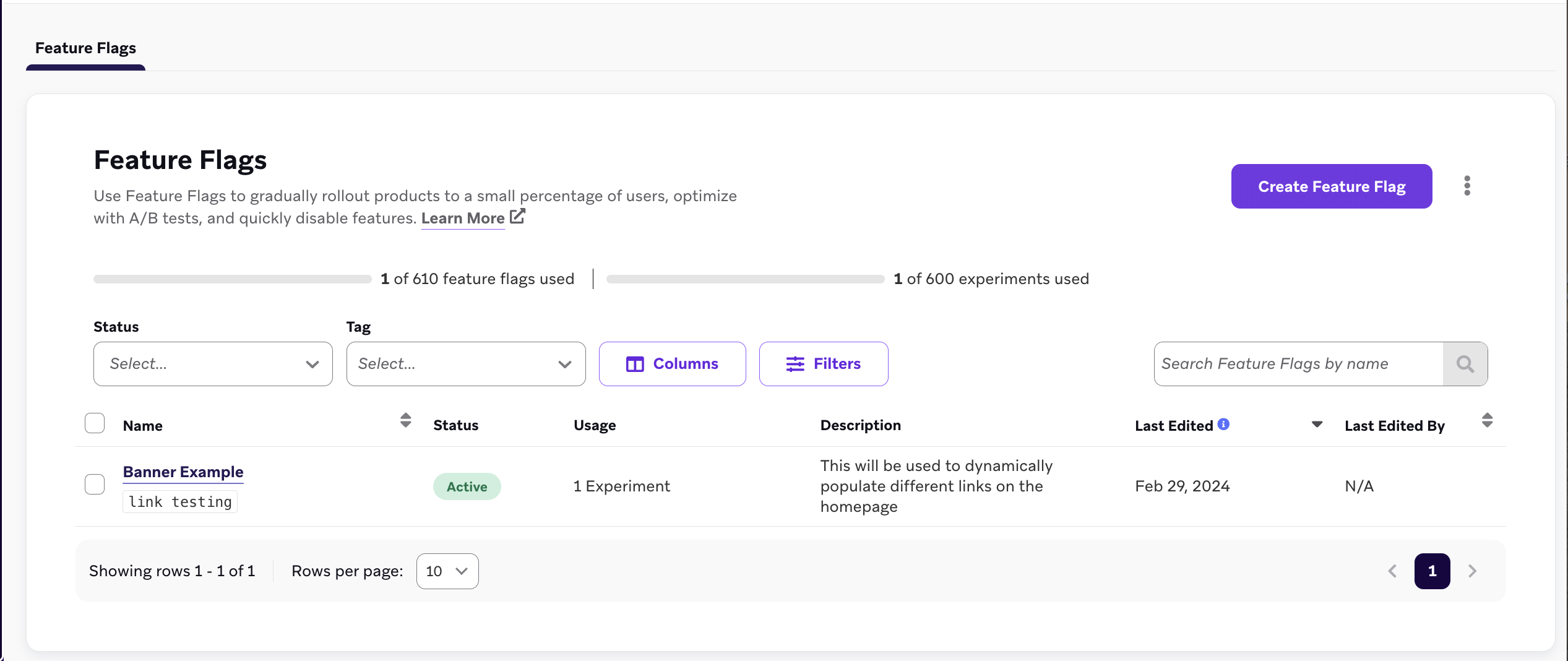
Acesse Envio de mensagens > Feature Flags e selecione Criar Feature Flag.
Etapa 2: Preencha os detalhes
Em Detalhes do Feature Flag, insira um nome, ID e descrição para seu Feature Flag.
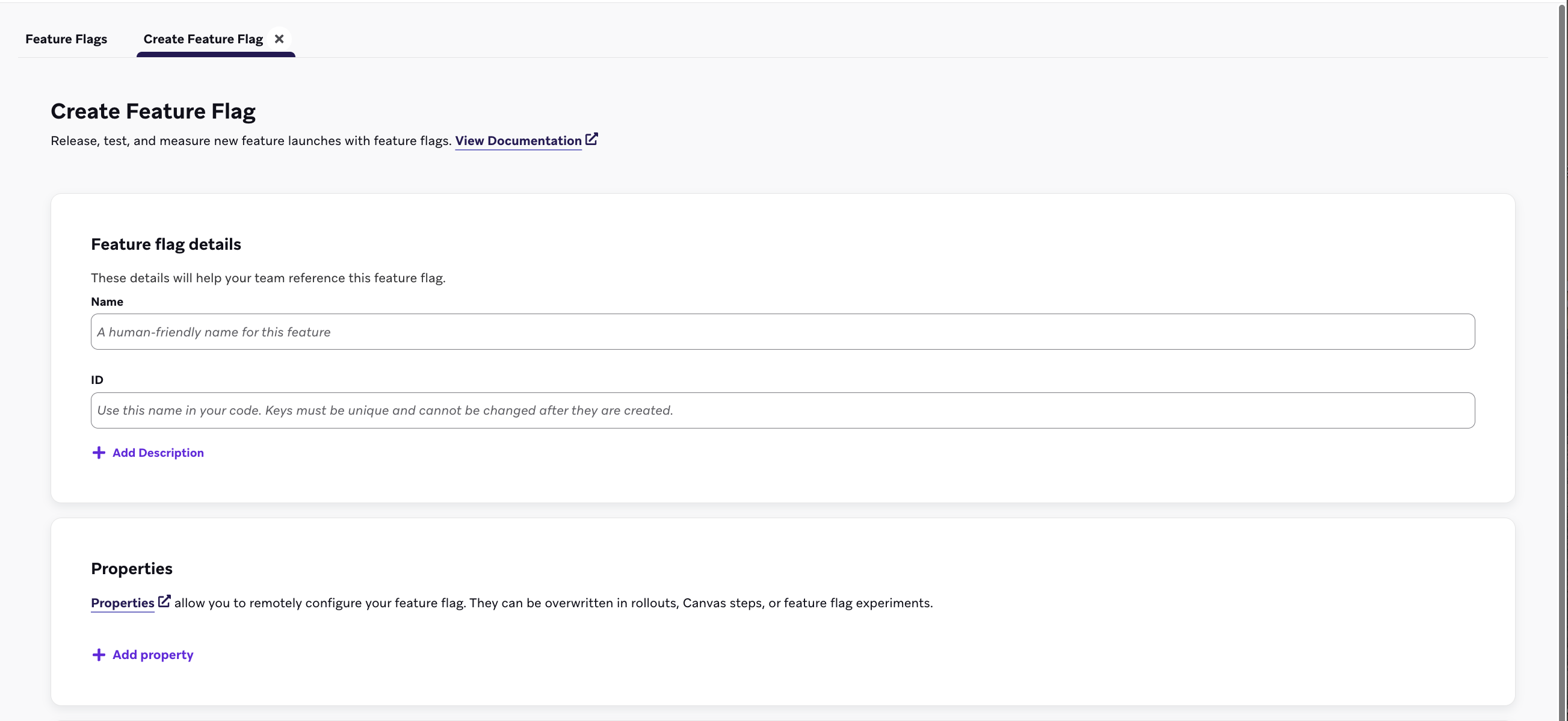
| Campo |
Descrição |
| Nome |
Um título legível para seus profissionais de marketing e administradores. |
| ID |
O ID exclusivo que você usará em seu código para verificar se esse recurso está ativado para um usuário. Esse ID não pode ser alterado posteriormente, portanto, revise as práticas recomendadas de nomenclatura de ID antes de continuar. |
| Descrição |
Uma descrição opcional que fornece algum contexto sobre seu Feature Flag. |
| Propriedades |
Propriedades opcionais que configuram remotamente seu Feature Flag. Elas podem ser sobrescritas em etapas do canva ou em experimentos de Feature Flag. |
Etapa 2a: Criar propriedades personalizadas
Em Propriedades, você pode opcionalmente criar propriedades personalizadas que seu app pode acessar por meio do SDK da Braze quando seu recurso estiver ativado. Você pode atribuir um valor de string, booleano, imagem, timestamp, JSON ou número a cada variável, além de definir um valor padrão.
No exemplo a seguir, o Feature Flag mostra um banner de produto esgotado para uma loja de eCommerce usando as propriedades personalizadas listadas:
| Nome da propriedade |
Tipo |
Valor |
banner_height |
number |
75 |
banner_color |
string |
blue |
banner_text |
string |
Widgets are out of stock until July 1. |
dismissible |
boolean |
false |
homepage_icon |
image |
http://s3.amazonaws.com/[bucket_name]/ |
account_start |
timestamp |
2011-01-01T12:00:00Z |
footer_settings |
JSON |
{ "colors": [ "red", "blue", "green" ], "placement": 123 } |
Dica:
Não há limite para o número de propriedades que você pode adicionar. No entanto, as propriedades de um Feature Flag são limitadas a um total de 10 KB. Tanto os valores de propriedade quanto as chaves estão limitados a 255 caracteres de comprimento.
Etapa 4: Escolha os segmentos a serem direcionados
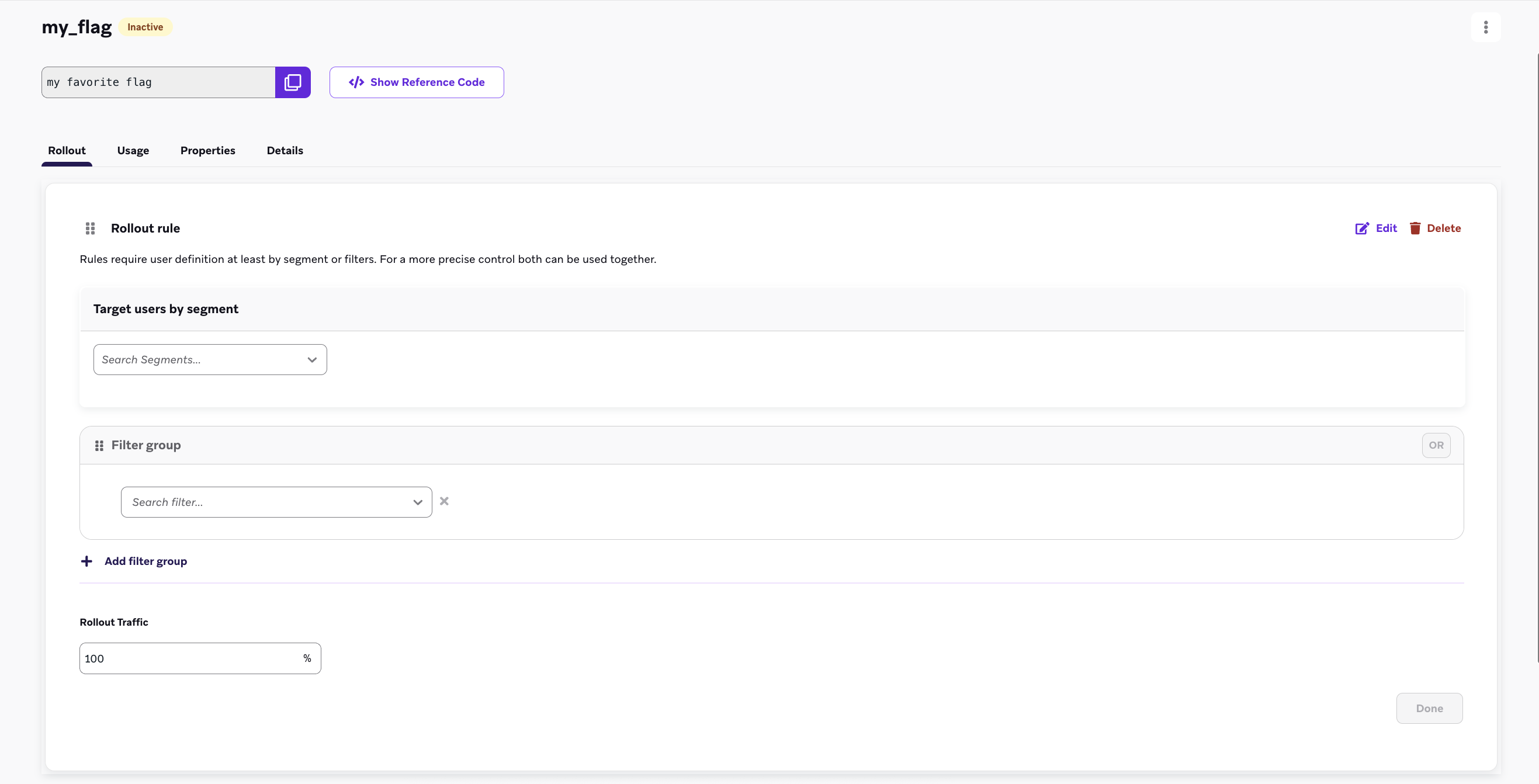
Antes de implementar um Feature Flag, é necessário escolher um segmento de usuários para direcionamento. Selecione Adicionar regra no seu flag recém-criado e depois use os menus suspensos de grupo de filtro e segmento para filtrar usuários fora do seu público-alvo. Adicione múltiplos filtros para restringir ainda mais seu público.
Etapa 5: Definir o tráfego de lançamento
Por padrão, os Feature Flags estão sempre inativos, o que permite separar a data de lançamento do seu recurso da ativação total dos usuários. Para iniciar seu lançamento, use a seção Tráfego de lançamento para inserir uma porcentagem na caixa de texto. Isso escolherá a porcentagem de usuários aleatórios no seu segmento selecionado para receber este novo recurso.
Importante:
Não defina seu tráfego de lançamento acima de 0% até que o novo recurso possa entrar em operação. Na primeira definição do seu Feature Flag no dashboard, deixe essa configuração em 0%.
Importante:
Para lançar um flag com apenas uma regra ou para um público singular, adicione sua primeira regra com critérios de segmentação e porcentagens de lançamento selecionadas. Por fim, confirme que a regra Restante do público está desativada e salve seu flag.
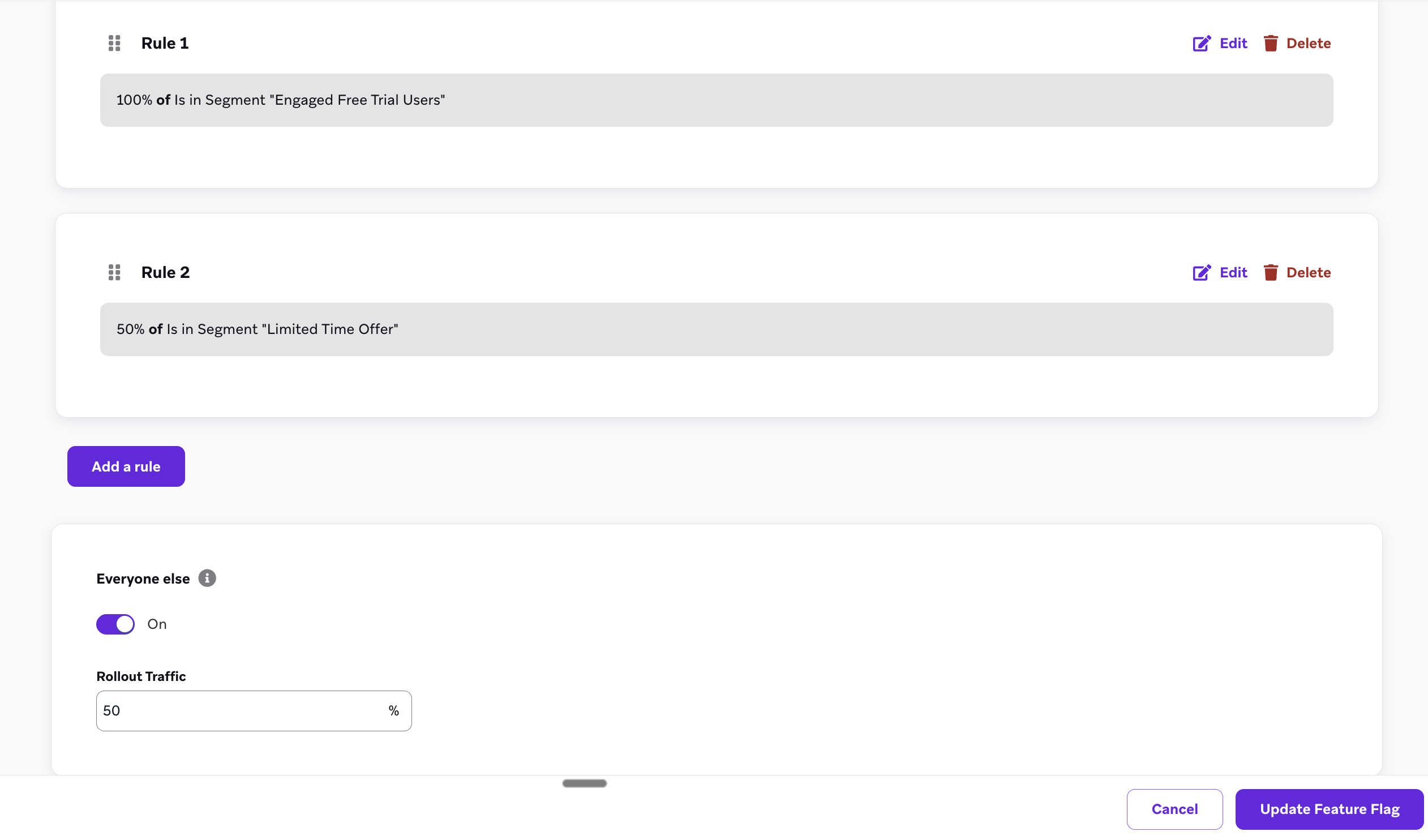
Use lançamentos de Feature Flag com múltiplas regras para definir uma sequência de regras para avaliar usuários, o que permite segmentação precisa e lançamentos controlados de recursos. Esse método é ideal para implantar o mesmo recurso para públicos diversos.
Ordem de avaliação
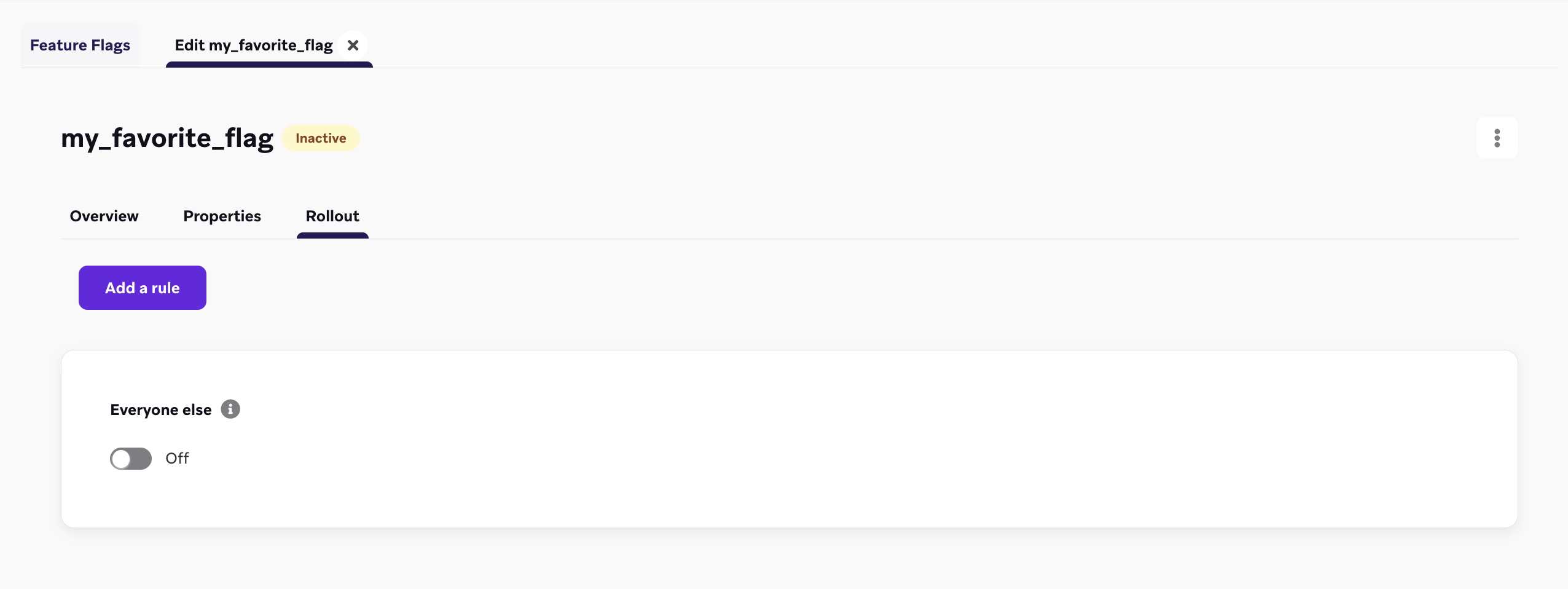
As regras de Feature Flag são avaliadas de cima para baixo, na ordem em que estão listadas. Um usuário se qualifica pela primeira regra que atende. Se um usuário não atender a nenhuma regra, sua elegibilidade é determinada pela regra padrão “Restante do público”.
Qualificação do usuário
- Se um usuário atender aos critérios da primeira regra, ele está imediatamente elegível para receber o Feature Flag.
- Se um usuário não se qualificar para a primeira regra, ele será avaliado em relação à segunda regra, e assim por diante.
A avaliação sequencial continua até que um usuário se qualifique para uma regra ou alcance a regra “Restante do público” no final da lista.
Regra “Restante do público”
A regra “Restante do público” atua como um padrão. Se um usuário não se qualificar para nenhuma das regras anteriores, sua elegibilidade para o Feature Flag será determinada pela configuração de alternância da regra “Restante do público”. Por exemplo, se a regra “Restante do público” estiver alternada para “Desligado”, no estado padrão, um usuário que não atender aos critérios de nenhuma outra regra não receberá o Feature Flag ao iniciar sua sessão.
Reordenando regras
Por padrão, as regras são ordenadas na sequência em que foram criadas, mas você pode reordená-las arrastando e soltando no dashboard.
Liberar gradualmente uma página de checkout
Vamos supor que você trabalhe para uma marca de eCommerce e tenha uma nova página de checkout que deseja lançar em diferentes regiões para garantir estabilidade. Usando Feature Flags com múltiplas regras, você pode definir o seguinte:
- Regra 1: Seu segmento dos EUA está definido para 100%.
- Regra 2: Seu segmento está definido para 50% dos seus usuários brasileiros, então nem todos recebem o fluxo ao mesmo tempo.
- Regra 3 (Restante do público): Para todos os outros usuários, ative sua regra “Restante do público” e defina-a para 15%, para que uma parte de todos os usuários possa finalizar a compra com o novo fluxo.
Alcançar os testadores internos primeiro
Vamos supor que você seja um gerente de produto que quer garantir que seus testadores internos sempre recebam o Feature Flag quando você lançar um novo produto. Você pode adicionar seu segmento de testadores internos à sua primeira regra e defini-lo para 100%, para que seus testadores internos sejam elegíveis durante cada lançamento de recurso.
Usando o campo “enabled” para seus Feature Flags
Depois de definir seu Feature Flag, configure seu app ou site para verificar se ele está ativado para um usuário específico. Quando estiver ativado, você definirá alguma ação ou fará referência às propriedades variáveis do Feature Flag com base no seu caso de uso. O SDK da Braze fornece métodos getter para obter o status do Feature Flag e suas propriedades em seu app.
Os Feature Flags são atualizados automaticamente no início da sessão para que você possa exibir a versão mais atualizada do seu recurso no lançamento. O SDK armazena esses valores em cache para que possam ser usados off-line.
Digamos que você esteja implementando um novo tipo de perfil de usuário para o seu app. Você pode definir o ID como expanded_user_profile. Em seguida, o app verificaria se deve exibir esse novo perfil de usuário para um usuário específico. Por exemplo:
1
2
3
4
5
6
| const featureFlag = braze.getFeatureFlag("expanded_user_profile");
if (featureFlag?.enabled) {
console.log(`expanded_user_profile is enabled`);
} else {
console.log(`expanded_user_profile is not enabled`);
}
|
1
2
3
4
5
6
| let featureFlag = braze.featureFlags.featureFlag(id: "expanded_user_profile")
if featureFlag?.enabled == true {
print("expanded_user_profile is enabled")
} else {
print("expanded_user_profile is not enabled")
}
|
1
2
3
4
5
6
| FeatureFlag featureFlag = braze.getFeatureFlag("expanded_user_profile");
if (featureFlag != null && featureFlag.getEnabled()) {
Log.i(TAG, "expanded_user_profile is enabled");
} else {
Log.i(TAG, "expanded_user_profile is not enabled");
}
|
1
2
3
4
5
6
| val featureFlag = braze.getFeatureFlag("expanded_user_profile")
if (featureFlag?.enabled == true) {
Log.i(TAG, "expanded_user_profile is enabled.")
} else {
Log.i(TAG, "expanded_user_profile is not enabled.")
}
|
1
2
3
4
5
6
| const featureFlag = await Braze.getFeatureFlag("expanded_user_profile");
if (featureFlag?.enabled) {
console.log(`expanded_user_profile is enabled`);
} else {
console.log(`expanded_user_profile is not enabled`);
}
|
1
2
3
4
5
6
| var featureFlag = Appboy.AppboyBinding.GetFeatureFlag("expanded_user_profile");
if (featureFlag != null && featureFlag.Enabled) {
Console.WriteLine("expanded_user_profile is enabled");
} else {
Console.WriteLine("expanded_user_profile is not enabled");
}
|
1
2
3
4
5
6
| const featureFlag = await BrazePlugin.getFeatureFlag("expanded_user_profile");
if (featureFlag?.enabled) {
console.log(`expanded_user_profile is enabled`);
} else {
console.log(`expanded_user_profile is not enabled`);
}
|
1
2
3
4
5
6
| BrazeFeatureFlag? featureFlag = await braze.getFeatureFlagByID("expanded_user_profile");
if (featureFlag?.enabled == true) {
print("expanded_user_profile is enabled");
} else {
print("expanded_user_profile is not enabled");
}
|
1
2
3
4
5
6
| featureFlag = m.braze.getFeatureFlag("expanded_user_profile")
if featureFlag <> invalid and featureFlag.enabled
print "expanded_user_profile is enabled"
else
print "expanded_user_profile is not enabled"
end if
|
Registro da impressão de um Feature Flag
Rastreie a impressão de um Feature Flag sempre que um usuário tiver a oportunidade de interagir com seu novo recurso ou quando ele poderia ter interagido se o recurso estivesse desativado (no caso de um grupo de controle em um teste A/B). As impressões de Feature Flags são registradas apenas uma vez por sessão.
Normalmente, você pode colocar essa linha de código diretamente abaixo de onde faz referência ao Feature Flag em seu app:
1
| braze.logFeatureFlagImpression("expanded_user_profile");
|
1
| braze.featureFlags.logFeatureFlagImpression(id: "expanded_user_profile")
|
1
| braze.logFeatureFlagImpression("expanded_user_profile");
|
1
| braze.logFeatureFlagImpression("expanded_user_profile")
|
1
| Braze.logFeatureFlagImpression("expanded_user_profile");
|
1
| Appboy.AppboyBinding.LogFeatureFlagImpression("expanded_user_profile");
|
1
| BrazePlugin.logFeatureFlagImpression("expanded_user_profile");
|
1
| braze.logFeatureFlagImpression("expanded_user_profile");
|
1
| m.Braze.logFeatureFlagImpression("expanded_user_profile");
|
Acesso a propriedades
Para acessar as propriedades de um Feature Flag, use um dos seguintes métodos, dependendo do tipo que você definiu no dashboard.
Se não houver tal propriedade do tipo correspondente para a chave que você forneceu, esses métodos retornarão null.
1
2
3
4
5
6
7
8
9
10
11
12
13
14
15
16
17
18
19
20
| // Returns the Feature Flag instance
const featureFlag = braze.getFeatureFlag("expanded_user_profile");
// Returns the String property
const stringProperty = featureFlag.getStringProperty("color");
// Returns the boolean property
const booleanProperty = featureFlag.getBooleanProperty("expanded");
// Returns the number property
const numberProperty = featureFlag.getNumberProperty("height");
// Returns the Unix UTC millisecond timestamp property as a number
const timestampProperty = featureFlag.getTimestampProperty("account_start");
// Returns the image property as a String of the image URL
const imageProperty = featureFlag.getImageProperty("homepage_icon");
// Returns the JSON object property as a FeatureFlagJsonPropertyValue
const jsonProperty = featureFlag.getJsonProperty("footer_settings");
|
1
2
3
4
5
6
7
8
9
10
11
12
13
14
15
16
17
18
19
20
| // Returns the Feature Flag instance
let featureFlag: FeatureFlag = braze.featureFlags.featureFlag(id: "expanded_user_profile")
// Returns the string property
let stringProperty: String? = featureFlag.stringProperty(key: "color")
// Returns the boolean property
let booleanProperty: Bool? = featureFlag.boolProperty(key: "expanded")
// Returns the number property as a double
let numberProperty: Double? = featureFlag.numberProperty(key: "height")
// Returns the Unix UTC millisecond timestamp property as an integer
let timestampProperty: Int? = featureFlag.timestampProperty(key: "account_start")
// Returns the image property as a String of the image URL
let imageProperty: String? = featureFlag.imageProperty(key: "homepage_icon")
// Returns the JSON object property as a [String: Any] dictionary
let jsonObjectProperty: [String: Any]? = featureFlag.jsonObjectProperty(key: "footer_settings")
|
1
2
3
4
5
6
7
8
9
10
11
12
13
14
15
16
17
18
19
20
| // Returns the Feature Flag instance
FeatureFlag featureFlag = braze.getFeatureFlag("expanded_user_profile");
// Returns the String property
String stringProperty = featureFlag.getStringProperty("color");
// Returns the boolean property
Boolean booleanProperty = featureFlag.getBooleanProperty("expanded");
// Returns the number property
Number numberProperty = featureFlag.getNumberProperty("height");
// Returns the Unix UTC millisecond timestamp property as a long
Long timestampProperty = featureFlag.getTimestampProperty("account_start");
// Returns the image property as a String of the image URL
String imageProperty = featureFlag.getImageProperty("homepage_icon");
// Returns the JSON object property as a JSONObject
JSONObject jsonObjectProperty = featureFlag.getJSONProperty("footer_settings");
|
1
2
3
4
5
6
7
8
9
10
11
12
13
14
15
16
17
18
19
20
| // Returns the Feature Flag instance
val featureFlag = braze.getFeatureFlag("expanded_user_profile")
// Returns the String property
val stringProperty: String? = featureFlag.getStringProperty("color")
// Returns the boolean property
val booleanProperty: Boolean? = featureFlag.getBooleanProperty("expanded")
// Returns the number property
val numberProperty: Number? = featureFlag.getNumberProperty("height")
// Returns the Unix UTC millisecond timestamp property as a long
val timestampProperty: Long? = featureFlag.getTimestampProperty("account_start")
// Returns the image property as a String of the image URL
val imageProperty: String? = featureFlag.getImageProperty("homepage_icon")
// Returns the JSON object property as a JSONObject
val jsonObjectProperty: JSONObject? = featureFlag.getJSONProperty("footer_settings")
|
1
2
3
4
5
6
7
8
9
10
11
12
13
14
15
16
17
| // Returns the String property
const stringProperty = await Braze.getFeatureFlagStringProperty("expanded_user_profile", "color");
// Returns the boolean property
const booleanProperty = await Braze.getFeatureFlagBooleanProperty("expanded_user_profile", "expanded");
// Returns the number property
const numberProperty = await Braze.getFeatureFlagNumberProperty("expanded_user_profile", "height");
// Returns the Unix UTC millisecond timestamp property as a number
const timestampProperty = await Braze.getFeatureFlagTimestampProperty("expanded_user_profile", "account_start");
// Returns the image property as a String of the image URL
const imageProperty = await Braze.getFeatureFlagImageProperty("expanded_user_profile", "homepage_icon");
// Returns the JSON object property as an object
const jsonObjectProperty = await Braze.getFeatureFlagJSONProperty("expanded_user_profile", "footer_settings");
|
1
2
3
4
5
6
7
8
9
10
11
12
13
14
15
16
17
18
19
20
21
22
23
| // Returns the Feature Flag instance
var featureFlag = Appboy.AppboyBinding.GetFeatureFlag("expanded_user_profile");
// Returns the String property
var stringProperty = featureFlag.GetStringProperty("color");
// Returns the boolean property
var booleanProperty = featureFlag.GetBooleanProperty("expanded");
// Returns the number property as an integer
var integerProperty = featureFlag.GetIntegerProperty("height");
// Returns the number property as a double
var doubleProperty = featureFlag.GetDoubleProperty("height");
// Returns the Unix UTC millisecond timestamp property as a long
var timestampProperty = featureFlag.GetTimestampProperty("account_start");
// Returns the image property as a String of the image URL
var imageProperty = featureFlag.GetImageProperty("homepage_icon");
// Returns the JSON object property as a JSONObject
var jsonObjectProperty = featureFlag.GetJSONProperty("footer_settings");
|
1
2
3
4
5
6
7
8
9
10
11
12
13
14
15
16
17
| // Returns the String property
const stringProperty = await BrazePlugin.getFeatureFlagStringProperty("expanded_user_profile", "color");
// Returns the boolean property
const booleanProperty = await BrazePlugin.getFeatureFlagBooleanProperty("expanded_user_profile", "expanded");
// Returns the number property
const numberProperty = await BrazePlugin.getFeatureFlagNumberProperty("expanded_user_profile", "height");
// Returns the Unix UTC millisecond timestamp property as a number
const timestampProperty = await BrazePlugin.getFeatureFlagTimestampProperty("expanded_user_profile", "account_start");
// Returns the image property as a String of the image URL
const imageProperty = await BrazePlugin.getFeatureFlagImageProperty("expanded_user_profile", "homepage_icon");
// Returns the JSON object property as an object
const jsonObjectProperty = await BrazePlugin.getFeatureFlagJSONProperty("expanded_user_profile", "footer_settings");
|
1
2
3
4
5
6
7
8
9
10
11
12
13
14
15
16
17
18
19
20
| // Returns the Feature Flag instance
BrazeFeatureFlag featureFlag = await braze.getFeatureFlagByID("expanded_user_profile");
// Returns the String property
var stringProperty = featureFlag.getStringProperty("color");
// Returns the boolean property
var booleanProperty = featureFlag.getBooleanProperty("expanded");
// Returns the number property
var numberProperty = featureFlag.getNumberProperty("height");
// Returns the Unix UTC millisecond timestamp property as an integer
var timestampProperty = featureFlag.getTimestampProperty("account_start");
// Returns the image property as a String of the image URL
var imageProperty = featureFlag.getImageProperty("homepage_icon");
// Returns the JSON object property as a Map<String, dynamic> collection
var jsonObjectProperty = featureFlag.getJSONProperty("footer_settings");
|
1
2
3
4
5
6
7
8
9
10
11
12
13
14
15
16
17
| ' Returns the String property
color = featureFlag.getStringProperty("color")
' Returns the boolean property
expanded = featureFlag.getBooleanProperty("expanded")
' Returns the number property
height = featureFlag.getNumberProperty("height")
' Returns the Unix UTC millisecond timestamp property
account_start = featureFlag.getTimestampProperty("account_start")
' Returns the image property as a String of the image URL
homepage_icon = featureFlag.getImageProperty("homepage_icon")
' Returns the JSON object property
footer_settings = featureFlag.getJSONProperty("footer_settings")
|
Obter uma lista de todos os Feature Flags
1
2
3
4
| const features = getAllFeatureFlags();
for(const feature of features) {
console.log(`Feature: ${feature.id}`, feature.enabled);
}
|
1
2
3
4
| let features = braze.featureFlags.featureFlags
for let feature in features {
print("Feature: \(feature.id)", feature.enabled)
}
|
1
2
3
4
| List<FeatureFlag> features = braze.getAllFeatureFlags();
for (FeatureFlag feature: features) {
Log.i(TAG, "Feature: ", feature.getId(), feature.getEnabled());
}
|
1
2
3
4
| val featureFlags = braze.getAllFeatureFlags()
featureFlags.forEach { feature ->
Log.i(TAG, "Feature: ${feature.id} ${feature.enabled}")
}
|
1
2
3
4
| const features = await Braze.getAllFeatureFlags();
for(const feature of features) {
console.log(`Feature: ${feature.id}`, feature.enabled);
}
|
1
2
3
4
| List<FeatureFlag> features = Appboy.AppboyBinding.GetAllFeatureFlags();
foreach (FeatureFlag feature in features) {
Console.WriteLine("Feature: {0} - enabled: {1}", feature.ID, feature.Enabled);
}
|
1
2
3
4
| const features = await BrazePlugin.getAllFeatureFlags();
for(const feature of features) {
console.log(`Feature: ${feature.id}`, feature.enabled);
}
|
1
2
3
4
| List<BrazeFeatureFlag> featureFlags = await braze.getAllFeatureFlags();
featureFlags.forEach((feature) {
print("Feature: ${feature.id} ${feature.enabled}");
});
|
1
2
3
4
| features = m.braze.getAllFeatureFlags()
for each feature in features
print "Feature: " + feature.id + " enabled: " + feature.enabled.toStr()
end for
|
Atualizar os Feature Flags
É possível atualizar os Feature Flags do usuário atual no meio da sessão para obter os valores mais recentes da Braze.
Dica:
A atualização ocorre automaticamente no início da sessão. A atualização só é necessária antes de ações importantes do usuário, como antes de carregar uma página de checkout, ou se você souber que um Feature Flag será referenciado.
1
2
3
4
5
| braze.refreshFeatureFlags(() => {
console.log(`Feature flags have been refreshed.`);
}, () => {
console.log(`Failed to refresh feature flags.`);
});
|
1
2
3
4
5
6
7
8
| braze.featureFlags.requestRefresh { result in
switch result {
case .success(let features):
print("Feature flags have been refreshed:", features)
case .failure(let error):
print("Failed to refresh feature flags:", error)
}
}
|
1
| braze.refreshFeatureFlags();
|
1
| braze.refreshFeatureFlags()
|
1
| Braze.refreshFeatureFlags();
|
1
| Appboy.AppboyBinding.RefreshFeatureFlags();
|
1
| BrazePlugin.refreshFeatureFlags();
|
1
| braze.refreshFeatureFlags();
|
1
| m.Braze.refreshFeatureFlags()
|
Ouvindo as mudanças
Você pode configurar o SDK da Braze para ouvir e atualizar seu app quando o SDK atualizar qualquer Feature Flag.
Isso é útil se você quiser atualizar seu app quando um usuário não for mais elegível para um recurso. Por exemplo, definir algum estado em seu app com base no fato de um recurso estar ou não ativado ou em um de seus valores de propriedade.
1
2
3
4
5
6
| // Register an event listener
const subscriptionId = braze.subscribeToFeatureFlagsUpdates((features) => {
console.log(`Features were updated`, features);
});
// Unregister this event listener
braze.removeSubscription(subscriptionId);
|
1
2
3
4
5
6
7
| // Create the feature flags subscription
// - You must keep a strong reference to the subscription to keep it active
let subscription = braze.featureFlags.subscribeToUpdates { features in
print("Feature flags were updated:", features)
}
// Cancel the subscription
subscription.cancel()
|
1
2
3
4
5
6
| braze.subscribeToFeatureFlagsUpdates(event -> {
Log.i(TAG, "Feature flags were updated.");
for (FeatureFlag feature: event.getFeatureFlags()) {
Log.i(TAG, "Feature: ", feature.getId(), feature.getEnabled());
}
});
|
1
2
3
4
5
6
| braze.subscribeToFeatureFlagsUpdates() { event ->
Log.i(TAG, "Feature flags were updated.")
event.featureFlags.forEach { feature ->
Log.i(TAG, "Feature: ${feature.id}")
}
}
|
1
2
3
4
| // Register an event listener
Braze.addListener(braze.Events.FEATURE_FLAGS_UPDATED, (featureFlags) => {
console.log(`featureFlagUpdates`, JSON.stringify(featureFlags));
});
|
Para ouvir as alterações, defina os valores de Game Object Name e Callback Method Name em Braze Configuration > Feature Flags para os valores correspondentes em seu aplicativo.
1
2
3
4
| // Register an event listener
BrazePlugin.subscribeToFeatureFlagUpdates((featureFlags) => {
console.log(`featureFlagUpdates`, JSON.stringify(featureFlags));
});
|
No código Dart em seu app, use o seguinte código de exemplo:
1
2
3
4
5
6
7
8
9
| // Create stream subscription
StreamSubscription featureFlagsStreamSubscription;
featureFlagsStreamSubscription = braze.subscribeToFeatureFlags((featureFlags) {
print("Feature flags were updated");
});
// Cancel stream subscription
featureFlagsStreamSubscription.cancel();
|
Os dados de Feature Flags são encaminhados automaticamente a partir das camadas nativas Android e iOS. Nenhuma configuração adicional é necessária.
Se você estiver usando o Flutter SDK 17.1.0 ou anterior, o encaminhamento de dados de Feature Flags a partir da camada nativa iOS requer configuração manual. Seu aplicativo provavelmente contém um retorno de chamada featureFlags.subscribeToUpdates que chama BrazePlugin.processFeatureFlags(featureFlags). Para migrar para o Flutter SDK 18.0.0, remova a chamada BrazePlugin.processFeatureFlags(_:) — o encaminhamento de dados agora é feito automaticamente.
Para ver um exemplo, consulte AppDelegate.swift no aplicativo de exemplo do SDK Flutter da Braze.
1
2
| ' Define a function called `onFeatureFlagChanges` to be called when feature flags are refreshed
m.BrazeTask.ObserveField("BrazeFeatureFlags", "onFeatureFlagChanges")
|
1
2
3
4
5
6
7
8
9
10
11
12
13
14
15
16
17
18
19
20
21
22
23
24
| import { useEffect, useState } from "react";
import {
FeatureFlag,
getFeatureFlag,
removeSubscription,
subscribeToFeatureFlagsUpdates,
} from "@braze/web-sdk";
export const useFeatureFlag = (id: string): FeatureFlag => {
const [featureFlag, setFeatureFlag] = useState<FeatureFlag>(
getFeatureFlag(id)
);
useEffect(() => {
const listener = subscribeToFeatureFlagsUpdates(() => {
setFeatureFlag(getFeatureFlag(id));
});
return () => {
removeSubscription(listener);
};
}, [id]);
return featureFlag;
};
|
Verificando a elegibilidade do usuário
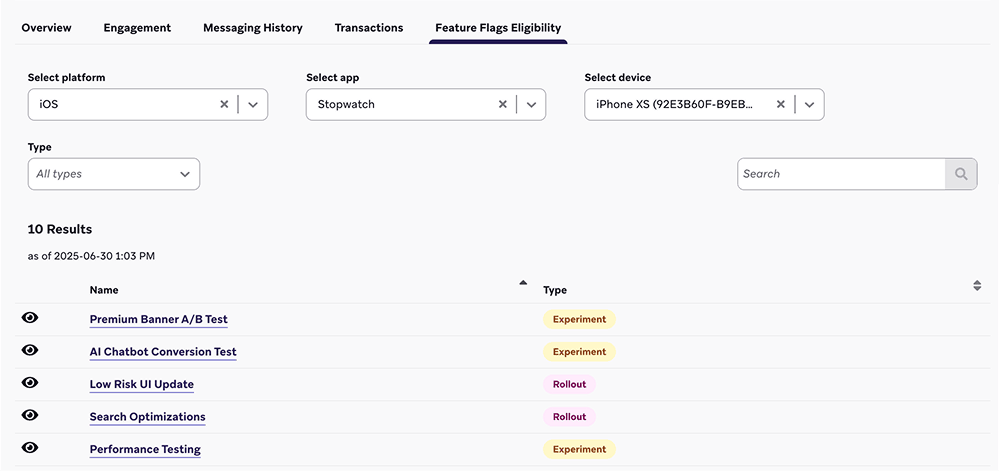
Para verificar para quais Feature Flags um usuário é elegível na Braze, acesse Público > Pesquisar Usuários e pesquise e selecione um usuário.
Na guia Elegibilidade dos Feature Flags, você pode filtrar a lista de Feature Flags elegíveis por plataforma, aplicativo ou dispositivo. Você também pode visualizar a carga útil que será retornada ao usuário selecionando ao lado de um Feature Flag.
Exibir o changelog
Para visualizar o changelog de um Feature Flag, abra um Feature Flag e selecione Changelog.

Aqui, você pode revisar quando uma mudança aconteceu, quem fez a mudança, a qual categoria pertence e mais.

Segmentação com Feature Flags
A Braze mantém automaticamente o rastreamento de quais usuários estão atualmente ativados para um Feature Flag. Você pode criar um segmento ou direcionar o envio de mensagens usando o filtro Feature Flag. Para saber mais sobre filtragem em segmentos, consulte Criação de um segmento.

Nota:
Para evitar segmentos recursivos, não é possível criar um segmento que faça referência a outros Feature Flags.
Práticas recomendadas
Para evitar que os usuários sejam ativados e desativados por diferentes pontos de entrada, defina o controle deslizante de lançamento como um valor maior que zero OU ative o Feature Flag em um Canvas ou experimento. Como prática recomendada, se você planeja usar um Feature Flag em um Canvas ou experimento, mantenha a porcentagem de lançamento em zero.
Convenções de nomenclatura
Para manter seu código claro e consistente, considere usar o seguinte formato ao nomear o ID do Feature Flag:
1
| BEHAVIOR_PRODUCT_FEATURE
|
Substitua o seguinte:
| Espaço reservado |
Descrição |
BEHAVIOR |
O comportamento do recurso. Em seu código, certifique-se de que o comportamento esteja desativado por padrão e evite usar frases como disabled no nome do Feature Flag. |
PRODUCT |
O produto ao qual o recurso pertence. |
FEATURE |
O nome do recurso. |
Veja um exemplo de Feature Flag em que show é o comportamento, animation_profile é o produto e driver é o recurso:
1
| show_animation_profile_driver
|
Planejamento antecipado
Sempre jogue pelo seguro. Ao considerar novos recursos que podem exigir um botão de desativação, é melhor lançar um novo código com um Feature Flag e não precisar dele do que perceber que é necessária uma nova atualização do app.
Seja descritivo
Adicione uma descrição ao seu Feature Flag. Embora esse seja um campo opcional na Braze, ele pode ajudar a responder a perguntas que outras pessoas possam ter ao pesquisar os Feature Flags disponíveis.
- Informações de contato de quem é responsável pela capacitação e pelo comportamento desse flag
- Quando esse flag deve ser desativado
- Links para documentação ou notas sobre o novo recurso que esse flag controla
- Quaisquer dependências ou notas sobre como usar o recurso
Limpeza de Feature Flags antigos
É muito comum deixarmos recursos 100% implementados por mais tempo do que o necessário.
Para ajudar a manter seu código (e o dashboard da Braze) limpo, remova os Feature Flags permanentes de sua base de código depois que todos os usuários tiverem feito upgrade e você não precisar mais da opção de desativar o recurso. Isso ajuda a reduzir a complexidade de seu ambiente de desenvolvimento, mas também mantém sua lista de Feature Flags organizada.
 Editar esta página no GitHub