Google Tag Manager com o SDK da Braze
Aprenda como usar o Google Tag Manager (GTM) com o SDK da Braze, para que você possa controlar remotamente o rastreamento de eventos da Braze e as atualizações de atributos de usuário sem precisar de alterações de código ou novas versões do app.
Sobre o Google Tag Manager para Web
O Google Tag Manager (GTM) permite que você adicione, remova e edite tags remotamente em seu site sem precisar de uma liberação de código de produção ou recursos de engenharia. A Braze oferece os seguintes modelos para o Web SDK:
| Tipo de tag | Caso de uso |
|---|---|
| Tag de inicialização | Essa tag permite que você integre o Web Braze SDK sem precisar modificar o código do seu site. |
| Tag de ação | Essa tag permite que você crie Content Cards, defina atributos do usuário e gerencie a coleta de dados. |
Sequenciamento de tags para tags de ação da Braze
Eventos personalizados e outras tags de ação da Braze podem falhar quando são disparados antes que a tag Braze Initialization termine de carregar o Web SDK. No Google Tag Manager, abra a tag de ação, acesse Advanced Settings > Tag Sequencing, selecione A tag that fires before [this tag] is fired e escolha sua tag Braze Initialization.
Para mais detalhes, consulte Verificar o sequenciamento de tags para eventos personalizados.
Registrar compras com o GTM
Nas tags de ação da Braze e nas tags Custom HTML, chame braze.logPurchase() para registrar receita. O namespace legado appboy.logPurchase() não é compatível com as integrações atuais do Web SDK.
Registrando eventos personalizados com o GTM
Você pode registrar eventos personalizados usando uma tag Custom HTML no GTM. Essa abordagem usa a camada de dados do GTM para passar dados de eventos do seu site para uma tag do GTM que chama o Web SDK da Braze.
Etapa 1: Envie o evento para a camada de dados
No código do seu site, envie um evento para a camada de dados sempre que quiser disparar o evento personalizado. Por exemplo, para registrar um evento personalizado quando um botão é clicado:
1
<button onclick="dataLayer.push({'event': 'my_custom_event'});">Track Event</button>
Etapa 2: Crie um disparador no GTM
- No seu contêiner do GTM, acesse Triggers e crie um novo disparador.
- Defina o Trigger Type como Custom Event.
- Defina o Event Name com o mesmo valor que você enviou para a camada de dados (por exemplo,
my_custom_event). - Escolha quando o disparador deve ser acionado (por exemplo, All Custom Events).
Etapa 3: Crie uma tag Custom HTML
- No GTM, acesse Tags e crie uma nova tag.
- Defina o Tag Type como Custom HTML.
-
No campo HTML, adicione o seguinte:
1
2
3
 <script>
 window.braze.logCustomEvent("my_custom_event");
 </script>
- Em Triggering, selecione o disparador que você criou na etapa 2.
- Salve e publique seu contêiner.
Para incluir propriedades do evento, passe-as como segundo argumento:
1
2
3
<script>
window.braze.logCustomEvent("my_custom_event", {"property_key": "property_value"});
</script>
Política de consentimento do usuário do Google na UE

O Google está atualizando sua Política de consentimento do usuário da UE em resposta às mudanças na Lei dos Mercados Digitais (DMA), que está em vigor desde 6 de março de 2024. Essa nova alteração exige que os anunciantes divulguem determinadas informações aos seus usuários finais do EEE e do Reino Unido, bem como obtenham deles os consentimentos necessários. Consulte a documentação a seguir para saber mais.
Como parte da Política de consentimento do usuário da UE do Google, os seguintes atributos personalizados booleanos precisam ser registrados nos perfis de usuário:
$google_ad_user_data$google_ad_personalization
Se estiver configurando-os por meio da integração com o GTM, os atributos personalizados exigirão a criação de uma tag HTML personalizada. A seguir, um exemplo de como registrar esses valores como tipos de dados booleanos (não como strings):
1
2
3
<script>
window.braze.getUser().setCustomUserAttribute("$google_ad_personalization", true);
</script>
Para saber mais, consulte Audience Sync to Google.
Pré-requisitos
Antes de usar este recurso, você precisará integrar o SDK Android Braze.
Usando o Google Tag Manager para Android
No exemplo a seguir, um aplicativo de streaming de música deseja registrar diferentes eventos à medida que os usuários ouvem músicas. Usando o Google Tag Manager para Android, eles podem controlar quais dos fornecedores de terceiros da Braze recebem este evento e criar tags específicas para a Braze.
Etapa 1: Crie um disparador para eventos personalizados
Os eventos personalizados são registrados com actionType definido como logEvent. O provedor de tag personalizado da Braze neste exemplo espera que o nome do evento personalizado seja definido usando eventName.
Para começar, crie um disparador que procure um “Nome do evento” igual a played song
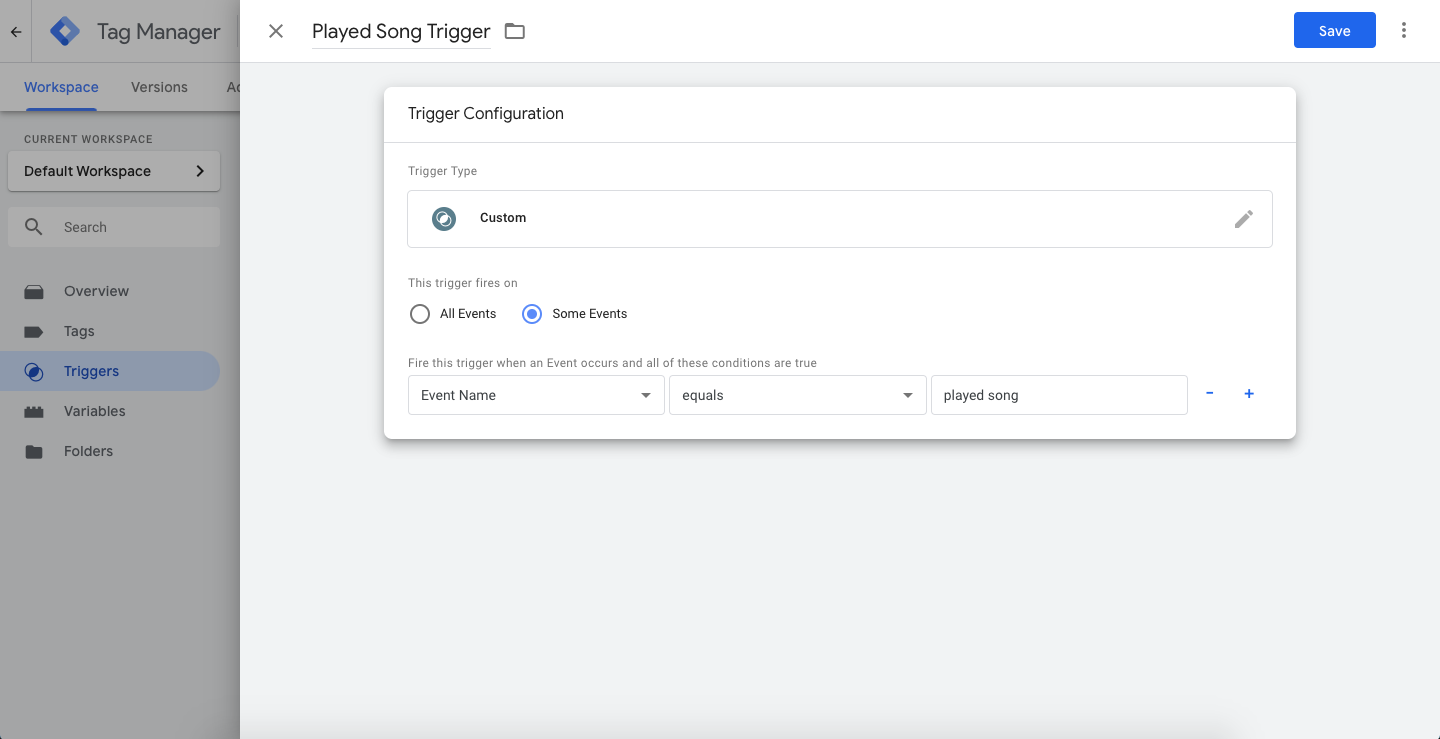
Em seguida, crie uma nova tag (também conhecida como “Chamada de Função”) e insira o caminho da classe do seu provedor de tag personalizado descrito mais adiante neste artigo. Esta tag será disparada quando você registrar o evento played song.
Nos parâmetros personalizados da tag (também conhecidos como pares chave-valor), defina eventName como played song. Este será o nome do evento personalizado registrado na Braze.
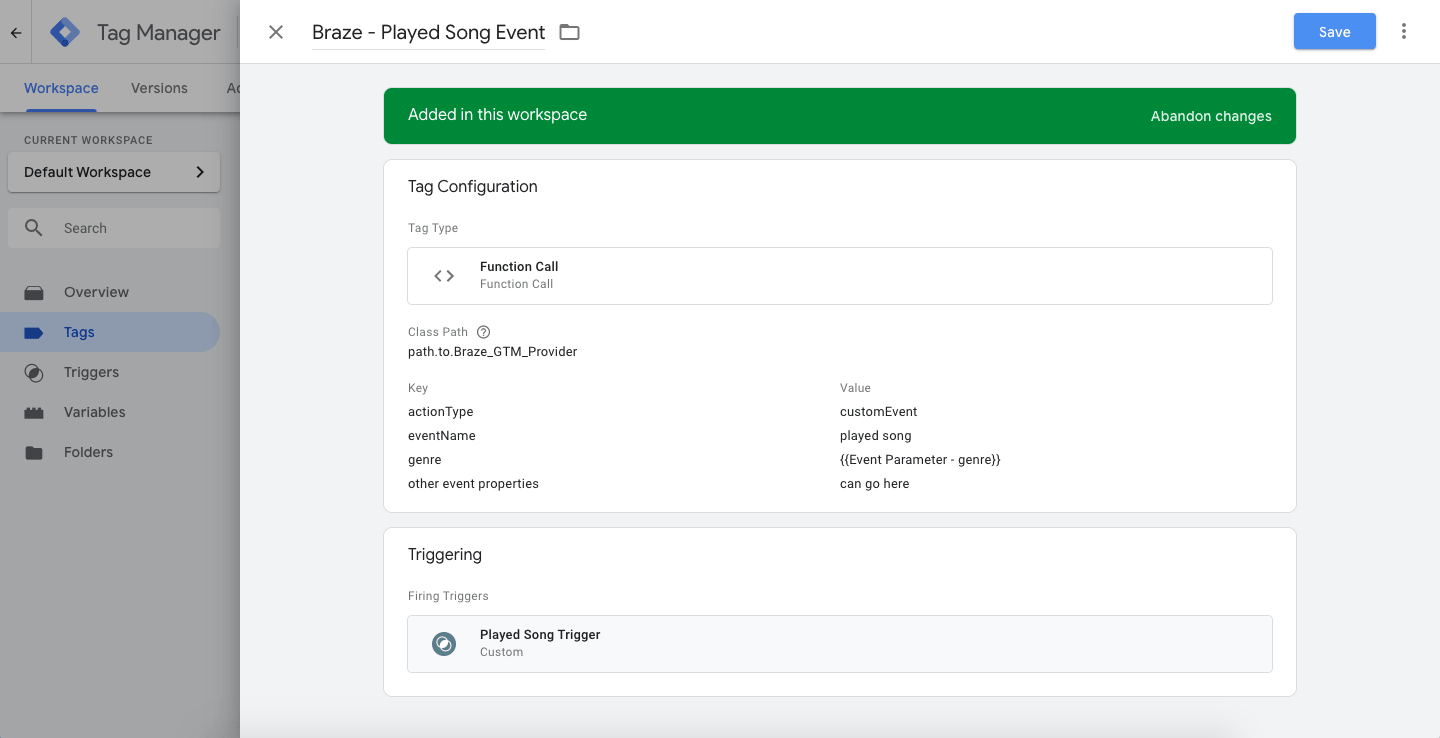
Ao enviar um evento personalizado, certifique-se de definir actionType como logEvent e defina um valor para eventName para que a Braze receba o nome do evento correto e a ação a ser tomada.
Você também pode incluir argumentos adicionais de pares de valores-chave na tag, que serão enviados como propriedades de eventos personalizados para o Braze. eventName e actionType não serão ignorados nas propriedades de eventos personalizados. No exemplo de tag a seguir, genre é passado e definido usando uma variável de tag no Google Tag Manager, que é originada do evento personalizado registrado no aplicativo.
Como o Google Tag Manager para Android usa o Firebase como a camada de dados, a propriedade do evento genre é enviada ao Google Tag Manager como uma variável “Firebase - Parâmetro de Evento”.
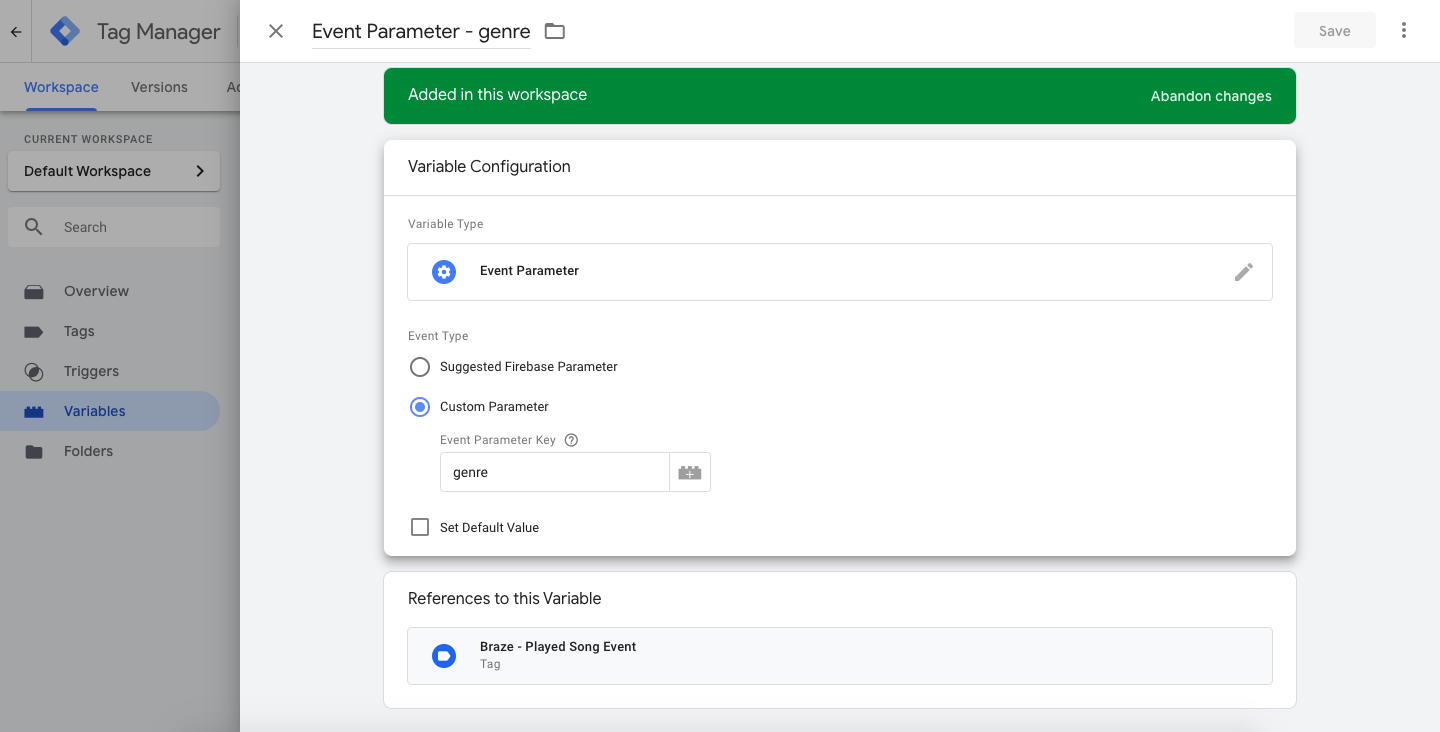
Quando um usuário toca uma música no aplicativo, um evento será registrado através do Firebase e do Google Tag Manager usando o nome do evento de análise do Firebase que corresponde ao nome do disparador da tag, played song:
1
2
3
4
Bundle params = new Bundle();
params.putString("genre", "pop");
params.putInt("number of times listened", 42);
mFirebaseAnalytics.logEvent("played song", params);
1
2
3
4
val params = Bundle()
params.putString("genre", "pop")
params.putInt("number of times listened", 42);
mFirebaseAnalytics.logEvent("played song", params)
Etapa 2: Registrar atributos personalizados
Os atributos personalizados são definidos por meio de um actionType definido como customAttribute. O provedor de tag personalizada da Braze está esperando que o atributo personalizado chave-valor seja definido por meio de customAttributeKey e customAttributeValue:
1
2
3
4
Bundle params = new Bundle();
params.putString("customAttributeKey", "favorite song");
params.putString("customAttributeValue", "Private Eyes");
mFirebaseAnalytics.logEvent("customAttribute", params);
1
2
3
4
val params = Bundle()
params.putString("customAttributeKey", "favorite song")
params.putString("customAttributeValue", "Private Eyes")
mFirebaseAnalytics.logEvent("customAttribute", params)
Etapa 3: Chamar changeUser()
As chamadas para changeUser() são feitas por meio de um actionType definido como changeUser. O provedor de tags personalizadas do Braze espera que o ID de usuário do Braze seja definido por meio de um par de valores-chave externalUserId dentro da sua tag:
1
2
3
Bundle params = new Bundle();
params.putString("externalUserId", userId);
mFirebaseAnalytics.logEvent("changeUser", params);
1
2
3
val params = Bundle()
params.putString("externalUserId", userId)
mFirebaseAnalytics.logEvent("changeUser", params)
Etapa 4: Adicionar um provedor de tag personalizado
Com as tags e os disparadores configurados, você também precisará implementar o Google Tag Manager em seu app para Android, o que pode ser encontrado na documentação do Google.
Após o Google Tag Manager ser instalado em seu aplicativo, adicione um provedor de tag personalizado para chamar métodos do SDK da Braze com base nas tags que você configurou dentro do Google Tag Manager.
Certifique-se de anotar o “Caminho da Classe” para o arquivo - é isso que você irá inserir ao configurar uma tag no console do Google Tag Manager.
Este exemplo destaca uma das muitas maneiras de estruturar seu provedor de tag personalizado. Especificamente, mostra como determinar qual método do SDK da Braze chamar com base no par chave-valor actionType enviado pela Tag do GTM.
Os actionType mostrados neste exemplo são logEvent, customAttribute e changeUser, mas você pode preferir mudar como seu provedor de tag lida com dados do Google Tag Manager.
1
2
3
4
5
6
7
8
9
10
11
12
13
14
15
16
17
18
19
20
21
22
23
24
25
26
27
28
29
30
31
32
33
34
35
36
37
38
39
40
41
42
43
44
45
46
47
48
49
50
51
52
53
54
55
56
57
58
59
60
61
62
63
64
65
66
67
68
69
70
71
72
73
74
75
76
77
78
79
80
81
82
83
84
85
86
87
88
89
90
91
92
93
94
95
96
97
98
99
100
101
102
103
104
105
106
107
108
109
110
111
112
113
114
115
116
117
118
119
120
121
122
123
124
125
public class BrazeGtmTagProvider implements CustomTagProvider {
  private static final String TAG = BrazeLogger.getBrazeLogTag(BrazeGtmTagProvider.class);
  private static final String ACTION_TYPE_KEY = "actionType";

  // Custom Events
  private static final String LOG_EVENT_ACTION_TYPE = "logEvent";
  private static final String EVENT_NAME_VARIABLE = "eventName";

  // Custom Attributes
  private static final String CUSTOM_ATTRIBUTE_ACTION_TYPE = "customAttribute";
  private static final String CUSTOM_ATTRIBUTE_KEY = "customAttributeKey";
  private static final String CUSTOM_ATTRIBUTE_VALUE_KEY = "customAttributeValue";

  // Change User
  private static final String CHANGE_USER_ACTION_TYPE = "changeUser";
  private static final String CHANGE_USER_ID_VARIABLE = "externalUserId";

  private static Context sApplicationContext;

  /**
   * Must be set before calling any of the following methods
   * so that the proper application context is available when needed.
   *
   * Recommended to be called in your {@link Application#onCreate()}.
   */
  public static void setApplicationContext(Context applicationContext) {
    if (applicationContext != null) {
      sApplicationContext = applicationContext.getApplicationContext();
    }
  }

  @Override
  public void execute(Map<String, Object> map) {
    BrazeLogger.i(TAG, "Got google tag manager parameters map: " + map);

    if (sApplicationContext == null) {
      BrazeLogger.w(TAG, "No application context provided to this tag provider.");
      return;
    }

    if (!map.containsKey(ACTION_TYPE_KEY)) {
      BrazeLogger.w(TAG, "Map does not contain the Braze action type key: " + ACTION_TYPE_KEY);
      return;
    }
    String actionType = String.valueOf(map.remove(ACTION_TYPE_KEY));

    switch (actionType) {
      case LOG_EVENT_ACTION_TYPE:
        logEvent(map);
        break;
      case CUSTOM_ATTRIBUTE_ACTION_TYPE:
        setCustomAttribute(map);
        break;
      case CHANGE_USER_ACTION_TYPE:
        changeUser(map);
        break;
      default:
        BrazeLogger.w(TAG, "Got unknown action type: " + actionType);
        break;
    }
  }

  private void logEvent(Map<String, Object> tagParameterMap) {
    String eventName = String.valueOf(tagParameterMap.remove(EVENT_NAME_VARIABLE));
    Braze.getInstance(sApplicationContext).logCustomEvent(eventName, parseMapIntoProperties(tagParameterMap));
  }

  private BrazeProperties parseMapIntoProperties(Map<String, Object> map) {
    BrazeProperties brazeProperties = new BrazeProperties();
    for (Map.Entry<String, Object> entry : map.entrySet()) {
      final Object value = entry.getValue();
      final String key = entry.getKey();
      if (value instanceof Boolean) {
        brazeProperties.addProperty(key, (Boolean) value);
      } else if (value instanceof Integer) {
        brazeProperties.addProperty(key, (Integer) value);
      } else if (value instanceof Date) {
        brazeProperties.addProperty(key, (Date) value);
      } else if (value instanceof Long) {
        brazeProperties.addProperty(key, (Long) value);
      } else if (value instanceof String) {
        brazeProperties.addProperty(key, (String) value);
      } else if (value instanceof Double) {
        brazeProperties.addProperty(key, (Double) value);
      } else {
        BrazeLogger.w(TAG, "Failed to parse value into an BrazeProperties "
            + "accepted type. Key: '" + key + "' Value: '" + value + "'");
      }
    }

    return brazeProperties;
  }

  private void setCustomAttribute(Map<String, Object> tagParameterMap) {
    String key = String.valueOf(tagParameterMap.get(CUSTOM_ATTRIBUTE_KEY));
    Object value = tagParameterMap.get(CUSTOM_ATTRIBUTE_VALUE_KEY);

    Braze.getInstance(sApplicationContext).getCurrentUser(new IValueCallback<BrazeUser>() {
      @Override
      public void onSuccess(BrazeUser brazeUser) {
        if (value instanceof Boolean) {
          brazeUser.setCustomUserAttribute(key, (Boolean) value);
        } else if (value instanceof Integer) {
          brazeUser.setCustomUserAttribute(key, (Integer) value);
        } else if (value instanceof Long) {
          brazeUser.setCustomUserAttribute(key, (Long) value);
        } else if (value instanceof String) {
          brazeUser.setCustomUserAttribute(key, (String) value);
        } else if (value instanceof Double) {
          brazeUser.setCustomUserAttribute(key, (Double) value);
        } else if (value instanceof Float) {
          brazeUser.setCustomUserAttribute(key, (Float) value);
        } else {
          BrazeLogger.w(TAG, "Failed to parse value into a custom "
              + "attribute accepted type. Key: '" + key + "' Value: '" + value + "'");
        }
      }
    });
  }

  private void changeUser(Map<String, Object> tagParameterMap) {
    String userId = String.valueOf(tagParameterMap.get(CHANGE_USER_ID_VARIABLE));
    Braze.getInstance(sApplicationContext).changeUser(userId);
  }
}
1
2
3
4
5
6
7
8
9
10
11
12
13
14
15
16
17
18
19
20
21
22
23
24
25
26
27
28
29
30
31
32
33
34
35
36
37
38
39
40
41
42
43
44
45
46
47
48
49
50
51
52
53
54
55
56
57
58
59
60
61
62
63
64
65
66
67
68
69
70
71
72
73
74
75
76
77
78
79
80
81
82
83
84
85
86
87
88
89
90
91
92
93
94
95
96
97
98
99
100
101
102
103
104
105
106
class BrazeGtmTagProvider : CustomTagProvider {

  override fun execute(map: MutableMap<String, Any>) {
    BrazeLogger.i(TAG, "Got google tag manager parameters map: $map")

    if (sApplicationContext == null) {
      BrazeLogger.w(TAG, "No application context provided to this tag provider.")
      return
    }

    if (!map.containsKey(ACTION_TYPE_KEY)) {
      BrazeLogger.w(TAG, "Map does not contain the Braze action type key: $ACTION_TYPE_KEY")
      return
    }
    val actionType = map.remove(ACTION_TYPE_KEY).toString()

    when (actionType) {
      LOG_EVENT_ACTION_TYPE -> logEvent(map)
      CUSTOM_ATTRIBUTE_ACTION_TYPE -> setCustomAttribute(map)
      CHANGE_USER_ACTION_TYPE -> changeUser(map)
      else -> BrazeLogger.w(TAG, "Got unknown action type: $actionType")
    }
  }

  private fun logEvent(tagParameterMap: MutableMap<String, Any>) {
    val eventName = tagParameterMap.remove(EVENT_NAME_VARIABLE).toString()
    Braze.getInstance(sApplicationContext).logCustomEvent(eventName, parseMapIntoProperties(tagParameterMap))
  }

  private fun parseMapIntoProperties(map: Map<String, Any>): BrazeProperties {
    val brazeProperties = BrazeProperties()
    map.forEach { param ->
      val key = param.key
      val value = param.value
      when (value) {
        is Boolean -> brazeProperties.addProperty(key, value)
        is Int -> brazeProperties.addProperty(key, value)
        is Date -> brazeProperties.addProperty(key, value)
        is Long -> brazeProperties.addProperty(key, value)
        is String -> brazeProperties.addProperty(key, value)
        is Double -> brazeProperties.addProperty(key, value)
        else -> BrazeLogger.w(TAG, "Failed to parse value into an BrazeProperties "
            + "accepted type. Key: '" + key + "' Value: '" + value + "'")
      }
    }

    return brazeProperties
  }

  private fun setCustomAttribute(tagParameterMap: Map<String, Any>) {
    val key = tagParameterMap[CUSTOM_ATTRIBUTE_KEY].toString()
    val value = tagParameterMap[CUSTOM_ATTRIBUTE_VALUE_KEY]

    Braze.getInstance(sApplicationContext).getCurrentUser { brazeUser ->
      when (value) {
        is Boolean -> brazeUser.setCustomUserAttribute(key, value)
        is Int -> brazeUser.setCustomUserAttribute(key, value)
        is Long -> brazeUser.setCustomUserAttribute(key, value)
        is String -> brazeUser.setCustomUserAttribute(key, value)
        is Double -> brazeUser.setCustomUserAttribute(key, value)
        is Float -> brazeUser.setCustomUserAttribute(key, value)
        else -> BrazeLogger.w(
          TAG, "Failed to parse value into a custom "
            + "attribute accepted type. Key: '" + key + "' Value: '" + value + "'"
        )
      }
    }
  }

  private fun changeUser(tagParameterMap: Map<String, Any>) {
    val userId = tagParameterMap[CHANGE_USER_ID_VARIABLE].toString()
    Braze.getInstance(sApplicationContext).changeUser(userId)
  }

  companion object {
    private val TAG = BrazeLogger.getBrazeLogTag(BrazeGtmTagProvider::class.java)
    private val ACTION_TYPE_KEY = "actionType"

    // Custom Events
    private val LOG_EVENT_ACTION_TYPE = "logEvent"
    private val EVENT_NAME_VARIABLE = "eventName"

    // Custom Attributes
    private val CUSTOM_ATTRIBUTE_ACTION_TYPE = "customAttribute"
    private val CUSTOM_ATTRIBUTE_KEY = "customAttributeKey"
    private val CUSTOM_ATTRIBUTE_VALUE_KEY = "customAttributeValue"

    // Change User
    private val CHANGE_USER_ACTION_TYPE = "changeUser"
    private val CHANGE_USER_ID_VARIABLE = "externalUserId"

    private var sApplicationContext: Context? = null

    /**
     * Must be set before calling any of the following methods so
     * that the proper application context is available when needed.
     *
     * Recommended to be called in your [Application.onCreate].
     */
    fun setApplicationContext(applicationContext: Context?) {
      if (applicationContext != null) {
        sApplicationContext = applicationContext.applicationContext
      }
    }
  }
}
Em seu site Application.onCreate(), não se esqueça de adicionar a seguinte inicialização para o snippet anterior:
1
BrazeGtmTagProvider.setApplicationContext(this.getApplicationContext());
1
BrazeGtmTagProvider.setApplicationContext(this.applicationContext)
Pré-requisitos
Antes de poder usar esse recurso, você precisará integrar o Swift Braze SDK.
Uso do Google Tag Manager para Swift
No exemplo a seguir, um app de streaming de música deseja registrar diferentes eventos à medida que os usuários ouvem as músicas. Usando o Google Tag Manager para iOS, eles podem controlar quais dos fornecedores terceirizados do Braze recebem esse evento e criar tags específicas para o Braze.
Etapa 1: Criar um disparador para eventos personalizados
Os eventos personalizados são registrados com actionType definido como logEvent. Neste exemplo, o provedor de tag personalizada do Braze está esperando que o nome do evento personalizado seja definido usando eventName.
Primeiro, crie um disparador que procure um eventName que seja igual a played song.
Em seguida, crie uma nova tag (também conhecida como “Chamada de função”) e insira a jornada da classe de seu provedor de tag personalizado descrito mais adiante neste artigo. Essa tag será disparada quando for registrado o evento played song. Como eventName está definido como played song, ele será usado como o nome do evento personalizado que é registrado no Braze.
Ao enviar um evento personalizado, defina actionType como logEvent e defina um valor para eventName para que o Braze receba o nome correto do evento e a ação a ser tomada.
Você também pode incluir argumentos adicionais de pares de valores-chave na tag, que serão enviados como propriedades de eventos personalizados para o Braze. eventName e actionType não serão ignorados nas propriedades de eventos personalizados. Na tag do exemplo a seguir, passe em genre, que foi definida usando uma variável de tag no Google Tag Manager e originada do evento personalizado registrado no app.
A propriedade do evento genre é enviada ao Google Tag Manager como uma variável “Firebase - Event Parameter”, pois o Google Tag Manager para iOS usa o Firebase como camada de dados.
Quando um usuário reproduzir uma música no app, registre um evento no Firebase e no Google Tag Manager usando o nome do evento de análise de dados do Firebase que corresponda ao nome do disparo da tag, played song:
1
2
3
let parameters: [String: Any] = ["genre": "pop",
                                 "number of times listened": 42]
Analytics.logEvent("played song", parameters: parameters)
1
2
3
NSDictionary *parameters = @{@"genre" : @"pop",
                             @"number of times listened" : @42};
[FIRAnalytics logEventWithName:@"played song" parameters:parameters];
Etapa 2: Registrar atributos personalizados
Os atributos personalizados são definidos por meio de um actionType definido como customAttribute. O provedor de tag personalizada da Braze está esperando que o atributo personalizado chave-valor seja definido por meio de customAttributeKey e customAttributeValue:
1
2
3
let parameters: [String: Any] = ["customAttributeKey": "favoriteSong",
                                 "customAttributeValue": "Private Eyes"]
FIRAnalytics.logEvent(withName:"customAttribute", parameters: parameters)
1
2
3
NSDictionary *parameters = @{@"customAttributeKey" : @"favoriteSong",
                             @"customAttributeValue" : @"Private Eyes"};
[FIRAnalytics logEventWithName:@"customAttribute" parameters:parameters];
Etapa 3: Chamada changeUser()
As chamadas para changeUser() são feitas por meio de um actionType definido como changeUser. O provedor de tags personalizadas do Braze espera que o ID de usuário do Braze seja definido por meio de um par de valores-chave externalUserId dentro da sua tag:
1
2
let parameters: [String: Any] = ["externalUserId": "favorite userId"]
Analytics.logEvent(withName:"changeUser", parameters: parameters)
1
2
NSDictionary *parameters = @{@"externalUserId" : userId};
[FIRAnalytics logEventWithName:@"changeUser" parameters:parameters];
Etapa 4: Adicionar um provedor de tag personalizado
Com as tags e os disparadores configurados, você também precisará implementar o Google Tag Manager em seu app para iOS, o que pode ser encontrado na documentação do Google.
Depois que o Google Tag Manager estiver instalado em seu app, adicione um provedor de tag personalizado para chamar os métodos do Braze SDK com base nas tags que você configurou no Google Tag Manager.
Não se esqueça de notar o “Class Path” (caminho da classe) para o arquivo - é isso que você digitará ao configurar uma tag no console do Google Tag Manager.
Este exemplo destaca uma das muitas maneiras de estruturar seu provedor de tags personalizadas. Especificamente, ele mostra como determinar qual método do Braze SDK deve ser chamado com base no par de valores-chave actionType enviado pela tag GTM. Este exemplo pressupõe que você atribuiu a instância da Braze como uma variável no AppDelegate.
Os actionType suportados neste exemplo são logEvent, customAttribute e changeUser, mas você pode preferir alterar a forma como seu provedor de tags trata os dados do Google Tag Manager.
Adicione o seguinte código ao seu arquivo BrazeGTMTagManager.swift.
1
2
3
4
5
6
7
8
9
10
11
12
13
14
15
16
17
18
19
20
21
22
23
24
25
26
27
28
29
30
31
32
33
34
35
36
37
38
39
40
41
42
43
44
45
46
47
48
49
50
51
52
53
54
55
56
57
58
59
60
61
62
63
64
65
66
67
68
69
import FirebaseAnalytics
import GoogleTagManager
import BrazeKit

let ActionTypeKey: String = "actionType"

// Custom Events
let LogEventAction: String = "logEvent"
let LogEventName: String = "eventName"

// Custom Attributes
let CustomAttributeAction: String = "customAttribute"
let CustomAttributeKey: String = "customAttributeKey"
let CustomAttributeValueKey: String = "customAttributeValue"

// Change User
let ChangeUserAction: String = "changeUser"
let ChangeUserExternalUserId: String = "externalUserId"

@objc(BrazeGTMTagManager)
final class BrazeGTMTagManager : NSObject, TAGCustomFunction {
  @objc func execute(withParameters parameters: [AnyHashable : Any]!) -> NSObject! {
    var parameters: [String : Any] = parameters as! [String : Any]
    guard let actionType: String = parameters[ActionTypeKey] as? String else {
      print("There is no Braze action type key in this call. Doing nothing.")
      return nil
    }
    parameters.removeValue(forKey: ActionTypeKey)
    if actionType == LogEventAction {
      logEvent(parameters: parameters)
    } else if actionType == CustomAttributeAction {
      logCustomAttribute(parameters: parameters)
    } else if actionType == ChangeUserAction {
      changeUser(parameters: parameters)
    }
    return nil
  }

  func logEvent(parameters: [String : Any]) {
    var parameters: [String : Any] = parameters
    guard let eventName: String = parameters[LogEventName] as? String else { return }
    parameters.removeValue(forKey: LogEventName)
    AppDelegate.braze?.logCustomEvent(name: eventName, properties: parameters)
  }

  func logCustomAttribute(parameters: [String: Any]) {
    guard let customAttributeKey = parameters[CustomAttributeKey] as? String else { return }
    let customAttributeValue = parameters[CustomAttributeValueKey]

    if let customAttributeValue = customAttributeValue as? String {
      AppDelegate.braze?.user.setCustomAttribute(key: customAttributeKey, value: customAttributeValue)
    } else if let customAttributeValue = customAttributeValue as? Date {
      AppDelegate.braze?.user.setCustomAttribute(key: customAttributeKey, value: customAttributeValue)
    } else if let customAttributeValue = customAttributeValue as? Double {
      AppDelegate.braze?.user.setCustomAttribute(key: customAttributeKey, value: customAttributeValue)
    } else if let customAttributeValue = customAttributeValue as? Bool {
      AppDelegate.braze?.user.setCustomAttribute(key: customAttributeKey, value: customAttributeValue)
    } else if let customAttributeValue = customAttributeValue as? Int {
      AppDelegate.braze?.user.setCustomAttribute(key: customAttributeKey, value: customAttributeValue)
    } else if let customAttibuteValue = customAttributeValue as? [String] {
      AppDelegate.braze?.user.setCustomAttributeArray(key: customAttributeKey, array: customAttibuteValue)
    }
  }

  func changeUser(parameters: [String: Any]) {
    guard let userId = parameters[ChangeUserExternalUserId] as? String else { return }
    AppDelegate.braze?.changeUser(userId: userId)
  }
}
Adicione o seguinte código ao seu arquivo BrazeGTMTagManager.h:
1
2
3
4
5
6
@import Firebase;
@import GoogleTagManager;

@interface BrazeGTMTagManager : NSObject <TAGCustomFunction>

@end
E adicione o seguinte código ao seu arquivo BrazeGTMTagManager.m:
1
2
3
4
5
6
7
8
9
10
11
12
13
14
15
16
17
18
19
20
21
22
23
24
25
26
27
28
29
30
31
32
33
34
35
36
37
38
39
40
41
42
43
44
45
46
47
48
49
50
51
52
53
54
55
56
57
58
59
60
61
62
63
64
65
66
67
68
69
70
71
72
73
74
75
76
77
78
79
80
81
82
83
84
85
86
87
88
89
90
#import <Foundation/Foundation.h>
#import "BrazeGTMTagManager.h"
#import "BrazeKit"
#import "AppDelegate.h"

static NSString *const ActionTypeKey = @"actionType";

// Custom Events
static NSString *const LogEventAction = @"logEvent";
static NSString *const LogEventEventName = @"eventName";

// Custom Attributes
static NSString *const CustomAttributeAction = @"customAttribute";
static NSString *const CustomAttributeKey = @"customAttributeKey";
static NSString *const CustomAttributeValueKey = @"customAttributeValue";

// Change User
static NSString *const ChangeUserAction = @"changeUser";
static NSString *const ChangeUserExternalUserId = @"externalUserId";

@implementation BrazeGTMTagManager

- (NSObject *)executeWithParameters:(NSDictionary *)parameters {
  NSMutableDictionary *mutableParameters = [parameters mutableCopy];

  NSString *actionType = mutableParameters[ActionTypeKey];
  if (!actionType) {
    NSLog(@"There is no Braze action type key in this call. Doing nothing.", nil);
    return nil;
  }

  [mutableParameters removeObjectForKey:ActionTypeKey];

  if ([actionType isEqualToString:LogEventAction]) {
    [self logEvent:mutableParameters];
  } else if ([actionType isEqualToString:CustomAttributeAction]) {
    [self logCustomAttribute:mutableParameters];
  } else if ([actionType isEqualToString:ChangeUserAction]) {
    [self changeUser:mutableParameters];
  } else {
    NSLog(@"Invalid action type. Doing nothing.");
  }
  return nil;
}

- (void)logEvent:(NSMutableDictionary *)parameters {
  NSString *eventName = parameters[LogEventEventName];
  [parameters removeObjectForKey:LogEventEventName];
  [AppDelegate.braze logCustomEvent:eventName
                         properties:parameters];
}

- (void)logCustomAttribute:(NSMutableDictionary *)parameters {
  NSString *customAttributeKey = parameters[CustomAttributeKey];
  id customAttributeValue = parameters[CustomAttributeValueKey];

  if ([customAttributeValue isKindOfClass:[NSString class]]) {
    [AppDelegate.braze logCustomEvent:customAttributeKey
                           properties:parameters];
  } else if ([customAttributeValue isKindOfClass:[NSDate class]]) {
    [AppDelegate.braze.user setCustomAttributeWithKey:customAttributeKey
                                            dateValue:customAttributeValue];
  } else if ([customAttributeValue isKindOfClass:[NSNumber class]]) {
    if (strcmp([customAttributeValue objCType], [@(YES) objCType]) == 0) {
      [AppDelegate.braze.user setCustomAttributeWithKey:customAttributeKey
                                              boolValue:[(NSNumber *)customAttributeValue boolValue]];
    } else if (strcmp([customAttributeValue objCType], @encode(short)) == 0 ||
               strcmp([customAttributeValue objCType], @encode(int)) == 0 ||
               strcmp([customAttributeValue objCType], @encode(long)) == 0) {
      [AppDelegate.braze.user setCustomAttributeWithKey:customAttributeKey
                                               intValue:[(NSNumber *)customAttributeValue integerValue]];
    } else if (strcmp([customAttributeValue objCType], @encode(float)) == 0 ||
               strcmp([customAttributeValue objCType], @encode(double)) == 0) {
      [AppDelegate.braze.user setCustomAttributeWithKey:customAttributeKey
                                            doubleValue:[(NSNumber *)customAttributeValue doubleValue]];
    } else {
      NSLog(@"Could not map NSNumber value to Braze custom attribute:%@", customAttributeValue);
    }
  } else if ([customAttributeValue isKindOfClass:[NSArray class]]) {
    [AppDelegate.braze.user setCustomAttributeArrayWithKey:customAttributeKey
                                                     array:customAttributeValue];
  }
}

- (void)changeUser:(NSMutableDictionary *)parameters {
  NSString *userId = parameters[ChangeUserExternalUserId];
  [AppDelegate.braze changeUser:userId];
}

@end
Solução de problemas
Se a Braze não inicializar ou os eventos não aparecerem como esperado, confirme se o contêiner do GTM está publicado, se os disparadores e a ordem de acionamento das tags estão alinhados com o ciclo de vida e a estratégia de inicialização do seu SDK, e se os dispositivos de teste não estão bloqueando os endpoints da Braze.
Para falhas de inicialização, verifique se a tag da Braze ou o provedor de tag personalizado está recebendo o actionType e os parâmetros esperados (consulte as guias Android, Swift e Web nesta página). Para obter um registro detalhado ao validar eventos disparados pelo GTM, ative o registro de depuração do SDK da sua plataforma conforme descrito nos guias de integração vinculados nessas guias.