プッシュ分析とカスタムイベントのログ記録
このページでは、ネイティブプッシュ分析(開封、影響を受けた開封、キャンペーンレポート)とプッシュペイロードからのカスタムデータのログ記録(カスタムイベントと属性)のワークフローについて説明します。このガイドを使用して、ユースケースに該当するワークフローを特定し、プラットフォームに応じた手順に従ってください。
前提条件
開始する前に、プラットフォームの初期プッシュ通知統合を完了してください:
ネイティブプッシュ分析とカスタムイベントのログ記録の違い
以下のワークフローはそれぞれ異なるレポート画面を持っています。
| 分析カテゴリ | 説明 | 表示場所 |
|---|---|---|
| ネイティブプッシュ分析 | 開封や影響を受けた開封など、Braze プッシュキャンペーンに紐づくプッシュ指標 | プッシュキャンペーン分析、Currents メッセージエンゲージメントイベント、レポートビルダー |
| カスタムイベントと属性 | SDK メソッドまたは/users/trackエンドポイントを通じて定義・ログ記録する分析 |
ユーザープロファイル、セグメンテーション、アクションベースのキャンペーンとキャンバス、カスタムイベント分析 |
カスタムイベント(push_notification_openedなど)のログ記録は、Braze のネイティブプッシュ開封トラッキングとは異なります。カスタムイベントは、ネイティブプッシュキャンペーンの開封指標やプッシュアトリビューションには反映されません。
Braze が自動的にログ記録するもの
SDK 統合が設定されている場合、Braze はプッシュ開封や影響を受けた開封を含むコアチャネルインタラクションデータを自動的にログ記録します。標準的なプッシュ分析には追加のコードは不要です。自動的に収集されるデータの完全なリストについては、SDK データ収集を参照してください。
詳細については、以下を参照してください:
- SDK データ収集:自動的に収集されるデータとオプションデータの完全なリスト。
- 影響を受けた開封:Braze が影響を受けた開封を計算する方法。
- メッセージエンゲージメントイベント:Currents のダウンストリームイベントスキーマ。
カスタムプッシュ処理でネイティブプッシュ分析を維持する
複数のプッシュプロバイダーの統合、追加のペイロードデータの処理、またはカスタム通知表示ロジックの実装が必要な場合、カスタムプッシュハンドラーを使用することがあります。カスタムプッシュハンドラーを使用する場合でも、プッシュペイロードを Braze SDK メソッドに渡す必要があります。これにより、Braze は埋め込まれたトラッキングデータを抽出し、ネイティブプッシュ分析(開封、影響を受けた開封、配信指標)をログ記録できます。
カスタムFirebaseMessagingServiceがある場合、onMessageReceivedメソッド内でBrazeFirebaseMessagingService.handleBrazeRemoteMessage(...)を呼び出してください。FirebaseMessagingServiceサブクラスは、Android システムによってフラグ付けまたは終了されないよう、呼び出しから9秒以内に実行を完了する必要があることに注意してください。
1
2
3
4
5
6
7
8
9
10
11
public class MyFirebaseMessagingService extends FirebaseMessagingService {
  @Override
  public void onMessageReceived(RemoteMessage remoteMessage) {
    super.onMessageReceived(remoteMessage);
    if (BrazeFirebaseMessagingService.handleBrazeRemoteMessage(this, remoteMessage)) {
      // Braze processed a Braze push payload.
    } else {
      // Non-Braze payload: pass to your other handlers.
    }
  }
}
完全な実装例については、Braze Android SDK Firebase プッシュサンプルアプリを参照してください。
手動プッシュ統合では、バックグラウンドおよびユーザー通知のコールバックを Braze に転送します。
バックグラウンド通知:
1
2
3
4
5
6
7
if let braze = AppDelegate.braze, braze.notifications.handleBackgroundNotification(
  userInfo: userInfo,
  fetchCompletionHandler: completionHandler
) {
  return
}
completionHandler(.noData)
ユーザー通知レスポンス:
1
2
3
4
5
6
7
if let braze = AppDelegate.braze, braze.notifications.handleUserNotification(
  response: response,
  withCompletionHandler: completionHandler
) {
  return
}
completionHandler()
フォアグラウンド通知:
1
2
3
4
5
6
7
8
9
10
11
12
13
14
func userNotificationCenter(
  _ center: UNUserNotificationCenter,
  willPresent notification: UNNotification,
  withCompletionHandler completionHandler: @escaping (UNNotificationPresentationOptions) -> Void
) {
  if let braze = AppDelegate.braze {
    braze.notifications.handleForegroundNotification(notification: notification)
  }
  if #available(iOS 14.0, *) {
    completionHandler([.banner, .list, .sound])
  } else {
    completionHandler([.alert, .sound])
  }
}
完全な実装例については、Braze Swift SDK 手動プッシュサンプル(AppDelegate.swift)を参照してください。
Web プッシュの場合、Web プッシュ通知の説明に従って、サービスワーカーと SDK の初期化を設定してください。
その他のコードサンプルについては、Braze Web SDK リポジトリを参照してください。
プッシュペイロードからカスタムデータをログ記録する
プッシュペイロードのキーと値のペアから、ビジネスロジックに紐づくカスタムイベントや属性などの追加データをログ記録する必要がある場合は、このセクションを使用してください。
カスタムイベントの詳細については、カスタムイベントを参照してください。SDK メソッドを通じてカスタムイベントをログ記録するには、カスタムイベントのログ記録を参照してください。
オプション A:/users/trackエンドポイントでログ記録する
/users/trackエンドポイントを呼び出すことで、リアルタイムに分析をログ記録できます。
ユーザープロファイルを識別するには、プッシュペイロードのキーと値のペアにbraze_idを含めてください。
braze_idを渡すとプロファイルの識別のみが行われます。ペイロードの値を読み取り、ログ記録したいイベントや属性を含む/users/trackリクエストを送信する実装ロジックは別途必要です。
オプション B:アプリ起動後に SDK メソッドでログ記録する
ペイロードデータをローカルに保存し、アプリの初期化後に SDK メソッドを通じてカスタムイベントと属性をログ記録することもできます。このアプローチは、分析データを先に永続化し、次回のアプリ起動時にフラッシュする通知コンテンツエクステンションのフローで一般的です。
分析はアプリが起動するまで Braze に送信されません。解除設定によっては、ユーザーが通知を解除してからアプリが開いて分析をフラッシュするまでに遅延が生じる場合があります。
通知コンテンツエクステンションからのログ記録(Swift)
以下の手順では、Swift 通知コンテンツエクステンションからカスタムイベント、カスタム属性、ユーザー属性を保存・送信する方法を説明します。
ステップ 1:Xcode で App Groups を設定する
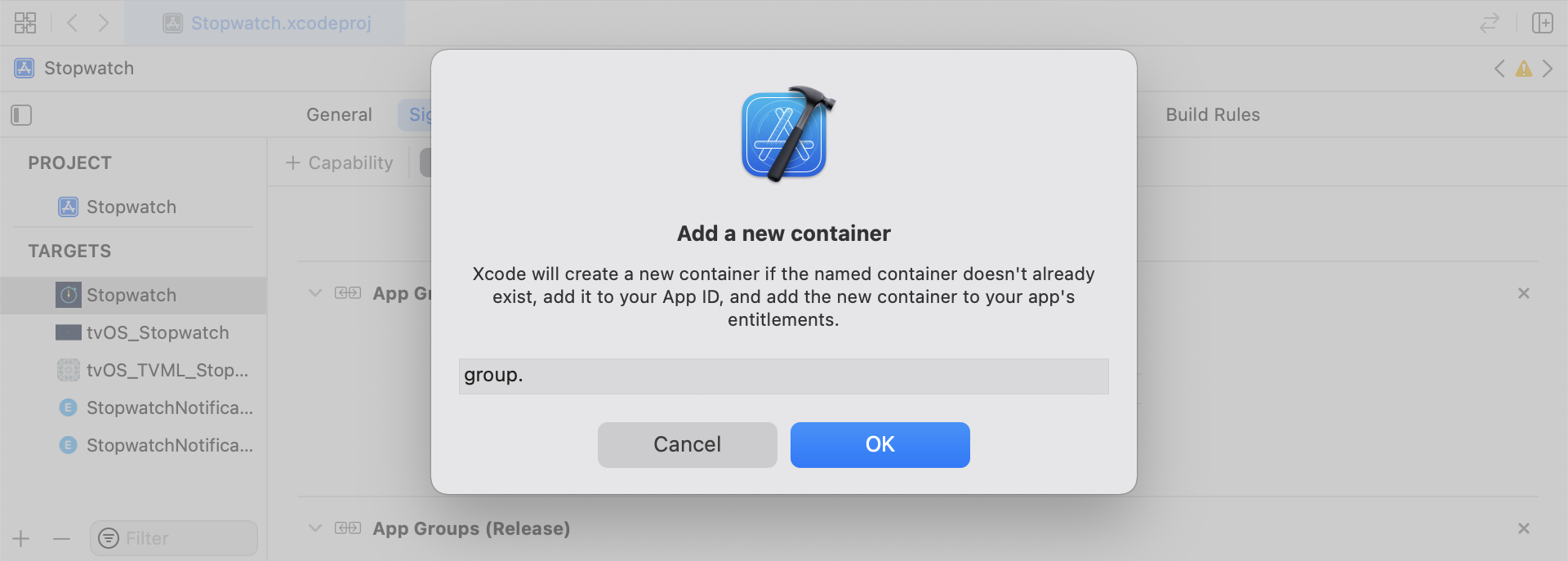
Xcode で、メインアプリターゲットにApp Groups機能を追加します。App Groups をオンにし、+ をクリックして新しいグループを追加します。アプリのバンドル ID を使用してグループ識別子を作成します(例:group.com.company.appname.xyz)。メインアプリターゲットとコンテンツエクステンションターゲットの両方で App Groups をオンにしてください。
ステップ 2:ログ記録する内容を選択する
スニペットを実装する前に、ログ記録したい分析カテゴリを選択してください:
- カスタムイベント: ユーザーが行うアクション(例:フローの完了や特定の UI 要素のタップ)。カスタムイベントは、アクションベースのトリガー、セグメンテーション、イベント分析に使用します。詳細については、カスタムイベントとカスタムイベントのログ記録を参照してください。
- カスタム属性: 定義するプロファイルフィールド(例:
plan_tierやpreferred_language)で、時間の経過とともに更新されます。詳細については、カスタム属性とユーザー属性の設定を参照してください。 - ユーザー属性: 標準プロファイルフィールド(例:メール、名、電話番号)。サンプルコードでは、型付き
UserAttributeモデルで表現され、Braze のユーザーフィールドにマッピングされます。
このセクションのヘルパーファイル(RemoteStorage、UserAttribute、EventName Dictionary)は、このサンプル実装で使用されるローカルユーティリティファイルです。SDK 組み込みのクラスではありません。ペイロード由来のデータをUserDefaultsに保存し、保留中のユーザー更新の型付きモデルを定義し、イベントペイロードの構築を標準化します。ローカルデータストレージの動作の詳細については、ストレージを参照してください。
カスタムイベントの保存
ディクショナリを構築し、メタデータを入力し、ヘルパーファイルで保存することで分析ペイロードを作成します。
- イベントメタデータでディクショナリを初期化します。
userDefaultsを初期化してイベントデータを取得・保存します。- 既存の配列が見つかった場合、追加して保存します。
- 配列が存在しない場合、新しい配列を保存します。
1
2
3
4
5
6
7
8
9
10
11
12
13
14
15
16
func saveCustomEvent(with properties: [String: Any]? = nil) {
  // 1
  let customEventDictionary = Dictionary(eventName: "YOUR-EVENT-NAME", properties: properties)

  // 2
  let remoteStorage = RemoteStorage(storageType: .suite)

  // 3
  if var pendingEvents = remoteStorage.retrieve(forKey: .pendingCustomEvents) as? [[String: Any]] {
    pendingEvents.append(contentsOf: [customEventDictionary])
    remoteStorage.store(pendingEvents, forKey: .pendingCustomEvents)
  } else {
    // 4
    remoteStorage.store([customEventDictionary], forKey: .pendingCustomEvents)
  }
}
1
2
3
4
5
6
7
8
9
10
11
12
13
14
15
16
17
- (void)saveCustomEvent:(NSDictionary<NSString *, id> *)properties {
  // 1
  NSDictionary<NSString *, id> *customEventDictionary = [[NSDictionary alloc] initWithEventName:@"YOUR-EVENT-NAME" properties:properties];

  // 2
  RemoteStorage *remoteStorage = [[RemoteStorage alloc] initWithStorageType:StorageTypeSuite];
  NSMutableArray *pendingEvents = [[remoteStorage retrieveForKey:RemoteStorageKeyPendingCustomEvents] mutableCopy];

  // 3
  if (pendingEvents) {
    [pendingEvents addObject:customEventDictionary];
    [remoteStorage store:pendingEvents forKey:RemoteStorageKeyPendingCustomEvents];
  } else {
    // 4
    [remoteStorage store:@[ customEventDictionary ] forKey:RemoteStorageKeyPendingCustomEvents];
  }
}
カスタムイベントを Braze に送信する
SDK の初期化直後に、保存された分析をログ記録します。
- 保留中のイベントをループ処理します。
- 各イベントのキーと値のペアをループ処理します。
event_nameキーを確認します。- 残りのキーと値のペアを
propertiesディクショナリに追加します。 - 各カスタムイベントをログ記録します。
- 保留中のイベントをストレージから削除します。
1
2
3
4
5
6
7
8
9
10
11
12
13
14
15
16
17
18
19
20
21
22
23
24
25
26
27
28
29
30
31
32
func logPendingCustomEventsIfNecessary() {
  let remoteStorage = RemoteStorage(storageType: .suite)
  guard let pendingEvents = remoteStorage.retrieve(forKey: .pendingCustomEvents) as? [[String: Any]] else { return }

  // 1
  for event in pendingEvents {
    var eventName: String?
    var properties: [AnyHashable: Any] = [:]

    // 2
    for (key, value) in event {
      if key == "event_name" {
        // 3
        if let eventNameValue = value as? String {
          eventName = eventNameValue
        } else {
          print("Invalid type for event_name key")
        }
      } else {
        // 4
        properties[key] = value
      }
    }
    // 5
    if let eventName = eventName {
      AppDelegate.braze?.logCustomEvent(name: eventName, properties: properties)
    }
  }

  // 6
  remoteStorage.removeObject(forKey: .pendingCustomEvents)
}
1
2
3
4
5
6
7
8
9
10
11
12
13
14
15
16
17
18
19
20
21
22
23
24
25
26
27
28
29
30
31
32
- (void)logPendingEventsIfNecessary {
  RemoteStorage *remoteStorage = [[RemoteStorage alloc] initWithStorageType:StorageTypeSuite];
  NSArray *pendingEvents = [remoteStorage retrieveForKey:RemoteStorageKeyPendingCustomEvents];

  // 1
  for (NSDictionary<NSString *, id> *event in pendingEvents) {
    NSString *eventName = nil;
    NSMutableDictionary *properties = [NSMutableDictionary dictionary];

    // 2
    for (NSString* key in event) {
      if ([key isEqualToString:@"event_name"]) {
        // 3
        if ([[event objectForKey:key] isKindOfClass:[NSString class]]) {
          eventName = [event objectForKey:key];
        } else {
          NSLog(@"Invalid type for event_name key");
        }
      } else {
        // 4
        properties[key] = event[key];
      }
    }
    // 5
    if (eventName != nil) {
      [AppDelegate.braze logCustomEvent:eventName properties:properties];
    }
  }

  // 6
  [remoteStorage removeObjectForKey:RemoteStorageKeyPendingCustomEvents];
}
カスタム属性の保存
分析ディクショナリをゼロから作成し、永続化します。
- 属性メタデータでディクショナリを初期化します。
userDefaultsを初期化して属性データを取得・保存します。- 既存の配列が見つかった場合、追加して保存します。
- 配列が存在しない場合、新しい配列を保存します。
1
2
3
4
5
6
7
8
9
10
11
12
13
14
15
16
func saveCustomAttribute() {
  // 1
  let customAttributeDictionary: [String: Any] = ["YOUR-CUSTOM-ATTRIBUTE-KEY": "YOUR-CUSTOM-ATTRIBUTE-VALUE"]

  // 2
  let remoteStorage = RemoteStorage(storageType: .suite)

  // 3
  if var pendingAttributes = remoteStorage.retrieve(forKey: .pendingCustomAttributes) as? [[String: Any]] {
    pendingAttributes.append(contentsOf: [customAttributeDictionary])
    remoteStorage.store(pendingAttributes, forKey: .pendingCustomAttributes)
  } else {
    // 4
    remoteStorage.store([customAttributeDictionary], forKey: .pendingCustomAttributes)
  }
}
1
2
3
4
5
6
7
8
9
10
11
12
13
14
15
16
17
- (void)saveCustomAttribute {
  // 1
  NSDictionary<NSString *, id> *customAttributeDictionary = @{ @"YOUR-CUSTOM-ATTRIBUTE-KEY": @"YOUR-CUSTOM-ATTRIBUTE-VALUE" };

  // 2
  RemoteStorage *remoteStorage = [[RemoteStorage alloc] initWithStorageType:StorageTypeSuite];
  NSMutableArray *pendingAttributes = [[remoteStorage retrieveForKey:RemoteStorageKeyPendingCustomAttributes] mutableCopy];

  // 3
  if (pendingAttributes) {
    [pendingAttributes addObject:customAttributeDictionary];
    [remoteStorage store:pendingAttributes forKey:RemoteStorageKeyPendingCustomAttributes];
  } else {
    // 4
    [remoteStorage store:@[ customAttributeDictionary ] forKey:RemoteStorageKeyPendingCustomAttributes];
  }
}
カスタム属性を Braze に送信する
SDK の初期化直後に、保存された分析をログ記録します。
- 保留中の属性をループ処理します。
- 各キーと値のペアをループ処理します。
- 各カスタム属性のキーと値をログ記録します。
- 保留中の属性をストレージから削除します。
1
2
3
4
5
6
7
8
9
10
11
12
13
14
15
16
17
18
19
20
21
22
func logPendingCustomAttributesIfNecessary() {
  let remoteStorage = RemoteStorage(storageType: .suite)
  guard let pendingAttributes = remoteStorage.retrieve(forKey: .pendingCustomAttributes) as? [[String: Any]] else { return }

  // 1
  pendingAttributes.forEach { setCustomAttributesWith(keysAndValues: $0) }

  // 4
  remoteStorage.removeObject(forKey: .pendingCustomAttributes)
}

func setCustomAttributesWith(keysAndValues: [String: Any]) {
  // 2
  for (key, value) in keysAndValues {
    // 3
    if let value = value as? [String] {
      setCustomAttributeArrayWithKey(key, andValue: value)
    } else {
      setCustomAttributeWithKey(key, andValue: value)
    }
  }
}
1
2
3
4
5
6
7
8
9
10
11
12
13
14
15
16
17
18
19
20
- (void)logPendingCustomAttributesIfNecessary {
  RemoteStorage *remoteStorage = [[RemoteStorage alloc] initWithStorageType:StorageTypeSuite];
  NSArray *pendingAttributes = [remoteStorage retrieveForKey:RemoteStorageKeyPendingCustomAttributes];

  // 1
  for (NSDictionary<NSString*, id> *attribute in pendingAttributes) {
    [self setCustomAttributeWith:attribute];
  }

  // 4
  [remoteStorage removeObjectForKey:RemoteStorageKeyPendingCustomAttributes];
}

- (void)setCustomAttributeWith:(NSDictionary<NSString *, id> *)keysAndValues {
  // 2
  for (NSString *key in keysAndValues) {
    // 3
    [self setCustomAttributeWith:key andValue:[keysAndValues objectForKey:key]];
  }
}
ユーザー属性の保存
ユーザー属性を保存する際は、更新されるユーザーフィールド(email、first_name、phone_numberなど)をキャプチャするカスタムオブジェクトを作成します。このオブジェクトはUserDefaultsを介した保存と取得に対応している必要があります。UserAttributeヘルパーファイルの例については、ヘルパーファイルタブを参照してください。
- 対応する型でエンコードされた
UserAttributeオブジェクトを初期化します。 userDefaultsを初期化してデータを取得・保存します。- 既存の配列が見つかった場合、追加して保存します。
- 配列が存在しない場合、新しい配列を保存します。
1
2
3
4
5
6
7
8
9
10
11
12
13
14
15
16
func saveUserAttribute() {
  // 1
  guard let data = try? PropertyListEncoder().encode(UserAttribute.email("USER-ATTRIBUTE-VALUE")) else { return }

  // 2
  let remoteStorage = RemoteStorage(storageType: .suite)

  // 3
  if var pendingAttributes = remoteStorage.retrieve(forKey: .pendingUserAttributes) as? [Data] {
    pendingAttributes.append(contentsOf: [data])
    remoteStorage.store(pendingAttributes, forKey: .pendingUserAttributes)
  } else {
    // 4
    remoteStorage.store([data], forKey: .pendingUserAttributes)
  }
}
1
2
3
4
5
6
7
8
9
10
11
12
13
14
15
16
17
18
19
20
21
22
23
- (void)saveUserAttribute {
  // 1
  UserAttribute *userAttribute = [[UserAttribute alloc] initWithUserField:@"USER-ATTRIBUTE-VALUE" attributeType:UserAttributeTypeEmail];

  NSError *error;
  NSData *data = [NSKeyedArchiver archivedDataWithRootObject:userAttribute requiringSecureCoding:YES error:&error];

  if (error != nil) {
    // log error
  }
  // 2
  RemoteStorage *remoteStorage = [[RemoteStorage alloc] initWithStorageType:StorageTypeSuite];
  NSMutableArray *pendingAttributes = [[remoteStorage retrieveForKey:RemoteStorageKeyPendingUserAttributes] mutableCopy];

  // 3
  if (pendingAttributes) {
    [pendingAttributes addObject:data];
    [remoteStorage store:pendingAttributes forKey:RemoteStorageKeyPendingUserAttributes];
  } else {
    // 4
    [remoteStorage store:@[data] forKey:RemoteStorageKeyPendingUserAttributes];
  }
}
ユーザー属性を Braze に送信する
SDK の初期化直後に、保存された分析をログ記録します。
pendingAttributesデータをループ処理します。- 各
UserAttributeをデコードします。 - 属性タイプに基づいてユーザーフィールドを設定します。
- 保留中のユーザー属性をストレージから削除します。
1
2
3
4
5
6
7
8
9
10
11
12
13
14
15
16
17
18
func logPendingUserAttributesIfNecessary() {
  let remoteStorage = RemoteStorage(storageType: .suite)
  guard let pendingAttributes = remoteStorage.retrieve(forKey: .pendingUserAttributes) as? [Data] else { return }

  // 1
  for attributeData in pendingAttributes {
    // 2
    guard let userAttribute = try? PropertyListDecoder().decode(UserAttribute.self, from: attributeData) else { continue }

    // 3
    switch userAttribute {
    case .email(let email):
      AppDelegate.braze?.user.set(email: email)
    }
  }
  // 4
  remoteStorage.removeObject(forKey: .pendingUserAttributes)
}
1
2
3
4
5
6
7
8
9
10
11
12
13
14
15
16
17
18
19
20
21
22
23
24
25
26
27
- (void)logPendingUserAttributesIfNecessary {
  RemoteStorage *remoteStorage = [[RemoteStorage alloc] initWithStorageType:StorageTypeSuite];
  NSArray *pendingAttributes = [remoteStorage retrieveForKey:RemoteStorageKeyPendingUserAttributes];

  // 1
  for (NSData *attributeData in pendingAttributes) {
    NSError *error;

    // 2
    UserAttribute *userAttribute = [NSKeyedUnarchiver unarchivedObjectOfClass:[UserAttribute class] fromData:attributeData error:&error];

    if (error != nil) {
      // log error
    }

    // 3
    if (userAttribute) {
      switch (userAttribute.attributeType) {
        case UserAttributeTypeEmail:
          [self user].email = userAttribute.userField;
          break;
      }
    }
  }
  // 4
  [remoteStorage removeObjectForKey:RemoteStorageKeyPendingUserAttributes];
}
RemoteStorage ヘルパーファイル
1
2
3
4
5
6
7
8
9
10
11
12
13
14
15
16
17
18
19
20
21
22
23
24
25
26
27
28
29
30
31
32
33
34
35
36
37
38
39
40
41
42
43
44
45
46
47
enum RemoteStorageKey: String, CaseIterable {

  // MARK: - Notification Content Extension Analytics
  case pendingCustomEvents = "pending_custom_events"
  case pendingCustomAttributes = "pending_custom_attributes"
  case pendingUserAttributes = "pending_user_attributes"
}

enum RemoteStorageType {
  case standard
  case suite
}

class RemoteStorage: NSObject {
  private var storageType: RemoteStorageType = .standard
  private lazy var defaults: UserDefaults = {
    switch storageType {
    case .standard:
      return .standard
    case .suite:
      // Use the App Group identifier you created in Step 1.
      return UserDefaults(suiteName: "group.com.company.appname.xyz")!
    }
  }()

  init(storageType: RemoteStorageType = .standard) {
    self.storageType = storageType
  }

  func store(_ value: Any, forKey key: RemoteStorageKey) {
    defaults.set(value, forKey: key.rawValue)
  }

  func retrieve(forKey key: RemoteStorageKey) -> Any? {
    return defaults.object(forKey: key.rawValue)
  }

  func removeObject(forKey key: RemoteStorageKey) {
    defaults.removeObject(forKey: key.rawValue)
  }

  func resetStorageKeys() {
    for key in RemoteStorageKey.allCases {
      defaults.removeObject(forKey: key.rawValue)
    }
  }
}
1
2
3
4
5
6
7
8
9
10
11
12
13
14
15
16
17
18
19
20
21
22
23
24
25
26
27
28
29
30
31
32
33
34
35
36
37
38
39
40
41
42
43
44
45
46
47
48
49
50
51
52
53
54
55
56
57
58
59
60
@interface RemoteStorage ()

@property (nonatomic) StorageType storageType;
@property (nonatomic, strong) NSUserDefaults *defaults;

@end

@implementation RemoteStorage

- (id)initWithStorageType:(StorageType)storageType {
  if (self = [super init]) {
    self.storageType = storageType;
  }
  return self;
}

- (void)store:(id)value forKey:(RemoteStorageKey)key {
  [[self defaults] setValue:value forKey:[self rawValueForKey:key]];
}

- (id)retrieveForKey:(RemoteStorageKey)key {
  return [[self defaults] objectForKey:[self rawValueForKey:key]];
}

- (void)removeObjectForKey:(RemoteStorageKey)key {
  [[self defaults] removeObjectForKey:[self rawValueForKey:key]];
}

- (void)resetStorageKeys {
  [[self defaults] removeObjectForKey:[self rawValueForKey:RemoteStorageKeyPendingCustomEvents]];
  [[self defaults] removeObjectForKey:[self rawValueForKey:RemoteStorageKeyPendingCustomAttributes]];
  [[self defaults] removeObjectForKey:[self rawValueForKey:RemoteStorageKeyPendingUserAttributes]];
}

- (NSUserDefaults *)defaults {
  if (!_defaults) {
    switch (self.storageType) {
      case StorageTypeStandard:
        _defaults = [NSUserDefaults standardUserDefaults];
        break;
      case StorageTypeSuite:
        _defaults = [[NSUserDefaults alloc] initWithSuiteName:@"group.com.company.appname.xyz"];
        break;
    }
  }
  return _defaults;
}

- (NSString*)rawValueForKey:(RemoteStorageKey)remoteStorageKey {
    switch(remoteStorageKey) {
    case RemoteStorageKeyPendingCustomEvents:
      return @"pending_custom_events";
    case RemoteStorageKeyPendingCustomAttributes:
      return @"pending_custom_attributes";
    case RemoteStorageKeyPendingUserAttributes:
      return @"pending_user_attributes";
    default:
      [NSException raise:NSGenericException format:@"Unexpected FormatType."];
  }
}
UserAttribute ヘルパーファイル
1
2
3
4
5
6
7
8
9
10
11
12
13
14
15
16
17
18
19
20
21
22
23
24
25
26
enum UserAttribute: Hashable {
  case email(String?)
}

// MARK: - Codable
extension UserAttribute: Codable {
  private enum CodingKeys: String, CodingKey {
    case email
  }

  func encode(to encoder: Encoder) throws {
    var values = encoder.container(keyedBy: CodingKeys.self)

    switch self {
    case .email(let email):
      try values.encodeIfPresent(email, forKey: .email)
    }
  }

  init(from decoder: Decoder) throws {
    let values = try decoder.container(keyedBy: CodingKeys.self)

    let email = try values.decodeIfPresent(String.self, forKey: .email)
    self = .email(email)
  }
}
1
2
3
4
5
6
7
8
9
10
11
12
13
14
15
16
17
18
19
20
21
22
23
24
25
26
@implementation UserAttribute

- (id)initWithUserField:(NSString *)userField attributeType:(UserAttributeType)attributeType {
  if (self = [super init]) {
    self.userField = userField;
    self.attributeType = attributeType;
  }
  return self;
}

- (void)encodeWithCoder:(NSCoder *)encoder {
  [encoder encodeObject:self.userField forKey:@"userField"];
  [encoder encodeInteger:self.attributeType forKey:@"attributeType"];
}

- (id)initWithCoder:(NSCoder *)decoder {
  if (self = [super init]) {
    self.userField = [decoder decodeObjectForKey:@"userField"];

    NSInteger attributeRawValue = [decoder decodeIntegerForKey:@"attributeType"];
    self.attributeType = (UserAttributeType) attributeRawValue;
  }
  return self;
}

@end
EventName ディクショナリヘルパーファイル
1
2
3
4
5
6
7
8
9
10
11
12
extension Dictionary where Key == String, Value == Any {
  init(eventName: String, properties: [String: Any]? = nil) {
    self.init()
    self[PushNotificationKey.eventName.rawValue] = eventName

    if let properties = properties {
      for (key, value) in properties {
        self[key] = value
      }
    }
  }
}
1
2
3
4
5
6
7
8
9
10
11
12
13
14
15
16
17
@implementation NSMutableDictionary (Helper)

+ (instancetype)dictionaryWithEventName:(NSString *)eventName
                              properties:(NSDictionary *)properties {
  NSMutableDictionary *dict = [NSMutableDictionary dictionary];
  dict[@"event_name"] = eventName;

  if (properties) {
    for (id key in properties) {
      dict[key] = properties[key];
    }
  }

  return dict;
}

@end
結果の分析
分析カテゴリに対応するレポート画面を使用してください:
| 分析カテゴリ | Braze での確認場所 |
|---|---|
| ネイティブプッシュ分析 | キャンペーンレベルのプッシュ開封指標を確認するには、プッシュキャンペーンのキャンペーン分析ページに移動します。指標の定義については、影響を受けた開封を参照してください。カスタム分析ビューを作成するには、分析 > レポートビルダー(新)に移動します。操作手順については、レポートビルダーを参照してください。ウェアハウスレベルのイベントスキーマについては、メッセージエンゲージメントイベントを参照してください。 |
| カスタムイベントと属性 | カスタムイベントのトレンドを確認するには、分析 > カスタムイベントレポートに移動します。詳細については、カスタムイベントを参照してください。ユーザーレベルの値を確認するには、ユーザー検索ページに移動してプロファイルを開きます。手順については、ユーザープロファイルを参照してください。これらの値でオーディエンスをフィルタリングするには、オーディエンス > セグメントに移動します。操作手順については、セグメントの作成とセグメンテーションフィルターのフィルターオプションを参照してください。 |
カスタムレポートの作成については、レポートビルダーを参照してください。
 GitHub でこのページを編集