AppboyKit (également connu sous le nom de SDK Objective-C) n’est plus pris en charge et a été remplacé par Swift SDK. Il ne recevra plus de nouvelles fonctionnalités, de corrections de bugs, de mises à jour de sécurité ou d’assistance technique - cependant, la messagerie et l’analyse continueront à fonctionner normalement. Pour en savoir plus, consultez Présentation du nouveau SDK Braze Swift.
Boutons d’action
Le SDK Braze pour iOS prend en charge les catégories de notifications push par défaut, y compris la prise en charge de la gestion d’URL pour chaque bouton d’action push. Actuellement, les catégories par défaut ont quatre ensembles de boutons d’action push : Accept/Decline, Yes/No, Confirm/Cancel, et More.
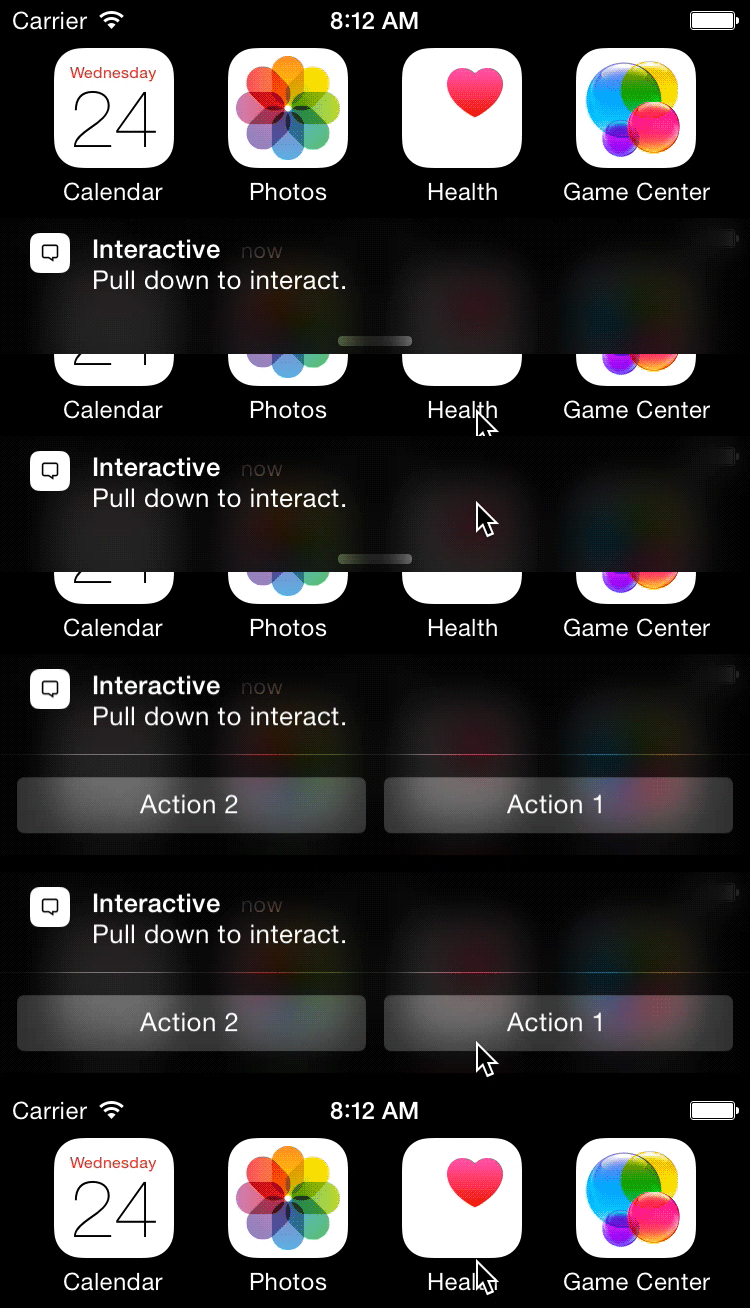
Pour enregistrer nos catégories push par défaut, suivez les instructions d’intégration :
Étape 1 : Ajoutez les catégories de notifications push par défaut de Braze
Utilisez le code suivant pour vous inscrire à nos catégories push par défaut lorsque vous vous inscrivez à push :
1
2
3
4
5
6
7
8
9
// For UserNotification.framework (iOS 10+ only)
NSSet *appboyCategories = [ABKPushUtils getAppboyUNNotificationCategorySet];
[[UNUserNotificationCenter currentNotificationCenter] setNotificationCategories:appboyCategories];

// For UIUserNotificationSettings (before iOS 10)
NSSet *appboyCategories = [ABKPushUtils getAppboyUIUserNotificationCategorySet];
UIUserNotificationSettings *settings = [UIUserNotificationSettings settingsForTypes:UIUserNotificationTypeBadge
                                                                         categories:appboyCategories];
[[UIApplication sharedApplication] registerUserNotificationSettings:settings];
1
2
3
4
5
6
7
8
// For UserNotification.framework (iOS 10+ only)
let appboyCategories = ABKPushUtils.getAppboyUNNotificationCategorySet()
UNUserNotificationCenter.current().setNotificationCategories(appboyCategories)

// For UIUserNotificationSettings (before iOS 10)
let appboyCategories = ABKPushUtils.getAppboyUIUserNotificationCategorySet()
let settings = UIUserNotificationSettings.init(types: .badge, categories: appboyCategories)
UIApplication.shared.registerUserNotificationSettings(settings)
Cliquer sur les boutons d’action push avec le mode d’activation en arrière-plan ne fera que rejeter la notification et n’ouvrira pas l’application. Lorsque l’utilisateur ouvrira à nouveau l’application, l’analyse de clics de bouton pour ces actions sera transmise au serveur.
Si vous souhaitez créer vos propres catégories de notifications personnalisées, consultez la personnalisation des boutons d’action.
Étape 2 : Activer la gestion interactive des notifications push
Si vous utilisez le cadre UNNotification et que vous avez mis en œuvre des délégués Braze, cette méthode devrait déjà être intégrée.
Pour activer la gestion de notre bouton d’action push, y compris l’analyse des clics et le routage des URL, ajoutez le code suivant à la méthode de délégation de votre application (void)userNotificationCenter:didReceiveNotificationResponse:withCompletionHandler: :
1
2
3
[[Appboy sharedInstance] userNotificationCenter:center
                           didReceiveNotificationResponse:response
                               withCompletionHandler:completionHandler];
1
2
3
Appboy.sharedInstance()?.userNotificationCenter(center,
                                                didReceive: response,
                                                withCompletionHandler: completionHandler)
Si vous n’utilisez pas UNNotification Framework, vous devrez ajouter le code suivant au site application:handleActionWithIdentifier:forRemoteNotification:completionHandler: de votre application pour activer la gestion de nos boutons d’action push :
1
2
3
[[Appboy sharedInstance] getActionWithIdentifier:identifier
                           forRemoteNotification:userInfo
                               completionHandler:completionHandler];
1
2
3
Appboy.sharedInstance()?.getActionWithIdentifier(identifier,
                                                 forRemoteNotification: userInfo,,
                                                 completionHandler: completionHandler)
Nous recommandons fortement aux personnes utilisant handleActionWithIdentifier de commencer à utiliser l’infrastructure UNNotification. Nous recommandons cette solution en raison de la dépréciation de l’option handleActionWithIdentifier.
Personnalisation de la catégorie de notifications push
En plus de fournir un ensemble de catégories de push par défaut, Braze prend en charge les catégories et actions de notification personnalisées. Après avoir enregistré des catégories dans votre application, vous pouvez utiliser le tableau de bord de Braze pour envoyer des catégories de notification à vos utilisateurs.
Si vous n’utilisez pas le cadre UserNotifications, consultez la documentation sur les catégories alternatives.
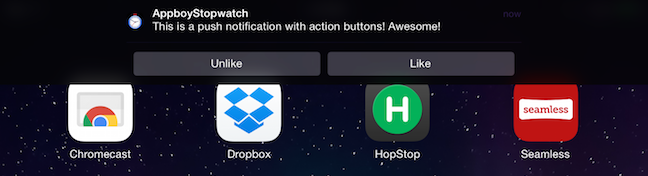
Ces catégories peuvent ensuite être affectées aux notifications push via notre tableau de bord pour déclencher les configurations des boutons d’action de votre conception. Voici un exemple qui tire parti du LIKE_CATEGORY affiché sur l’appareil :
 Modifier cette page sur GitHub