About push subscription states
Push subscription states
A “Push Subscription State” in Braze identifies a user’s global preference for their desire to receive push notifications. Because the subscription state is user-based, it is not specific to any individual app. Subscription states become helpful flags when deciding which users to target for push notifications.
A user’s push subscription state applies to their entire user profile, which includes all of the user’s devices.
The following subscription state options exist: Subscribed, Opted-In, and Unsubscribed.
By default, for your user to receive your messages through push, their push subscription state must be either Subscribed or Opted-In, and they must have foreground push enabled. You can override this setting if needed when composing a message.
| Opt-in State | Description |
|---|---|
Subscribed |
Default push subscription state when a user profile is created in Braze. |
Opted-In |
A user has explicitly expressed a preference to receive push notifications. Braze automatically moves a user’s opt-in state to Opted-In if the user accepts an OS-level push prompt.This does not apply to Android 12 or below users. |
Unsubscribed |
A user explicitly unsubscribed from push through your application or other methods your brand provides. By default, Braze push campaigns target only users that are Subscribed or Opted-in for push. |
Braze does not automatically change a user’s push subscription state to Unsubscribed. Remember that if a user’s push subscription state is Unsubscribed, then the user’s Foreground Push Enabled filter in segmentation is false.
Updating push subscription states
Review the following ways to update a user’s push subscription state:
Automatic opt-in (default)
By default, Braze sets a user’s push subscription state to Opted-In when they first authorize push notifications for your app. Braze also does this when a user re-enables push permissions in their system settings after previously disabling them.
To disable this default behavior, add the following property to your Android Studio project’s braze.xml file:
1
<bool name="com_braze_optin_when_push_authorized">false</bool>
Starting with Braze Swift SDK version 7.5.0, you can disable or further customize this behavior by adding the optInWhenPushAuthorized configuration to your Xcode project’s AppDelegate.swift file:
1
2
3
4
configuration.optInWhenPushAuthorized = false // disables the default behavior

let braze = Braze(configuration: configuration)
AppDelegate.braze = braze
SDK integration
You can update a user’s subscription state with the Braze SDK using the setPushNotificationSubscriptionType method on Web, Android, or iOS. For example, you can use this method to create a settings page in your app where users can manually enable or disable push notifications.
REST API
You can update a user’s subscription state with the Braze REST API using the /users/track endpoint to update their push_subscribe attribute.
Checking push subscription state
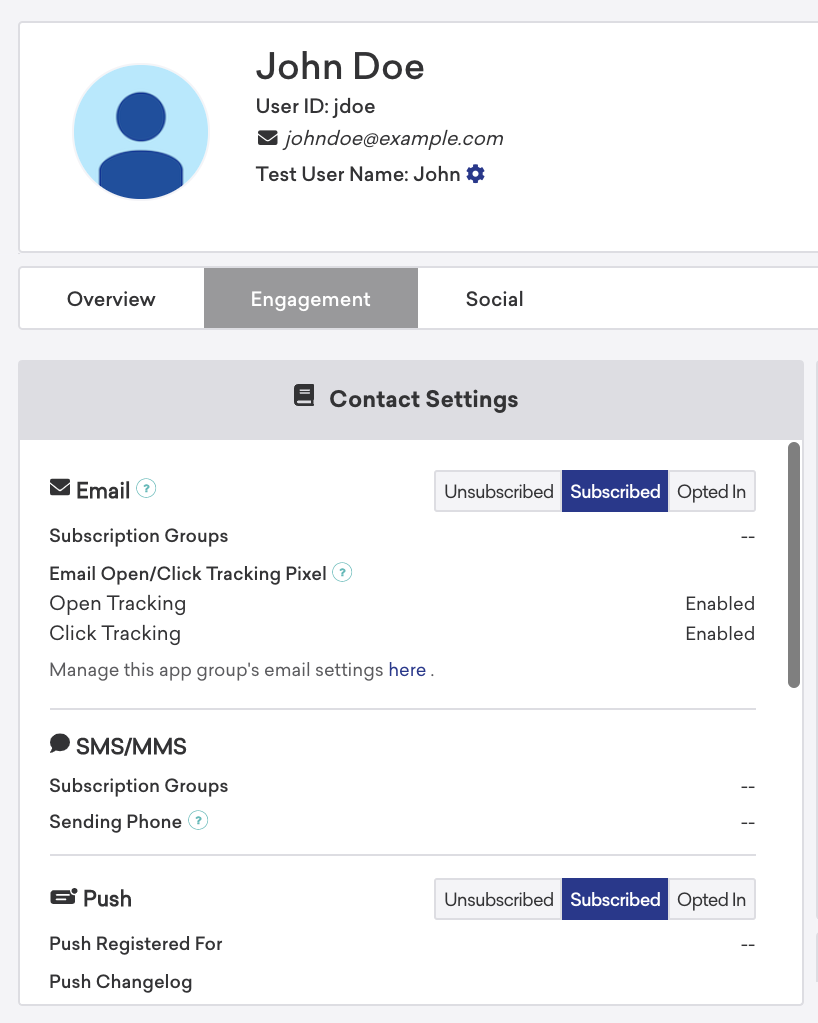
You can check a user’s push subscription state with Braze in any of the following ways:
- User profile: You can access individual user profiles through the Braze dashboard on the User Search page. After finding a user’s profile (via email address, phone number, or external user ID), you can select the Engagement tab to view and manually adjust a user’s subscription state.
- REST API export: You can export individual user profiles in JSON format using the export Users by segment or Users by identifier endpoints. Braze returns a push tokens object that contains push enablement information per device.
 Edit this page on GitHub