April 2, 2026 release
Data & Reporting
New Banner channel fields in Currents and Datashare events
Braze added fields for existing Banner channel events in Currents and Datashare exports. For a list of these event and field updates, see Changes in Version 7.
Mixpanel EU and India data center support for Currents
The Currents Mixpanel integration now supports Mixpanel’s EU and India data centers. When you configure a Mixpanel integration, you can choose which Mixpanel region Braze sends your data to. This update supports Mixpanel’s growing international footprint for mutual customers. For more information, see Mixpanel.
Reusable Cloud Data Ingestion (CDI) sources and syncs
Early access
Cloud Data Ingestion (CDI) has a new design that separates sources and syncs, so you can reuse one source across multiple syncs. Existing syncs migrate automatically to the new sources and syncs model with no downtime. Go to Cloud Data Ingestion > Sources to view, edit, or create sources, then select a source from the dropdown when creating a sync. This change reduces repetitive setup, and creates a foundation for future enhancements. For more information, see Setting up data warehouse integrations.
BrazeAITM
File support tickets from BrazeAI OperatorTM
General availability
BrazeAI Operator now includes a flow to file Braze support tickets without leaving the dashboard. For steps, auto-included context, and tips for faster resolution, see File support tickets with BrazeAI Operator.
Orchestration
Multi-language translations
General availability
After adding locales to your workspace, use multi-language translations to target users in different languages all within a single push, email, Banner, in-app message, or Content Block.

Canvas Context enhancements
General availability
In Canvas, you can now reference context variables to set:
- An expiration for Banners and in-app messages in a Message step
- A personalized delays for Action Paths steps
In the Context variable name field, you can also enter the context variable name or select it from the dropdown in the step editor. For more details, see Context and Context variables.
Channels & Touchpoints
KakaoTalk
General availability
KakaoTalk is a messaging channel that enables broadcast messaging and 1:1 chat with users. Create a personalized user experience by using Liquid and other dynamic content to build an environment that fosters and enhances a rich user experience with your brand.
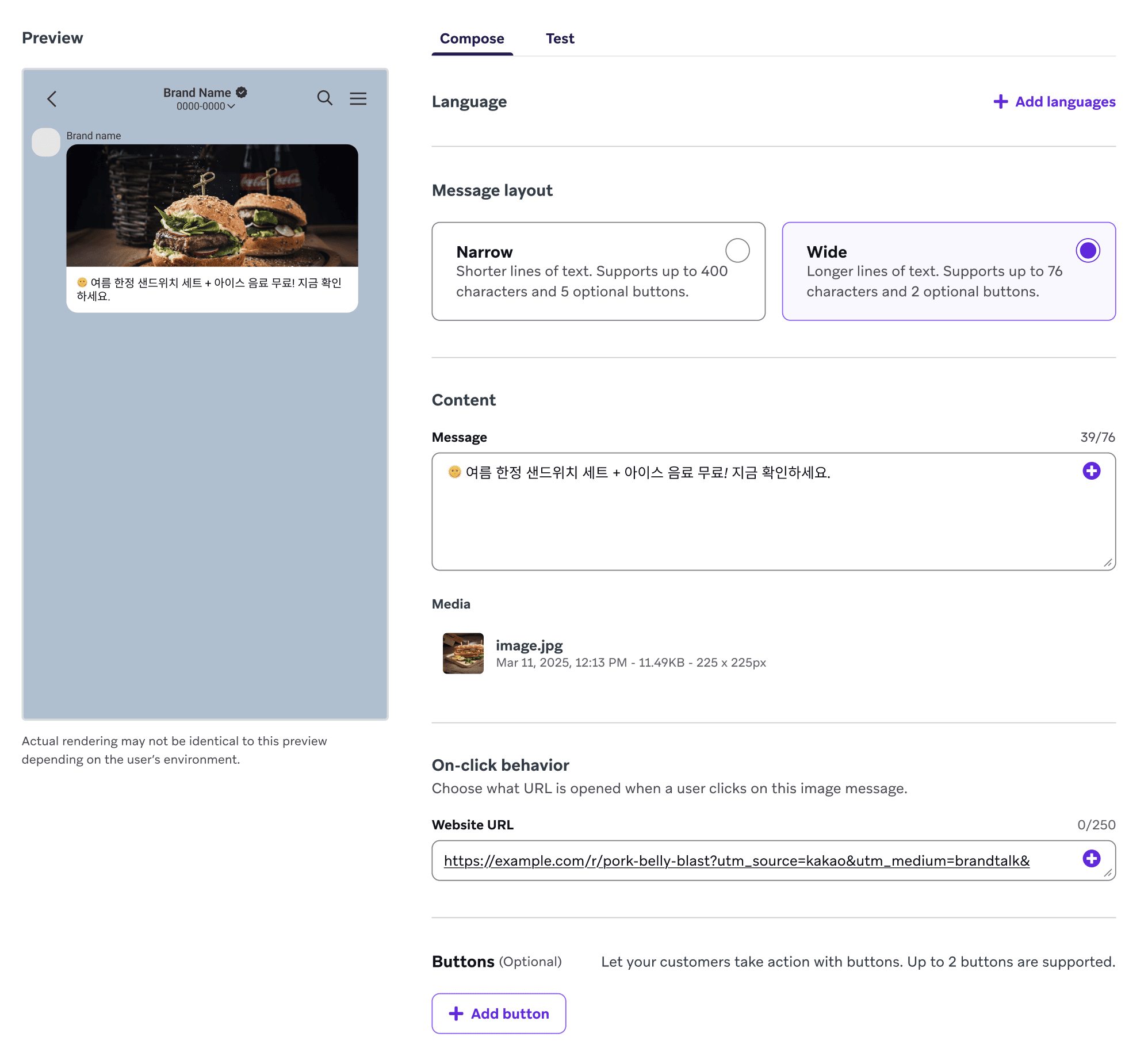
Banners in Canvas
General availability
You can use Banners as a messaging channel in Canvas Message steps. Banners allow you to personalize app or website content dynamically, reflecting real-time user eligibility and behavior.
Partnerships
CataBoom - Message Personalization - Visual and Interactive Content
CataBoom is a gamification platform. Brands use it to build and launch interactive digital experiences, including spin-to-win games, quizzes, and instant-win games. Those experiences deepen engagement and collect first-party data.
Denada - Message Orchestration - Templates
Denada is an AI-powered marketing creative platform that lets subject matter experts create on-brand marketing materials through natural conversation. With Denada, teams can go from ideation to finished email content without needing design expertise.
Poq - eCommerce - Mobile app platform
Poq enables enterprise businesses to rapidly launch, manage, and scale fully native iOS and Android apps—delivering high-performance mobile experiences that drive commerce and bring your brand promise to life.
The Trade Desk – Canvas Audience Sync
Using the Braze Audience Sync to The Trade Desk, you can dynamically sync your first-party user data from Braze directly into The Trade Desk for ad retargeting, lookalike modeling, and suppression.
SDK
Connect your Integrated Development Environment (IDE) to the Docs MCP
Use AI coding assistants to accelerate your Braze integration workflow by connecting your Integrated Development Environment (IDE) to the Braze Docs MCP through Context7. This gives your assistant direct access to current Braze documentation, so it can generate more accurate SDK guidance, code examples, and troubleshooting help in your development environment. For setup steps in Cursor, Claude Desktop, and VS Code, see Building with an LLM.
SDK breaking updates
The latest SDK updates have been released. Breaking updates are listed in the SDK updates section; all other updates can be found in the corresponding SDK changelogs.
- Cordova 15.0.0
- Updated the native Android bridge from Braze Android SDK 39.0.0 to 41.1.1.
- Updated the native iOS bridge from Braze Swift SDK 13.2.0 to 14.0.1.
- Fixes an issue with
subscribeToInAppMessageinvolving the success callback.
- Roku SDK 2.2.1
- Fixes a crash when processing a failed HTTP request for templated in-app messages while the device has intermittent or no connectivity.
- Web SDK 6.6.0
- Adds the
cookieExpiryInDaysinitialization option to configure cookie duration from the default of 400 days.
- Adds the
- Flutter SDK 18.0.0
- Adds delayed initialization support.
- Streamlines the iOS integration process to not require writing native code to forward Content Cards, Banners, feature flags, in-app messages, or push notification updates from the native SDK.
- The SDK will now automatically set up these subscriptions when the Braze instance is created.
- This matches the existing behavior on Android.
- To migrate, remove any manual calls to
braze.contentCards.subscribeToUpdates(),braze.banners.subscribeToUpdates(),braze.notifications.subscribeToUpdates,braze.featureFlags.subscribeToUpdatesandbraze.inAppMessagePresenterin theAppDelegate. - By default, in-app messages will be presented. To override this, set a custom in-app message presenter using the
postInitializationclosure inBrazePlugin.configure(_:postInitialization:).
- Swift SDK 14.0.4
- Fixes a bug with push automation on SDK re-initialization.
- Fixes an issue where invalid images in push stories were not filtered out.
- Swift SDK 14.0.3